.NET

Topics specific to .NET development.

Concatenating PDFs with F# and PdfSharp

In order to test part some new functionality I’m working on I needed to combine a bunch of somewhat arbitrary documents into one. At first I thought about just re-scanning the documents but the scanner attached to my PC is a single-sheet flatbed. I also thought about running them through our sheet-feed scanner but it’s attached to my counterpart’s PC, not shared, and I didn’t want to bother him with it. I’ve been working a bit with the PdfSharp library lately so I decided to do the programmer thing and write a script to concatenate the documents. Of course, this would be a perfect chance to flex my developing F# muscles and came up with what I think is a pretty decent solution.

Before taking a look at the script there are a few things to note:

  • The script is intended to be run from within a folder that contains the documents that you want to concatenate. This is mainly because I had a bunch of documents I wanted to combine and including the full path to each one quickly became unwieldy.
  • I don’t check that files exist or that what’s supplied is actually a PDF. PdfSharp will throw an exception in those cases
  • I needed something quick so I hard-coded the destination file name as Result.pdf.
  • fsi.CommandLineArgs includes the name of the script as the first array item. The easiest thing I could think of for getting a list that didn’t include the script name was to create a new list with Array.toList and grab the Tail.
  • The PdfPages class is built around IEnumerable rather than IEnumerable<T> so I needed to use a comprehension to build the pages list.

Script:

// PdfConcat.fsx

#r "PdfSharp.dll"

open System;
open System.IO
open PdfSharp.Pdf
open PdfSharp.Pdf.IO

let readPages (sourceFileName : string) =
  use source = PdfReader.Open(sourceFileName, PdfDocumentOpenMode.Import)
  [ for p in source.Pages -> p ]

let createDocFromPages pages =
  let targetDoc = new PdfDocument()
  pages |> List.iter (fun p -> targetDoc.Pages.Add p |> ignore)
  targetDoc

let docNames = (Array.toList fsi.CommandLineArgs).Tail
let workingDirectory = Environment.CurrentDirectory;
let targetFileName = Path.Combine(workingDirectory, "Result.pdf")

let allPages =
  [ for n in docNames -> Path.Combine(workingDirectory, n) ]
  |> List.map readPages
  |> List.concat

let doc = createDocFromPages allPages
doc.Save targetFileName
doc.Dispose()

Usage:

D:\ScannedDocuments>fsi D:\Dev\FSharp\PdfConcat\PdfConcat.fsx "07-09-2012 05;29;44PM.PDF" "07-11-2012 08;47;13PM.PDF" "07-11-2012 08;48;24PM.PDF" "07-11-2012 08;50;27PM.PDF"

CODODN Notes

I spent Saturday (Dec 8) over in Columbus, OH attending the Central Ohio Day of .NET conference. As with any multi-track conference there were plenty of good sessions to choose from but of course, I could only attend five. What follows are my raw, nearly unedited notes from the sessions I selected.

Underestimated C# Language Features

John Michael Hauck (@john_hauck | http://w8isms.blogspot.com)

Delegation

  • Anonymous functions
  • Closures
  • Automatic closures compile to classes

Yay!  ANOTHER discussion about using var or type name for declaring variables

Enumeration

  • IEnumerable<T>
  • yield return
  • IEnumerable of delegates

Deep Dive into Garbage Collection

Patrick Delancy (@patrickdelancy | http://patrickdelancy.com/)

Automatic Memory Management

  • Reference counting
  • Track & mark

Allocating

  • Application virtual memory
  • Heap is automatically reserved
  • New declarations are allocated into segments in the heap
  • Ephemeral segments
  • Clean-up tries to move longer lasting objects into other dedicated ephemeral segments
  • Longer-lasting objects are collected less frequently

GC Timing

  • When an ephemeral segment is full
  • GC.Collect() method call
  • Low memory notifications from the OS (physical memory)

Only finalization is non-deterministic

GC Process

  • Marking – Identifying objects for removal
  • Relocating – Relocating surviving pointers to older segments
  • Compacting – Moving actual object memory

Dead or Alive

Starting points:

  • Static Data is rooted in garbage collector (never out of scope)
  • Stack Root (call stack) has variable references
  • GC Handles – special cases that can be created and freed

Collector walks the tree from each point

GC Handles

Struct that has a reference to a managed object and can be passed off to unmanaged/native code

Marshalling

GCHandle.Alloc() and .Free()

Handle Types:

  • Weak – tracks the object but allows collection; Zeroed when collected; Zeroed before finalizer
  • WeakTrackResurrection – Weak but is not zeroed when collected; Can resurrect in finalizer
  • Normal – Opaque address via the handle (can’t get the address); not collected by GC; Managed object w/o managed references
  • Pinned – Normal with accessible address. Not collected or moved by GC; free quickly if needed

Generations

  • Generation 0 – newly allocated objects
  • Generation 1 – objects that survived gen 0; infrequent collection
  • Generation 2 – Long-lived objects; things allocated as large objects too; infrequent collection

Anything larger than 85K in memory is considered large and automatically placed on the large object heap.

Threshold checks consider machine resources including bitness and is always in flux (except gen 0 which is based on segment size)

Configuration

Workstation & server mode:

  • Default behavior is workstation
  • Workstation
    • Single-processor machines
    • Collection happens on triggering thread
    • Normal thread priority
  • Server
    • Multi-processor
    • Separate GC per thread processor
    • Parallel on all threads
    • Collection at highest thread priority
    • Intended to maximize GC throughput and scalability

Concurrency:

  • Foreground
    • Non-concurrent
    • All other threads are suspended until collection finishes
  • Concurrent & Background
    • Collect concurrently while app is running
    • Background (v4) is the replacement for concurrent
    • Collects concurrently while the app is running
    • Only applies to Gen 2 collection
    • Prevents Gen 0 & 1 collections while running

Latency modes

Time the user knows the system is busy

Useful especially when users will notice the collection – graphics rendering

  • Batch
    • Default when concurrency is disabled
    • Most intrusive when running
  • Interactive
    • Default when concurrency is enabled
    • Less intrusive but still accommodates the GC
  • LowLatency
    • For short-term use – impedes the GC process
    • Suppresses Gen 2 collection
    • Workstation mode only
    • Still collects under low host memory
    • Allows manual collection
  • SustainedLowLatency
    • Added in 4.5
    • Contained but longer
    • Suppresses foreground gen 2 collection
    • Only available with concurrency
    • Does not compact managed heap

Finalization

Non-deterministic

Only used with native resources (IntPtr handles)

  • To release unmanaged resources ONLY
  • Objects with a finalizer get promoted to the next generation and the next time the collector hits that generation it calls the finalizer; added to finalizaton queue
  • Finalizer runs on another thread after collection has finished and runs at the highest thread priority
  • Managed objects may already be freed
  • Flagged for finalization upon allocation
  • When troubleshooting performance check the size of the finalizer queue and look for hung finalizer threads

Disposable

Objects using managed resources that need to be released

Debug Build

  • Does some artificial rooting due to CLR optimizations

Unleashing the Power: A Lap around PowerShell

Sarah Dutkiewicz (@sadukie | http://codinggeekette.com/)

Covering PowerShell 3.0

Some Cmdlets:

  • Clear – clears the screen
  • Get-verb
  • Get-unique

Console

  • Part of Windows Management Framework 3.0 suite
    • 32/64 bit available
    • Windows 8 & Server 2012 have it installed
  • Built on CLR 4
  • Adds support for
    • Networking
    • Parallelism
    • MEF
    • Compatibility/Deployment
    • WWF
    • WCF
  • show-command cmdlet
    • allows searching for commands and executing in the console
    • often easier than get-command | more
  • Updatable help
    • Not installed by default on Win8/Server 2012
    • Update-Help cmdlet
    • Must run as administrator
    • No restart required
    • Can store to a network share
  • Language improvements
    • Simplified foreach (automatic/implicit)
      • PS C:\windows\system32> $verbs = get-verb
      • PS C:\windows\system32> $verbs.Group | Get-Unique
    • Simplified where
      • PS C:\windows\system32> $verbs | where group -eq “Data”
    • Enhanced tab completion
  • Unblock files with Unblock-File cmdlet
  • JSON, REST, & HTML Parsing support
  • Session improvements
    • Disconnected sessions on remote computers can be reconnected later w/o losing state
    • Both ends need 3.0

Integrated Scripting Environment

  • IntelliSense
  • Show-Command window
  • Unified console pane
  • Rich copy
  • Block copy
  • Snippets
  • Brace Matching

Scheduled Jobs

  • PowerShell jobs can now be integrated with task scheduler
    • Register-ScheduledJob
    • Found under Microsoft / Windows / PowerShell / ScheduledJobs

Autoloading Modules

  • PowerShell 3 automatically loads a module when one of its cmdlet is invoked

PowerShell Web Access

  • PowerShell in a browser
  • Mostly 3.0 w/ some limitations due to remotin
  • Prereqs:
    • Server 2012
  • Setup is difficult
    • Install web access
    • Authorization configuration
    • PowerShell remoting must be enabled to connect
  • Limitations:
    • Some function keys aren’t supportd
    • Only top-level progress is shown
    • Input color cannot be changed
    • Writing to console doesn’t work

Management OData IIS Extension

  • Allows RESTful OData access
  • Requires Server 2012, not Server Core

MS Script Explorer for Windows PowerShell

  • 32/64-bit platforms
  • PowerShell ISE is required
  • Downloadable (Non-standard)

Building Large Maintainable JavaScript Applications w/o a Framework

Steve Horn (@stevehorn | http://blog.stevehorn.cc/blog)

Quote from Kahn about complaining about status quo and theorizing about how things should be

(I tried to find the actual quote but couldn’t – if anyone knows where I can find it I’ll be happy to update these notes)

Assumptions for JavaScript Applications

  • Not progressive enhancement
  • JavaScript is enabled
  • Rendering of HTML templates is done on the client
  • Server side is for querying or performing work
  • The UI is the most important part of the app

Each framework is giving its own world view of how you should build an app

Code Organization

Book: JavaScript Patterns (Stoyan Stefanov)

  • How can I create modules and namespaces?

window.nmap = window.nmap || {};

Let JavaScript be JavaScript; don’t worry about public/private/etc…    

Constructor members are recreated every time the constructor is invoked

jQuery Tiny Pub/Sub http://benalman.com

Designing for Windows 8 Apps

Dan Shultz (@dshultz)

Metro/Windows 8 Style Design

  • Modern Design – Bauhaus
  • International Typographic Style – Swiss design
  • Motion Design – Cinematography

Windows 8 grid

  • Grid units
  • 20×20 pixel grids
  • Title size: 42pt
  • Title line height: 48pt
  • Page header is 5 units from the top

Responsive Design

…is the approach that suggests that design and development should respond to the user’s behavior and environment based on screen size, platform, and orientation

Techniques

  • A flexible grid
  • Media queries

Media Query Ranges

  • Mobile portrait < 479 px wide
  • Mobile landscape 480 – 767 px
  • Tablet portrait 768 – 1023 px
  • Tablet Landscape >= 1024 px

Certification Tips

  • Apps need to work in snap view to pass certification
  • Keep functionality off of the margins to prevent interference with charms and app switching
  • Use charms contracts where applicable
    • Share
    • Search
    • Picker
  • Need to include a privacy statement within settings
  • Weight functionality toward edges for higher usability
    • Center screen requires a posture change
  • Sharing & Ages
    • Limit < age 12
  • Reserved Space
  • Asset sizes
    • 100%
    • 140%
    • 180%
  • Invest in a great live tile
    • Consider different sizes

F# Tuples

How often have you had a few data elements that you wanted to keep together in an ordered manner without going through the trouble of creating a custom type because they were only going to be used in one or two places?  If the data was guaranteed to always be the same type an array or other collection type might suffice but we really have no guarantee about its size and we generally want the data contained in one object.

Most of the time I find myself in this situation, I find that I want something more than an array.  Sometimes that means I end up abusing KeyValuePair<TKey, TValue> for simple pairs or resorting to creating a class or struct that has no use outside of one small area.

.NET 3.0 introduced anonymous types but those are only useful in a few situations without jumping through a bunch of coding hoops.  .NET 4 gave the traditional .NET developer some relief by introducing the generic, immutable Tuple classes that are intended to address this very issue. Unfortunately, using them in a traditional .NET language isn’t particularly convenient.

Tuples in C#

Using Tuples in a language like C# is pretty cumbersome to say the least. To Microsoft’s credit, they provided an overloaded factory method to make them a bit easier to create but it doesn’t address their verbosity in other areas. Consider a function that calculates some measurements for a circle:

Tuple<double, double, double> GetCircleMeasurements(double radius)
{
  var diameter = radius * 2.0;
  var area = Math.PI * Math.Pow(radius, 2.0);
  var circumference = 2.0 * Math.PI * radius;

  return Tuple.Create(diameter, area, circumference);
}

Aliasing

The Create method saves us from having to type full tuple definition when creating one but we need to be more explicit virtually everywhere else. Depending on the number of members in a tuple I sometimes find it helpful to alias the type with a meaningful name. It’s still a bit verbose but to me it’s a good balance of leveraging an existing type while reducing potential points of failure. If we had another Tuple in the same context (say, another method that wanted to do something with the values) and we wanted to change the tuple elements we’d only need to change the alias to affect each place.

// With other using directives
using CircleMeasurements = System.Tuple<double, double, double>;

CircleMeasurements GetCircleMeasurements(double radius)
{
  var diameter = radius * 2.0;
  var area = Math.PI * Math.Pow(radius, 2.0);
  var circumference = 2.0 * Math.PI * radius;

  return new CircleMeasurements(diameter, area, circumference);
}

Accessing Tuple Members

Accessing tuple items in C# is pretty straightforward; we simply access each item via a property:

var measurements = GetCircleMeasurements(2.5);
var diameter = measurements.Item1;
var area = measurements.Item2;
var circumference = measurements.Item3;

Tuples in F#

Given that this is actually a post about tuples in F# you’ve probably guessed by now that using tuples is much simpler in F#. Not only do we get the benefits of type inference, F# has a built-in tuple syntax! In F# tuples are represented by a comma-delimited list and generally enclosed in parenthesis.

Here is the first example above reproduced in F#:

> let GetCircleMeasurements radius =
	let diameter = radius * 2.0
	let area = Math.PI * (radius ** 2.0)
	let circumference = 2.0 * Math.PI * radius

	(diameter, area, circumference)
	
val GetCircleMeasurements : float -> float * float * float

Don’t forget an open System;; line if trying this through FSI.

Although the bulk of the function body is the same you can see that we don’t have to concern ourselves with anything related to the framework itself – we simply use a language construct.

Representing Tuples

Tuples can be thought of as the product of two or more data types so they are represented by delimiting the items with the * character. For example, the tuple returned by the GetCircleMeasurements function would be represented as float * float * float.

Accessing Tuple Members

Accessing tuple members in F# is generally also be significantly easier than in C#. F# provides two built-in functions, fst and snd, for accessing the first and second items in a pair ('a * 'b). An error will be generated if you try to use these functions with a tuple containing more than two items so we something else for our example.

A primary way we can extract values from a tuple is through let bindings. We can easily extract all three values from the tuple returned by GetCircleMeasurements into separate variables. Compare this to the C# example above:

> let (diameter, area, circumference) = GetCircleMeasurements 2.5;;

val diameter : float = 5.0
val circumference : float = 15.70796327
val area : float = 19.63495408

The number of names defined in the binding must match the number of values in the tuple. If they don’t match we’ll get an error. If we only care about some of the values we can simply replace the names we don’t care about with underscores. For instance, if we only care about the area we could write this:

> let _, area, _ = GetCircleMeasurements 2.5;;

val area : float = 19.63495408

We can even easily define a function to return the third value from a triple (tuple with three items):

> let third (_, _, c) = c;;

val third : 'a * 'b * 'c -> 'c

> let circumference = third (GetCircleMeasurements 2.5);;

val circumference : float = 15.70796327

Language Interoperability

If you intend to use tuples across languages it’s important to keep in mind which version of the language you’re using. The tuple classes described in the C# section above were originally located in FSharp.Core.dll. When targeting a framework version prior to 4.0 the compiler uses the versions from this assembly rather than the ones in mscorlib.

Tuples also play a role when calling functions from other languages. Within F# most functions are curried (calling a function with fewer than the specified number of arguments results in creating a new function that accepts the remaining arguments) but outside of F# is a different story. Calling functions from other languages requires what is referred to as a syntactic tuple. Syntactic tuples look like the tuple types but as their name implies, they’re merely a mechanism of the syntax.

Next Steps

Tuples are convenient constructs that are available throughout the .NET Framework as of v4.0 yet cumbersome to use outside of F#. F#’s built-in tuple support makes using them virtually effortless. Despite their convenience, sometimes tuples aren’t enough. What if we want to name the values or extend functionality with custom functions? In those cases we can turn to the next topic in this series – an F# construct called a record type.

Overload Resolution Oops

Earlier today I was observing the output of some calls to Debug.WriteLine when I decided that one of the messages was a little too verbose. Basically the message included a fully qualified name when just the class name would suffice. I found the line which originally read:

Debug.WriteLine("Storing Pending Events for {0}", aggregate.GetType());

and changed it to:

Debug.WriteLine("Storing Pending Events for {0}", aggregate.GetType().Name);

Upon rerunning the app I saw something that surprised me but really shouldn’t have. The message now read “Document: Storing Pending Events for {0}” instead of “Storing Pending Events for Document.” How could this be?

The issue came down to overload resolution. Debug.WriteLine has five overloads but we’re really only interested in the last two:

public static void WriteLine(Object value)
public static void WriteLine(string message)
public static void WriteLine(Object value, string category)
public static void WriteLine(string format, params Object[] args)
public static void WriteLine(string message, string category)

The final two overloads serve very different purposes but potentially conflict as I was observing. One of them writes a formatted message (using String.Format behind the scenes) whereas the other writes a message and category. It just so happens that changing the second argument from aggregate.GetType() to aggregate.GetType().Name resulted in the compiler selecting a different overload because the one that accepts two strings is a better match than the one that accepts the object params array. Had our message included two or more format arguments we’d have never seen this but because we happened to be passing a Type rather than a string we got the params version.

To resolve the problem I first wrapped the two arguments into a call to String.Format but of course ReSharper complained about a redundant call (apparently it also thought that params version would be called). Ultimately I just cast the name to object and moved on.

Debug.WriteLine("Storing Pending Events for {0}", (object)aggregate.GetType().Name);

Like I said, this really shouldn’t have surprised me but it did. Hopefully next time I’ll remember that there’s a potentially conflicting overload to watch out for.

F# Interactive (FSI)

Having provided a basic introduction to F#, a discussion over its primitive types, and an in-depth look at units of measure I thought now would be a good time to take a step back and look at one of the helpful tools used when developing F# applications – F# Interactive, or FSI. FSI is a REPL-like (read-evaluate-print loop) utility that’s especially useful for experimenting with the language.

FSI is considered REPL-like because although it fills the same role as a traditional REPL tool it actually compiles the code rather than interpreting it. This distinction is important because it impacts the tool’s behavior. Types and values are commonly redefined in REPL tools but because FSI is compiling the code into new assemblies it only offers an illusion of redefinition. Everything already defined is still available and instances defined against previous definitions aren’t affected as long as they were defined in the same session.  FSI does enforce that if a type changes any new instances are created against the new definition but it’s important to be aware that those changes will not be reflected in any instances created before the change.

FSI is available as both a window within Visual Studio or as a console application. If you’re actively developing an application in Visual Studio you’ll probably find the F# Interactive window more helpful because you can select snippets of code and send them to the window for execution by pressing ALT + ENTER. The console version is especially well suited for running F# scripts (.fsx files).

You can open the F# Interactive window in Visual Studio by pressing CTRL + ALT + F or through the View/Other Windows menu.

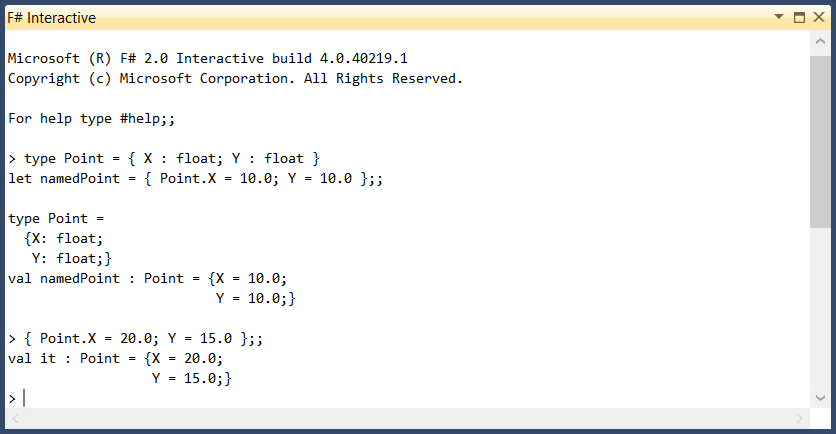
Whether running under Visual Studio or the console, operation is the same. Expressions are entered at the prompt and terminated with double semicolons (;;). FSI then attempts compilation and, if successful, prints the result of the expression evaluation.

For every new name introduced by the input, the FSI output will include a val entry. Anything that returns a value but does not have a name are represented as “it.”

FSI Example

Example of the FSI window in Visual Studio 2010.

You can easily reset an FSI session in Visual Studio by right-clicking the window and selecting the Reset Session option.

Common FSI Directives

FSI includes some directives that aren’t available with the compiler. A few of these are especially useful for scripting.

#r References an assembly
#I Adds the path to the assembly search path list
#load Loads, compiles, and executes one or more source files
#time Toggles inclusion of performance information (real time, CPU time, garbage collection, etc…) with the output
#quit Terminates the current session

More Reading

F# More On Units of Measure

In my last post we looked at how F# units of measure can help add an extra layer of safety to your code by enforcing the use of correct measurements.  We also saw how we can define relationships between units of measure to provide easy conversions and keep code intuitive.  Of course, there’s still plenty to talk about.

In this post we’ll look at increasing the power of units of measure by adding static members, using generic units of measure, and defining custom measure-aware types.  I recognize that I haven’t written anything about custom types or generics in F# yet so if you’re learning along with my posts I encourage you to read-up some of these concepts on MSDN before going any further.  Don’t worry though, I’ll be visiting those topics soon enough.

Static Members

Formulas are just one way we can define relationships between units of measure and they will often be more than sufficient.  Sometimes we need a little more power than formula expressions offer.  In some cases it may be more appropriate to define static members on the units of measure themselves.  Static members also have the advantage of keeping the logic with the measures they affect.

Static members on units of measure can be values or functions.  Naturally, the complexity of the measure definition varies according to the complexity of the member.  If we’re only defining a conversion factor on one of the related measures the definition will closely resemble a basic definition.  If we need conversion functions on both of the related measures then the definition will be much more complex with the types defined together so they can reference each other.  Let’s take a look at both.

Conversion Factor

Let’s say we have need to convert between inches and feet (I’m American, I’m allowed to use these units!).  We can easily define the measures to include a static conversion factor:

[<Measure>] type ft
[<Measure>] type inch = static member perFoot = 12.0<inch/ft>

Any code that needs to use to that conversion factor can simply refer to the static member by name:

> let inches = 1.0<ft> * inch.perFoot;;
val inches : float<inch> = 12.0

> let feet = 12.0<inch> / inch.perFoot;;
val feet : float<ft> = 1.0

Conversion Functions

When more logic than a conversion factor is required we can define a static function in a measure. To illustrate how complex measure definitions can get we’ll return to converting between inches and pixels by defining a conversion function on both the inch and px measures. In order for type inference to work we’ll need to define the measure types at the same time with the and keyword. The dpi measure will be defined independently but before the other two.

[<Measure>] type dpi
[<Measure>]
type inch =
  static member ToPixels (inches : float<inch>) (resolution : float<dpi>) =
    LanguagePrimitives.FloatWithMeasure<px> (float inches * float resolution)
and
  [<Measure>]
  px =
    static member ToInches (pixels : float<px>) (resolution : float<dpi>) =
      LanguagePrimitives.FloatWithMeasure<inch> (float pixels / float resolution)

There should be very little surprising in the conversion functions themselves. All they’re doing is stripping the units from the parameters, multiplying or dividing the floats and converting the resulting value to a measured float.

Just like with the conversion factor, any code that needs to convert can simply refer to the static member:

let resolution = 150.0<dpi>
let pixels = inch.ToPixels 8.0<inch> resolution
let inches = px.ToInches pixels resolution

Generic Units of Measure

Everything function we’ve looked at so far in this post and the last has relied on specific measure types. We’ve seen how measure-aware functions add an extra level of safety when working across multiple units of measure. We’ve also briefly discussed how many functions are not written to accept measured values as arguments so any units must be dropped. Although many functions that aren’t measure-aware are outside of our control, we can take advantage of generic units of measure in our code to maintain that extra level of safety.

To use generic units of measure we just need to alter the type annotation in the function signature a little bit by replacing the concrete measure with an underscore:

> let square (x : float<_>) = x * x
val square : float<'u> -> float<'u ^ 2>

As you can see, the type inference engine has changed the underscore to 'u ('u being F#’s way to denote generics) and identified the return value as float<'u ^ 2>. We can now call this with any float value and get a result in the proper units.

> let squaredInches = square 3.0<inch>;;
val squaredInches : float<inch ^ 2> = 9.0

> let squaredPixels = square 450.0<inch>;;
val squaredPixels : float<inch ^ 2> = 202500.0

> let squaredUnitless = square 9.0;;
val squaredUnitless : float = 81.0

What’s more is that once we have a function defined to use generic units of measure, the type inference engine can infer the type for other functions that consume it.

> let cube x = x * square x;;
val cube : float<'u> -> float<'u ^ 3>

Even though we didn’t give the compiler any hints about x in the cube function it was able to infer by virtue of calling the square function that it should accept float<'u> and return float<'u ^ 3>!

> let cubedInches = cube 3.0<inch>;;
val cubedInches : float<inch ^ 3> = 27.0

> let cubedPixels = cube 450.0<inch>;;
val cubedPixels : float<inch ^ 3> = 91125000.0

> let cubedUnitless = cube 9.0;;
val cubedUnitless : float = 729.0

Custom Measure-Aware Types

The last thing we’ll examine in regards to units of measure is defining custom measure-aware types. The way we make a custom type measure-aware is to include a measure parameter as part of the type’s generic type list.

Let’s consider a simple Point type. This type will include the standard X and Y coordinates and a function for calculating the distance between two points. One way we could define this type is as a measure-aware record type:

type Point< [<Measure>] 'u > = { X : float<'u>; Y : float<'u> } with
  member this.FindDistance other =
    let deltaX = other.X - this.X
    let deltaY = other.Y - this.Y
    sqrt ((deltaX * deltaX) + (deltaY * deltaY))

Because we’re actually referencing the measure type in our value definitions we need to be sure to give it a name in the generic type list rather than using underscore as we saw earlier. All other usages of the measure are actually inferred. With this type defined we can consume it like any other type:

> let point1 = { X = 10.0<inch>; Y = 10.0<inch> };;
val point1 : Point<inch> = {X = 10.0;
                            Y = 10.0;}

> let point2 = { X = 20.0<inch>; Y = 15.0<inch> };;
val point2 : Point<inch> = {X = 20.0;
                            Y = 15.0;}

> let distance = point1.FindDistance point2;;
val distance : float<inch> = 11.18033989

We’re not restricted to record types when making custom types measure aware either. We can define a measure-aware class almost as easily:

type Point< [<Measure>] 'u >(x : float<'u>, y : float<'u>) =
  member this.X = x
  member this.Y = y

  member this.FindDistance (other : Point<'u>) =
    let deltaX = other.X - this.X
    let deltaY = other.Y - this.Y
    sqrt ((deltaX * deltaX) + (deltaY * deltaY))

  override this.ToString() =
    sprintf "(%f, %f)" (float this.X) (float this.Y)

Consuming the class is naturally a bit more verbose as well:

> let point1 = Point<inch>(10.0<inch>, 10.0<inch>);;
val point1 : Point<inch> = (10.000000, 10.000000)

> let point2 = Point<inch>(20.0<inch>, 15.0<inch>);;
val point2 : Point<inch> = (20.000000, 15.000000)

> let distance = point1.FindDistance point2;;
val distance : float<inch> = 11.18033989

Wrapping Up

Over the last two posts we’ve taken a pretty comprehensive tour of F#’s units of measure and seen how powerful the feature is. Annotating values with measures truly helps ensure code correctness by enforcing that calculations are performed against the correct measurements.

We may have finished with units of measure but there’s still plenty more to explore in F#. Over the coming weeks I’ll be taking a close look into other topics like tuples, records, discriminated unions, and pattern matching among other things. Thanks for reading!

F# Basic Units of Measure

As I’ve been outlining the things I want to write about in regards to F# there are only a few topics that excite me more than units of measure.  If you’ve ever had to write code that deals with different measurement units (and who hasn’t?) this feature can quickly become one of your best friends. I really struggled with where to include this in the series but ultimately decided that it made the most sense to keep it near primitive data types since they’re so closely related.

The Case for Units of Measure

My current project at work involves a bit of image manipulation.  If we were only working with pixels this wouldn’t be an issue but we actually need to translate some values between inches and pixels.  This, of course, means we have three distinct units of measure: inches, pixels, and dots per inch for conversion.  Keeping track of which types and methods require pixels versus those that require inches can be troublesome to say the least.  We can mitigate the problem a bit through naming conventions but simply calling something widthInInches does not guarantee that the supplied value is actually in inches.

This example is pretty insignificant in terms of impact on the world but using the wrong unit of measure can have devastating consequences.  Wouldn’t it be nice if the compiler could enforce using the correct measurement?  Units of measure in F# do just that.

Before we dive in to defining units I think it’s helpful to start from an example that doesn’t have them. Consider the following:

let convertToPixels inches resolution =
	inches * resolution
	
let convertToInches pixels resolution =
	pixels / resolution

let resolution = 150.0
let pixels = convertToPixels 8.0 resolution
let inches = convertToInches pixels resolution

In this simple example we have functions to convert between inches and pixels. The parameter names guide us but there’s nothing enforcing any rules about the values. How can we be sure that 8.0 and 150.0 are actually inches and dots per inch? The answer, of course, is to define and apply some units.

Introducing Units of Measure

Units of measure are simply specially annotated types that can be associated with numeric (both signed integral and floating point) values. Defining a basic unit of measure is easy; just define an opaque (memberless) type and decorate it with the Measure attribute. For instance, we can define dpi, inches, and pixels as follows:

[<Measure>] type dpi
[<Measure>] type inch
[<Measure>] type px

If your application requires SI units (International System of Units) you can save yourself some time as these units are already defined. For F# versions prior to 3.0 you can find them in the F# PowerPack on CodePlex. In F# 3.0 they are included in the FSharp.Core assembly and found under the Microsoft.FSharp.Data.UnitSystems.SI.UnitNames and Microsoft.FSharp.Data.UnitSystems.SI.UnitSymbols namespaces.

Identifying values of a particular unit is similarly trivial:

let dpiValue = 150.0<dpi>
let inchValue = 8.0<inch>
let pxValue = 1200.0<px>

Microsoft recommends using only using units of measure with floating point expressions to avoid potential conversion problem. I’ll be following that convention throughout this article.

In the above example, each value is qualified by a particular measure. With this knowledge we can modify our conversion code to enforce that only properly qualified values can be supplied.

[<Measure>] type dpi
[<Measure>] type inch
[<Measure>] type px

let convertToPixels (inches : float<inch>) (resolution : float<dpi>) =
  float(inches * resolution) * 1.0<px>

let convertToInches (pixels : float<px>) (resolution : float<dpi>) =
  float(pixels / resolution) * 1.0<inch>

let resolution = 150.0
let pixels = convertToPixels 8.0 resolution
let inches = convertToInches pixels resolution

The function signatures have been updated with type annotations to qualify the parameters with the required unit of measure. If we attempt to run this code though the compiler will raise an error because the values being passed to the functions haven’t been qualified. To continue we just need to update the value definitions with the correct units:

let resolution = 150.0<dpi>
let pixels = convertToPixels 8.0<inch> resolution
let inches = convertToInches pixels resolution

Changing Units of Measure

Not all code is aware of measures so there will be plenty of occasions when we’ll need to either add or remove units of measure from an existing value and there are a couple of approaches to both.

Adding Units of Measure

If your data is coming from an external source you’ll need to add units to it to use it with your measure aware code. The easiest way to add units is to take the raw value and multiply it by some value with the desired unit.

> 150.0 * 1.0<dpi>
val it : float<dpi> = 150.0

Alternatively we can use a library function from the LanguagePrimitives module in FSharp.Core.

> LanguagePrimitives.FloatWithMeasure<dpi> 150.0
val it : float<dpi> = 150.0

Removing Units of Measure

If your data needs to be used by something that isn’t measure aware you’ll need to strip away the units. Like with adding units, removing units can be done with a simple mathematical operation. To easily remove units just multiply the measured value by another value of the same units.

> 150.0<dpi> / 1.0<dpi>;;
val it : float = 150.0

We can also remove units by passing the measured value to the conversion function that corresponds to it’s underlying type.

> float 150.0<dpi>;;
val it : float = 150.0

Relating Units of Measure

In the physical world there is often a correlation between different units of measures. F# allows us to express those relationships naturally. Continuing with the theme of image processing let’s look at dots per inch. So far we’ve used a unit named dpi to define dots per inch. On it’s own this is already a huge improvement over a naming convention but we can express the concept much more eloquently by adding another measure and defining relationships between them.

[<Measure>] type px
[<Measure>] type inch
[<Measure>] type dot = 1 px
[<Measure>] type dpi = dot / inch

We added in the dot measure with a formula that identifies a dot as being equivalent to a pixel (the 1 is optional, see the rules section below for more information). We also modified the dpi measure with a formula defining it as being dots divided by inches. These two changes have a profound impact on our conversion code. By defining the formulas and including a type annotation for the function return value the compiler has enough information to convert the return values from float<dpi inch> and float<px/dpi> to float<px> and float<inch>, respectively.

let convertToPixels (inches : float<inch>) (resolution : float<dpi>) : float<px> =
  inches * resolution

let convertToInches (pixels : float<px>) (resolution : float<dpi>) : float<inch> =
  pixels / resolution

Measure Formula Rules

There are some rules to keep in mind when writing unit formulas. Some highlights:

  • Positive and negative integral powers are supported
  • Spaces (or *) between measures indicate a product
  • A / character between measures indicates a quotient
  • 1 is allowed to express a dimensionless quantity or with other units

Runtime Implications

Units of measure are a feature of F#’s static type checking logic and are not included in the compiled code. The implication is that except in certain scenarios we can’t write anything to detect units of measure at runtime.

Next Steps

This article introduced units of measure and demonstrated how they can improve the quality of your code but we’ve only examined how to apply them to simple values and pass specific units to functions. In the next article in this continuing series we’ll look at some other ways to use units of measure including:

  • Adding static members to measures
  • Using generic measures
  • Defining custom measure-aware types

F# Primitives

If you’re reading this I’m assuming that you have a background in software development (.NET in particular) so I won’t do more than show the keyword to .NET type mappings and highlight a few notable items.

As a .NET language F# supports the same primitives as the traditional .NET languages.  Also like other .NET languages, F# supports suffixes on most numeric types to remove ambiguity.  Using suffixes in your code can help the type inference engine resolve types, reducing the need for explicit type annotations.

Mappings

F# Keyword .NET Type Suffix
bool System.Boolean
unit N/A
void System.Void
char System.Char
string System.String
byte System.Byte uy
sbyte System.SByte y
int16 System.Int16 s
uint16 System.UInt16 us
int (or int32) System.Int32 l (optional)
uint (or uint32) System.UInt32 u
int64 System.Int64 L
uint64 System.UInt64 UL
nativeint System.IntPtr n
unativeint System.UIntPtr un
decimal System.Decimal m (or M)
float (or double) System.Double
float32 (or single) System.Single f (or F)

Although it is not a primitive type, F# also exposes System.BigInteger via the bigint keyword for computations with integers larger than 64-bits.

Unit

You should already be familiar with most of the types listed above but there’s one type that’s specific to F#.  The unit type, denoted by (), represents the absence of an actual value but should not be confused with null or void.  The unit value is generally used where a value would be required by the language syntax but not by the program logic such as the return value for functions that are invoked for their side-effect(s) rather than their result.

Type Conversions

One important way that F# differs from other .NET languages is that it does not allow implicit type conversions because of bugs that can arise due to type conversion errors.  Instead we can explicitly convert values using the built-in conversion functions.

(float 1) + 2.0 |> printfn "%A"

In the example we convert the int value to float by passing it to the float function and add it to the existing float value.

Introducing F#

If you’ve been watching my blog over the past few months you’ve probably noticed a few posts about F#.  If you’ve spoken to me about programming and the conversation has turned to F# you’ve probably had a hard time getting me to stop talking about it.  I’ve known about F# for a few years but despite wanting to learn it and a few false starts I really hadn’t done anything but glance at it until a few months ago.

I’ve been using C# as my primary language since I started with .NET but the past few years there has been something really bothering me about the language.  It wasn’t until one afternoon while mowing the lawn and listening to Hanselminutes #311 when I heard Phillip Trelford pinpoint one of my issues in a much more eloquent and entertaining manner than I could.  He likened writing C# to completing local government forms in triplicate.  C# has a way of making us describe the same thing multiple times.  The result is that we end up writing extra code to make the compiler happy rather than solving a problem.  It was with this newly found clarity that I decided to dive into F#.

Since getting serious about learning the language I’ve taken a PluralSight course, read Programming F#, referenced Real World Functional Programming a few times, and have begun doing most of my prototyping code with it.  I still have a lot to learn but I finally feel that I’ve reached a point where I’m comfortable enough with the language that I can start sharing my love a bit.

Just in case it isn’t apparent yet, this is the first in what will be an ongoing series about F#.  I’m by no means an F# expert and my intent isn’t to provide a comprehensive reference.  Instead I’m going to introduce the language, its features, and document some of the aspects I find most interesting as I continue to learn and explore.

What is F#?

Originally developed in 2005 at Microsoft Research, Cambridge, F# is a case-sensitive, statically typed, multi-paradigm language targeting the .NET framework. F# belongs to the ML family and is heavily influenced by OCaml in particular.  Like other languages in the ML family F# makes heavy use of type inference often making explicit type annotations unnecessary.

As an ML language, F# emphasizes functional programming and as such, it sports a variety of concepts from functional languages such as first-class functions and immutability.  However, it cannot be considered purely functional because it allows for side-effects including optional mutability.  Because it targets the .NET Framework, F# code compiles to MSIL.  F# assemblies can also consume or be consumed by other .NET assemblies.

Anatomy of an F# Application

If you’re diving in to F# from a traditional .NET background like me, F# is probably going to be a bit of a shock.  F# differs from traditional .NET languages in virtually every way including project organization and programming style.

Top-Down Evaluation

In traditional .NET languages it’s standard practice to include only one type per file.  In these projects the files are almost always organized into a neatly organized folder hierarchy that mirrors the namespaces in the project.  This is most definitely not the case with F# where related types are often contained within the same file and files are evaluated from top-down in the order they appear in the project.

Top-down evaluation is a critical concept in F# in that it enables a number of language features including its powerful type inference and entry point inference capabilities.  Top-down evaluation can be a source of frustration though if you forget to properly organize new files since you can only access types defined earlier in the same file or in a file higher up in list.

Modules & Namespaces

Whether explicitly defined through code or not, each file in an F# application must be part of a module or namespace.  Modules are roughly equivalent to static classes in C# program while namespaces are organizational units just like in other .NET languages.  When a module or namespace isn’t explicitly declared, the compiler generates a default module  named after the code file.  For example, if you have a file named MyFile.fs, the compiler will generate a module named MyFile.

Whitespace

Where other languages use a variety of syntactic elements to denote code blocks (semicolons, curly braces, BEGIN, END, etc…) F# uses whitespace (see whitespace note below).  Code blocks are created by indenting the contents of the block beyond the beginning of the block.  Consider the following code:

let add x y = x + y

printfn &quot;%i&quot; (add 1 2)

In the example we define an add function that accepts two values. The body of the function is indented two spaces beyond the definition. If we were to remove the indentation the compiler would greet us with a warning about possible incorrect indentation.

Whitespace: Spaces or Tabs?
F# actually allows us to code using either an explicit syntax or a lightweight syntax.  Lightweight syntax is generally considered more readable because it lets us omit some language elements by making whitespace significant to organize code into blocks.  Since indentation level is significant for code blocks in lightweight syntax and because tabs can indicate any number of spaces F# puts a quick end to the unending debate over tabs or spaces by explicitly forbidding tabs in the language specification (section 15.1 for those interested).

Values, Bindings, & Immutability

Another major way that F# differs from traditional .NET languages is due to its functional nature.  .NET has always had some support for limited functional programming.  Even since the early days of .NET we’ve had support for delegates with anonymous functions and lambda expressions coming much later.  For the most part though functional programming in .NET has been pretty limited.  F# changes all that by focusing on functional programming rather than changes in state.  As such, all values in F# are immutable by default.  In fact it is generally a misnomer to refer to values in F# as variables.

Mutability is often the reason for subtle bugs that arise because of inadvertent changes to program state.  By enforcing immutability the likelihood of this type of error is greatly reduced.  Another implication of the immutable nature of F# is that asynchronous and parallel processing is greatly simplified since we don’t need to worry (as much) about side-effects.

In F# we bind a name to a value using the let keyword.

let name = &quot;Dave&quot;

Once we have bound a name to a value in this manner that value cannot be changed. In many cases it’s possible to “shadow” the original value by defining another binding with the same name. With shadowing, the original value still exists but is not accessible.

let name = &quot;Dave&quot;
let name = &quot;David&quot;

Immutability isn’t always desirable though.  Consider the case of a property’s backing variable.  If the property is writable we’ll generally want to change the value of its backing variable.  In cases like that we can simply include the mutable keyword in the backing variable’s definition to make it mutable.

let mutable name = &quot;Dave&quot;

Changing a mutable value is simple but note that the assignment operator is an arrow:

let mutable name = &quot;Dave&quot;
name &lt;- &quot;David&quot;

Return Values

Every expression in F# must return a value.  Because of this constraint it is assumed that the value returned from evaluating the last line of a function will be the return value so it is implicitly returned.  This is generally a great convenience but what if your function exists solely for it’s side-effect (such as printing something to the console)?

The unit type which is roughly equivalent to void in C# exists for this purpose.  To return unit from a function simply make the last line read ().

let add x y =
  printfn &quot;%i&quot; (x + y)
  ()

Sometimes we want to invoke a function for its side-effect and want to ignore the return value. If we were to forego binding the result to a name as is often the practice in other .NET languages the F# compiler will generate a warning about the ignored value. To work around the warning we can simply pipe the result (I’ll talk about piping in a future post) to the built-in ignore function.

let add x y = x + y

add 1 2 |&gt; ignore

Nulls

F# only has a limited concept of null. In most cases, null isn’t permitted but there are certain circumstances such as when interoperating with other .NET languages where it’s necessary.  If it’s absolutely necessary for an F# type to support null the AllowNullLiteral attribute can be used but it should be used sparingly and generally only when other non-null options have been exhausted.

Type Inference

I have to make a confession that will annoy some static typing purists.  I use var whenever possible in C#.  I like static typing but I like the DRY principle even more and I hate compiler inflicted repetition.  I see no reason why I should have to continually tell the compiler what data type I’m working with.  By using var to tap into the type inference engine in C# I’m able to avoid some of the repetition.  F# takes type inference in .NET to a new level.

If you’ve been paying attention to the examples, particularly those involving functions, you’ve probably noticed that the code samples haven’t had any explicit mention of types.  F#’s type inference engine gives me everything I want: static typing without the repetition.  The type inference engine is so powerful that it often isn’t necessary to explicitly annotate types even in function signatures.  It’s easily one of those features that separates the language from the pack in my eyes.

Let’s consider the add method again:

let add x y = x + y

add 1 2 |&gt; printfn &quot;%A&quot;

In this simple example the compiler is able to infer from usage that the arguments x and y are of type int. If we later decide that we need to pass float values we only need to change the type passed to the function:

let add x y = x + y

add 1.0 2.0 |&gt; printfn &quot;%A&quot;

If it isn’t clear how much impact this inference can have on readability and maintainability consider the equivalent code in C#:

Func&lt;int, int, int&gt; add = (x, y) =&gt; x + y;

Console.WriteLine(add(1, 2));

Even in this contrived example the difference is obvious. If we wanted to change the C# version to use float we’d have to make five changes instead of two!

Unfortunately, the compiler isn’t always able to infer the types. In those cases we need to turn to type annotations and give the compiler some help. Here’s the add function modified to always accept int values:

let add (x : int) (y : int) = x + y

add 1 2 |&gt; printfn &quot;%A&quot;

In this modified example, if we were to pass anything other than int values, the compiler would produce an error. We can even provide an annotation for the return type as follows:

let add (x : int) (y : int) : int = x + y

add 1 2 |&gt; Console.WriteLine

At this point we’ve reached the same level of complexity as the C# version so the gains are minimal but when a function is used consistently the compiler should have no problem inferring the correct types.

Type annotations aren’t limited to function signatures either.  We can use a similar syntax to instruct the compiler to enforce a particular type with value bindings too:

let name : string = &quot;Dave&quot;

Generally speaking though, defining a binding in this manner is seldom required. Most of the time the inference engine will determine the correct type. In the case of numeric types we can use type suffixes to give the compiler a hint about the actual type:

let int32Value = 10
let int64Value = 10L
let byteValue = 10y

Next Steps

Having only highlighted some of the very high level concepts available in F# I’ve barely scratched the surface of what it can do.  I hope this has at least piqued your interest enough to continue looking at the language and consider making it part of your toolkit.  In the coming weeks I’ll be writing more posts taking a closer look at many of the language’s features including some of the functional types, pattern matching, function currying, and object-oriented capabilities

In the mean time if you’d like to explore on your own or engage with the community here are a few resources for you:
C# 5.0 Breaking Changes

In the Language Lab section of the November 2012 issue of Visual Studio Magazine Patrick Steele highlights some of the lesser known changes to C#. Among the changes are some new attributes to help obtain caller information without having to resort to directly accessing StackFrames but that’s not what I want to call attention to. The more important part of his article are some breaking changes that anyone moving to C# 5 should be aware of.

The first of the breaking changes relate to capturing the value of an iteration variable in a lambda expression. If you’ve ever written a loop where the body contained a lambda expression that directly used the iteration variable you’ve encountered some unexpected behavior.  Consider Patrick’s example:

var computes = new List<Func<int>>();

foreach(var i in Enumerable.Range(0, 10))
{
	computes.Add(() => i * 2);
}

foreach(var func in computes)
{
	Console.WriteLine(func());
}

Without knowing the old behavior one could reasonably assume that the second loop would print out 0 – 18 (by 2s of course) but that’s not what happens. Prior to C# 5.0 deferring execution of the lambda expression to the second loop causes the expression to use the last value of i (9) so the number 18 is printed 10 times. We can observe similar behavior in LINQ as it iterates over sequences. The way to work around it was to create a state variable and capture it in a closure like in this modified example:

var computes = new List<Func<int>>();

foreach(var i in Enumerable.Range(0, 10))
{
	var state = i;
	computes.Add(() => state * 2);
}

foreach(var func in computes)
{
	Console.WriteLine(func());
}

Under C# 5.0 using a state variable is no longer necessary. The compiler will handle capturing the value of the iteration variable when it’s created.

The other breaking change relates to how named and positional arguments are handled. I typically only use explicit, ordered parameters so the old behavior never really affected me but previous versions of the compiler would evaluate named arguments before evaluating the ordered parameters. This behavior wasn’t particularly intuitive so it has been changed in C# 5.0. The only time this would really be a problem is when the expression being evaluated affected subsequent expression evaluations but since the change does affect compiler behavior it’s important to be aware of.