.NET

Topics specific to .NET development.

IndyMobileDev – June 3

On Tuesday, 3 June, I’ll be presenting Break Free with Managed Functional Programming: An Introduction to F# at the Indianapolis Mobile .NET Developers meeting. The meeting is held at Launch Fishers and begins at 7:00 PM. Immediately following my talk, Brad Pillow will showcase how F# fits into mobile development using Xamarin Studio. You can find full logistics details and a registration link on the group’s meetup page.

It should be a fun evening and I hope to see you there!

Clean Code, Evolved

Bob Martin’s 2008 book, Clean Code, is considered by many to be one of the “must read” books for software developers, and for good reason: The guidelines discussed in the book aim to decrease long-term software maintenance costs by improving code readability. One of the most beautiful aspects of Clean Code is that although it was written with an emphasis on Java development, the guidelines are applicable to software development in general.

Clean Code was written to combat the plague of unmaintainable code that creeps into software projects. You know the kind: intertwined dependencies, useless comments, poor names, long functions, functions with side-effects, and so on. Each of these things make code difficult to read but some are more nefarious because they make code fragile and difficult to reason about. The end result is code that is difficult and expensive to maintain or extend.

In March I had the good fortune to speak at Nebraska Code Camp. I was really excited about the way the schedule worked out because I was able to sit in on Cory House’s talk about Clean Code. As Cory walked through the points I remembered reading the book and pondered its impact on how I write code. Eventually, my thoughts drifted to the climate that necessitated such a book and its continued relevance today. In the days following Cory’s talk, I reread Clean Code and further developed my thoughts on these subjects. (Confession: I skipped the chapters on successive refinement, JUnit internals, and refactoring SerialDate this time around.) What I came to realize is that while the Clean Code guidelines are an important step toward improving code quality, many of them simply identify deficiencies in our tools and describe ways to avoid them. Several of the guidelines gently nudge us toward functional programming but they stop short of fixing the problems, instead relying on programmer discipline to write cleaner code.

There is no doubt that understanding and embracing the Clean Code guidelines leads to higher code quality but relying on developer discipline to enforce them isn’t enough. We need to evolve Clean Code. (more…)

Back to Basics: Streamlining the StringBuilder

To get back in the habit of blogging I thought I’d start by trying to breathe some new life into one of the oldest pieces of the .NET Framework – the StringBuilder. A few years ago I wrote about an aspect of the StringBuilder class that’s often overlooked – it’s fluent interface. Back then I speculated that one reason the fluent interface is so rarely used is that virtually every StringBuilder example, including those on MSDN, fail to highlight it by using a more imperative style. (more…)

The Book of F#

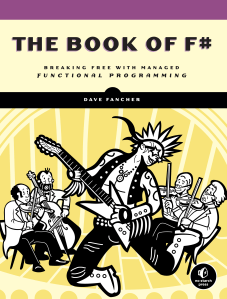
The Book Of F#Earlier this year (late February to be exact) my life took an interesting turn: a publisher approached me about writing an F# book. Writing a book had been something that I’d thought of doing for some time but it was never something I gave any serious consideration. After some discussion with my wife, mostly about the time commitment, I decided to go ahead with the project. Since then, a mix of writing, reviewing, revising, and the variety of other activities that go along with getting a book on the shelves have consumed most of my nights and weekends.

After months of work, I’m very excited to announce that The Book of F#: Breaking Free with Managed Functional Programming will be published by No Starch Press! The book is scheduled for release on March 22, 2014 but No Starch is accepting pre-orders now! By pre-ordering from No Starch with the coupon code PREORDER, you can save 30% off the cover price of $44.95.

If you’re an experienced .NET developer that would like to break free from the chains of C# and Visual Basic or someone that’s just curious about the language, this book is for you. The Book of F# will introduce you to the basics of the language and walk you through features such as currying, partial application, pattern matching, discriminated unions, record types, units of measure, type providers, and a plethora of other concepts. Throughout the book you’ll see examples of how F#’s terse syntax and functional-first nature will help you be more productive and produce code that’s more predictable than that of many modern languages.

F# has been getting a lot of attention lately. If you’re even remotely curious as to why, I hope you’ll consider adding this book to your collection.

.NET Users of Fort Wayne – August 21

On August 21st I’ll once again venture out of my cave for a trip to Fort Wayne, Indiana where I’ll spread more F# love with my friends at NUFW.

If you’re in the Fort Wayne area and want to learn about how F# and functional programming principles can improve your software, please join us. The doors open at 6:00 for networking and the main event begins at 6:30. Be sure to check NUFW ‘s events page for the latest logistics information.

BinaryReader Change in .NET 4.5

BinaryReader has always had what I consider a design flaw in the way it implemented IDisposable.  Even since the early days of .NET, the BinaryReader constructors have required a stream.  To me this means that the BinaryReader has a dependency on the stream thus something else is responsible for that stream’s lifecycle.  The problem is that when the BinaryReader was disposed it would also close the Stream!

It took until .NET 4.5 but Microsoft finally gave us a way to address this issue in the form of a third constructor overload.  With this constructor we can now specify whether we want to close the provided stream or leave it open.

Why F#?

If you’ve been following along with my posts over the past six months or so you can probably imagine that I’ve been asked some variation of this post’s title more than a few times. One question that I keep getting is why I chose F# over some other functional languages like Haskell, Erlang, or Scala. The problem with that question though is that it’s predicated on the assumption that I actually set out to learn a functional language. The truth is that moving to F# was more of a long but natural progression from C# rather than a conscious decision.

The story begins about two and a half years ago. I had pretty much burned out and was deep into what I can only begin to describe as a stagnation coma. I stopped attending user group meetings; I cut way back on reading; I pretty much stopped doing anything that would help me remain even remotely aware of what was going on in the industry.

It’s easy to explain how I got to this point. My employer at the time gave very little incentive to stay current. For instance, there were homegrown frameworks for nearly every aspect of the product. Who needs NHibernate (or other ORM) when you have a proprietary DAL? Why learn ASP.NET MVC when you have a proprietary system for page layout? What’s the point of diving into WPF when the entire application is Web-based? Introducing new technologies or practices was generally discouraged under the banner of being too risky.

It wasn’t until the company hired a new architect that I started to wake up. He brought a wealth of knowledge of fascinating technologies that I’d hardly heard of and his excitement reminded me of what I loved about technology. My passion for software development was reigniting and I started looking at many of the technologies that had passed me by.

The first technology that really caught my attention during this time was LINQ. I’d consider it my introduction to the wonderful world of functional programming. As cool as I thought its query syntax was, I was really interested in the method syntax. I remember reading early on (although I don’t remember where) that query syntax was only added to C# after users complained that method syntax was too cumbersome in the preview versions. I didn’t understand this sentiment at all because to me method syntax felt completely natural. Gradually I began to realize that the reason it felt so natural was because it works the way I think. Lambda expressions, higher-order functions, composability, all of these functional concepts just spoke to me.

Over time I started using more of C#’s functional aspects but found myself getting increasingly frustrated. For the longest time though I couldn’t quite pinpoint anything specific but something just didn’t feel right anymore. It wasn’t until I was mowing the lawn late on a summer afternoon when I had that “a ha!” moment that changed my life.

That afternoon my yard work podcast selection included Hanselminutes #311. In this episode Richard Minerich and Phillip Trelford were talking about a functional language called F# that had been around for a few years and was built upon the .NET framework. I’d seen a few mentions of F# here and there but before hearing this podcast I hadn’t given it much thought.

At one point the discussion turned to language productivity and Phillip remarked that writing C# feels like completing government forms in triplicate. As he elaborated I experienced a sudden burst of clarity into one of the major things that had been bothering me about C# – it’s verbosity! After listening to the rest of the podcast and hearing more about how the functional nature of the language made it less error prone and how things like default immutability helped alleviate some of the complexity of parallel programming I knew I had to give it a try.

A language that doesn’t affect the way you think about programming, is not worth knowing.
— Alan Perlis, Epigrams on Programming

Despite my love of F# most of my work is still in C# but learning F# has had an amazing impact on how I write C#. C# has been becoming more of a functional language with virtually every new release and I’ve been using many of those capabilities for a few years but the language is hardly built around them. That said, forgetting about all the times I’ve typed let instead of var or tried to define a default constructor in the class signature in the last week alone F# really has changed the way I work. I find myself writing more higher-order functions and making much better use of delegation; I’ve developed a strong preference for readonly member fields and properties; and I regularly find myself longing for some of F#’s constructs like tuples, records, discriminated unions, and pattern matching.

The truth is that for all of its strengths though I’m finding working in C# increasingly annoying especially as I continue to work with F#. In many ways, working with C# feels like interacting with a toddler. I feel like I have to hold its hand and guide it along with explicit instructions on what to do every step of the way – even if I’ve already told it something. On the other hand, F# feels like having a personal assistant. Its functional nature allows me to more or less describe what I want and it handles the details.

There are plenty of things that make me prefer F# over C# but I’d like to highlight a few in particular. I’ve already written extensively about some of these and will be writing more about others as time permits but here I’d like to look at them from a more comparative angle.

Terse Syntax

Even though F# is a functional-first language I think a great way to illustrate the language’s expressiveness is with an object-oriented. We’ll start with a simple class definition in C#.

public class CircleMeasurements
{
  private double _diameter;
  private double _area;
  private double _circumference;

  public CircleMeasurements(double diameter, double area, double circumference)
  {
    _diameter = diameter;
    _area = area;
    _circumference = circumference;
  }

  public double Diameter { get { return _diameter; } }
  public double Area { get { return _area; } }
  public double Circumference { get { return _circumference; }  }
}

// Usage
var measurements = new CircleMeasurements(5.0, 19.63495408, 15.70796327);

Look how much code was required to create a class with three properties. Even in this small example we had to tell the compiler what type to use for each value three times! I could have used auto-implemented properties to simplify it a bit but even then we still need to tell the compiler which type to use twice for each value. Now let’s take a look at the same class in F#:

type CircleMeasurements(diameter, area, circumference) =
  member x.Diameter = diameter
  member x.Area = area
  member x.Circumference = circumference

// Usage
let measurements = CircleMeasurements(5.0, 19.63495408, 15.70796327);

That’s it – four lines of code. Granted this compiles to something that resembles the C# class but we didn’t have to write any of it and thanks to the fantastic type inference system we didn’t have to tell the compiler multiple times which type to use for each value. Quite often though even this is more verbose than we actually need. Many times we can use another F# construct – a record type – to represent something we’d represent with a class in other .NET languages:

type CircleMeasurements = { Diameter : float; Area : float; Circumference : float }

// Usage
let measurements = { Diameter = 5.0; Area = 19.63495408; Circumference = 15.70796327 }

In addition to being even more concise than the corresponding class definition, record types have the added benefit of being structurally comparable so we can easily check for equality between two instances. Record types do require us to include the type annotations but we only need to explicitly tell the compiler what to use once for each value and the constructor and properties are each created implicitly.

Functional Style

I already mentioned that functional programming feels more natural to me and by design F# really shines when it comes to expressing and using functions. Traditional .NET development has always had some type of support for delegation and it has definitely improved over the years, particularly with the common generic delegate classes (e.g.: Func, Action) and lambda expressions but actually trying to use them in a more functional style is a pain. This is complicated by the fact that in some situations the C# compiler can’t infer whether a lambda expression is a delegate or an expression tree. Although in some regards I prefer the C# lambda expression syntax I definitely prefer F#’s syntactic distinction between delegates and code quotations.

While on the topic of functional programming I have to mention F#’s default immutability. Immutability is key to any functional language and has been shown to improve overall program correctness by eliminating side effects. C# has some support for immutability through readonly fields or by omitting setters from property definitions but either of these require a conscious decision to enable. Nearly everything in F# is immutable unless explicitly declared otherwise. Immutability also provides benefits when writing asynchronous code because if nothing is changing, there’s a reduced need for locking.

Discriminated Unions

If you haven’t read my post on discriminated unions yet, they’re a way to express simple object hierarchies (or even tree structures) in a concise manner. From a syntactic perspective they’re incredibly simple but trying to replicate them even for simple structures really isn’t particularly feasible in C#. Here’s a simple example:

In this example suit is another discriminated union.

type Card =
| Ace of Suit
| King of Suit
| Queen of Suit
| Jack of Suit
| ValueCard of Suit * int

Using this discriminated union we express the 7 of hearts as ValueCard(Heart, 7). For illustration of what it would take to represent this structure in C# I’m including a screenshot of ILSpy’s decompilation. Note that I’ve only included the signatures and even this five case discriminated union more than fills my screen. Just to drive the point home, fully expanded, this code is nearly 700 lines long! Granted there are a few CompilerGeneratedAttributes in there but they hardly count for a majority of the code.

Ultimately, the union type is an abstract class and each case is a nested class. The nested classes are each assigned a unique tag that’s used for type checking and code branching in some of the union type’s methods. Not included in the screenshot are implementations of several interfaces and overrides of Equals and GetHashCode.
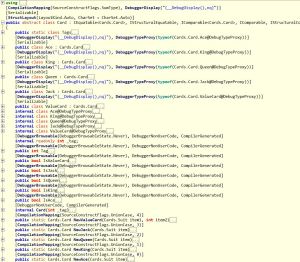
Decompiled Card Discriminated Union

Decompiled Card Discriminated Union

Collection Types & Comprehensions

C# has made great strides in regard to initializing various collection types but it still pales in comparison to the constructs offered by F#. Don’t get me wrong, collection initializers are a nice syntactic convenience but nearly every time I use it I think how much easier it would likely be with a comprehension. LINQ can address some of these shortcomings but even convenience methods like Enumerable.Range feel limiting. Yes, I could write some additional convenience methods to address some of the shortcomings but in F# I don’t have to.

Part of the beauty of comprehensions is that they generally apply regardless of which collection type you’re creating. Although each of the examples below create F# lists they can easily be modified to create sequences or arrays instead.

// Numbers 0 - 10
> [0..10];;
val it : int list = [0; 1; 2; 3; 4; 5; 6; 7; 8; 9; 10]

// Numbers 0 - 10 by 2
> [0..2..10];;
val it : int list = [0; 2; 4; 6; 8; 10]

// Charcters 'a' - 'z'
> ['a'..'z'];;
val it : char list =
  ['a'; 'b'; 'c'; 'd'; 'e'; 'f'; 'g'; 'h'; 'i'; 'j'; 'k'; 'l'; 'm'; 'n'; 'o';
   'p'; 'q'; 'r'; 's'; 't'; 'u'; 'v'; 'w'; 'x'; 'y'; 'z']

// Unshuffled deck
> let deck =
  [ for suit in [ Heart; Diamond; Spade; Club ] do
      yield Ace(suit)
      yield King(suit)
      yield Queen(suit)
      yield Jack(suit)
      for v in 2 .. 10 do
        yield ValueCard(suit, v)
  ];;

val deck : Card list =
  [Ace Heart; King Heart; Queen Heart; Jack Heart; ValueCard (Heart,2);
   ValueCard (Heart,3); ValueCard (Heart,4); ValueCard (Heart,5);
   ValueCard (Heart,6); ValueCard (Heart,7); ValueCard (Heart,8);
   ValueCard (Heart,9); ValueCard (Heart,10); Ace Diamond; King Diamond;
   Queen Diamond; Jack Diamond; ValueCard (Diamond,2); ValueCard (Diamond,3);
   ValueCard (Diamond,4); ValueCard (Diamond,5); ValueCard (Diamond,6);
   ValueCard (Diamond,7); ValueCard (Diamond,8); ValueCard (Diamond,9);
   ValueCard (Diamond,10); Ace Spade; King Spade; Queen Spade; Jack Spade;
   ValueCard (Spade,2); ValueCard (Spade,3); ValueCard (Spade,4);
   ValueCard (Spade,5); ValueCard (Spade,6); ValueCard (Spade,7);
   ValueCard (Spade,8); ValueCard (Spade,9); ValueCard (Spade,10); Ace Club;
   King Club; Queen Club; Jack Club; ValueCard (Club,2); ValueCard (Club,3);
   ValueCard (Club,4); ValueCard (Club,5); ValueCard (Club,6);
   ValueCard (Club,7); ValueCard (Club,8); ValueCard (Club,9);
   ValueCard (Club,10)]

Pattern Matching

faced with a 20th century computer
Scotty: Computer! Computer?
He’s handed a mouse, and he speaks into it
Scotty: Hello, computer.
Dr. Nichols: Just use the keyboard.
Scotty: Keyboard. How quaint.
— Star Trek IV

The above conversation enters my mind when I’m working with C#’s branching constructs, switch statements in particular.  F#’s pattern matching may bear a slight resemblance to C# switch statements but they’re so much more powerful.  switch statements limit us to simply branching on constant values but pattern matching allows value extraction, multiple cases, and refinement constraints for more precise control with a syntax much friendlier than your common if/else statement. Furthermore, like virtually everything else in F#, pattern matches are expressions so they return a value making them ideal candidates for inline conditional bindings.

Units of Measure

Every programmer works with code that uses different units of measure. In most languages dealing with units of measure is error prone because they require discipline from the developer to ensure that the correct units are always used. There are some libraries that attempt to address the problem but to my knowledge (please correct me if I’m wrong) F# is the only one to actually include it in the type system. F#’s unit of measure support is complete enough that it can often automatically convert values between units, particularly when a conversion expression is included with the type definition.

[<Measure>] type px
[<Measure>] type inch
[<Measure>] type dot = 1 px
[<Measure>] type dpi = dot / inch

let convertToPixels (inches : float<inch>) (resolution : float<dpi>) : float<px> =
  inches * resolution

let convertToInches (pixels : float<px>) (resolution : float<dpi>) : float<inch> =
  pixels / resolution

The biggest downfall of F#’s units of measure is that they’re a feature of the type system and compiler rather than a CLR feature. As such, the compiled code doesn’t have any unit information and we can’t enforce the units in cross-language scenarios.

Object Expressions

I haven’t written about object expressions yet but they’re definitely on my backlog. Object expressions provide a way to create ad-hoc (anonymous) types based on one or more interfaces or a base class. They’re useful in a variety of scenarios like creating one-off formatters or comparers and I think they can at least supplement, if not replace some mocking libraries. To illustrate we’ll use a somewhat contrived example of a logging service.

type LogMessageType =
| DebugMessage of string
| InfoMessage of string
| ErrorMessage of string

type ILogProvider =
  abstract member Log : LogMessageType -> unit

type LogService(provider : ILogProvider) =
  let log = provider.Log
  member this.LogDebug msg = DebugMessage(msg) |> log
  member this.LogInfo msg = InfoMessage(msg) |> log
  member this.LogError msg = ErrorMessage(msg) |> log

Here we use a discriminated union to define the message types the logging provider interface can handle. The log service itself provides a slightly friendlier API than the provider interface itself. Normally if we wanted to use the log service instance we’d have to define a concrete implementation of ILogProvider but object expressions allow us to easily define one inline.

let logger =
  LogService(
    { new ILogProvider with
      member this.Log msg =
        match msg with
        | DebugMessage(m) -> printfn "DEBUG: %s" m
        | InfoMessage(m) -> printfn "INFO: %s" m
        | ErrorMessage(m) -> printfn "ERROR: %s" m
    }
  )

In our object expression we use pattern matching to detect the message type, extract the associated string, and write an appropriate message to the console.

> logger.LogDebug "message"
logger.LogInfo "message"
logger.LogError "message";;
DEBUG: message
INFO: message
ERROR: message

What’s Not So Great?

I could continue on for a while with things I like about F# but this post is already long enough as it is. That said, I think it’s only fair to list out a few of the things I don’t like about the language.

Tooling Support

Probably the biggest gripe I have is the lack of tooling support around the language. So many tools and templates that I take for granted when working with C# simply aren’t available. Things like IntelliSense are pretty complete but if you’re just getting started with F# and looking to do more than a console application or library be prepared to spend some time looking for 3rd party templates and reading blog posts.

Language Interop

On a somewhat related note, even though F# compiles to MSIL and can reference or be referenced by other .NET assemblies there are some quirks that make language interoperability a but cumbersome. For instance, using extension methods defined in C# doesn’t work as cleanly as I thought they would. When I was experimenting with MassTransit I couldn’t get the UseMsmq, VerifyMsmqConfiguration, or a number of other extension methods to appear no matter what I tried. I ultimately had to call the static methods directly.

I’ve read that this is addressed in F# 3.0 but I haven’t done enough with 3.0 yet to confirm.

Project Structure

It’s not really fair to put this under the “what’s not so great?” heading but it seemed most appropriate. This isn’t so much an issue with the language as much as it’s a big mindset shift of a similar magnitude of switching from OO to functional. The structure of an F# project is significantly different than that of a C# (or even VB) project and is something I’m still struggling with.

In C# we generally organize code into folders representing namespaces and keep one type (class) per file. F# evaluates code from top down throughout the project so file sequence is significant. Furthermore, code is organized by modules rather than type. F# does have namespaces but even then they’re usually divided across one or more files and from my experience, not grouped by folder.

Wrap Up

No matter what language you work in, programming in a functional style provides benefits. You should do it whenever it is convenient, and you should think hard about the decision when it isn’t convenient.
— John Carmack, Functional Programming in C++

In general I’ve found that the more I learn and work with F# the more I like it. I regularly find myself reaching for it as my first choice, especially when it comes to new development. Although there are a few things that I don’t like about working in F# most of them just require more diligence on my part or are easily managed. I’ve only listed a few key areas where I think F# excels but I firmly believe that their strengths far outweigh any weaknesses.
Revisiting String Distances

Back in April I wrote about three different string distance algorithms.  If you’re not familiar with string distance algorithms I encourage you to read the original post but in short, these algorithms provide different ways to determine how many steps are required to translate one string into another.  Since the algorithms I wrote about aren’t particularly complex I thought translating them to F# would be a fun exercise.

In general the code is pretty similar to its C# counterpart but I was able to take advantage of a few F# constructs, tuples and pattern matching in particular.  These examples may or may not be the best way to implement the algorithms in F# (ok, I’ll be honest, they’re probably not) but they certainly show how well suited F# is to this type of work.

Hamming Distance

The Hamming distance algorithm simply counts how many characters are different in equal length strings.

let hammingDistance (source : string) (target : string) =
  if source.Length <> target.Length then failwith "Strings must be equal length"
 
  Array.zip (source.ToCharArray()) (target.ToCharArray())
  |> Array.fold (fun acc (x, y) -> acc + (if x = y then 0 else 1)) 0

hammingDistance "abcde" "abcde" |> printfn "%i" // 0
hammingDistance "abcde" "abcdz" |> printfn "%i" // 1
hammingDistance "abcde" "abcyz" |> printfn "%i" // 2
hammingDistance "abcde" "abxyz" |> printfn "%i" // 3
hammingDistance "abcde" "awxyz" |> printfn "%i" // 4
hammingDistance "abcde" "vwxyz" |> printfn "%i" // 5

Levenshtein Distance

The Levenshtein distance algorithm counts how many characters are different between any two strings taking into account character insertions and deletions.

open System
let levenshteinDistance (source : string) (target : string) =
  let wordLengths = (source.Length, target.Length)
  let matrix = Array2D.create ((fst wordLengths) + 1) ((snd wordLengths) + 1) 0

  for c1 = 0 to (fst wordLengths) do
    for c2 = 0 to (snd wordLengths) do
      matrix.[c1, c2] <-
        match (c1, c2) with
        | h, 0 -> h
        | 0, w -> w
        | h, w ->
          let sourceChar, targetChar = source.[h - 1], target.[w - 1]
          let cost = if sourceChar = targetChar then 0 else 1
          let insertion = matrix.[h, w - 1] + 1
          let deletion = matrix.[h - 1, w] + 1
          let subst = matrix.[h - 1, w - 1] + cost
          Math.Min(insertion, Math.Min(deletion, subst))
  matrix.[fst wordLengths, snd wordLengths]

levenshteinDistance "abcde" "abcde" |> printfn "%i" // 0
levenshteinDistance "abcde" "abcdz" |> printfn "%i" // 1
levenshteinDistance "abcde" "abcyz" |> printfn "%i" // 2
levenshteinDistance "abcde" "abxyz" |> printfn "%i" // 3
levenshteinDistance "abcde" "awxyz" |> printfn "%i" // 4
levenshteinDistance "abcde" "vwxyz" |> printfn "%i" // 5
levenshteinDistance "abcdefg" "abcde" |> printfn "%i" // 2
levenshteinDistance "abcdefg" "zxyde" |> printfn "%i" // 5
levenshteinDistance "abcde" "bacde" |> printfn "%i" // 2
levenshteinDistance "abcde" "baced" |> printfn "%i" // 4

Damerau-Levenshtein Distance

The Damerau-Levenshtein algorithm builds upon the Levenshtein algorithm by taking transpositions into account.

open System
let damerauLevenshteinDistance (source : string) (target : string) =
  let wordLengths = (source.Length, target.Length)
  let matrix = Array2D.create ((fst wordLengths) + 1) ((snd wordLengths) + 1) 0

  for h = 0 to (fst wordLengths) do
    for w = 0 to (snd wordLengths) do
      matrix.[h, w] <-
        match (h, w) with
        | x, 0 -> x
        | 0, y -> y
        | x, y ->
          let sourceChar, targetChar = source.[x - 1], target.[y - 1]
          let cost = if sourceChar = targetChar then 0 else 1
          let insertion = matrix.[x, y - 1] + 1
          let deletion = matrix.[x - 1, y] + 1
          let subst = matrix.[x - 1, y - 1] + cost

          let distance = Math.Min(insertion, Math.Min(deletion, subst))

          if x > 1 && w > 1 && sourceChar = target.[y - 2] && source.[x - 2] = targetChar then
            Math.Min(distance, matrix.[x - 2, y - 2] + cost)
          else
            distance
  matrix.[fst wordLengths, snd wordLengths]

damerauLevenshteinDistance "abcde" "abcde" |> printfn "%i" // 0
damerauLevenshteinDistance "abcde" "abcdz" |> printfn "%i" // 1
damerauLevenshteinDistance "abcde" "abcyz" |> printfn "%i" // 2
damerauLevenshteinDistance "abcde" "abxyz" |> printfn "%i" // 3
damerauLevenshteinDistance "abcde" "awxyz" |> printfn "%i" // 4
damerauLevenshteinDistance "abcde" "vwxyz" |> printfn "%i" // 5
damerauLevenshteinDistance "abcdefg" "abcde" |> printfn "%i" // 2
damerauLevenshteinDistance "abcdefg" "zxyde" |> printfn "%i" // 5
// Transpositions
damerauLevenshteinDistance "abcde" "bacde" |> printfn "%i" // 1
damerauLevenshteinDistance "abcde" "baced" |> printfn "%i" // 2

F# Enumerations

I was originally going to include this discussion about F# enumerations in the discriminated unions post because their syntax is so similar but the section quickly took on a life of its own. Enumerations in F# are the same as enumerations from other .NET languages so all of the same capabilities and restrictions apply.

Defining Enumerations

Defining an enumeration in F# is much like defining a discriminated union but here we bind an integral value. Unlike in C# though, F# doesn’t automatically generate values for each item so we need to give every case a value.

type DayOfWeek =
| Sunday = 0
| Monday = 1
| Tuesday = 2
| Wednesday = 3
| Thursday = 4
| Friday = 5
| Saturday = 6

Changing Base Type

We can also change the enumeration’s underlying type by changing the suffix of each value. For example, if we wanted to change the underlying type for the DayOfWeek enumeration to byte we could do so by appending a y to each value as follows:

type DayOfWeekByte =
| Sunday = 0y
| Monday = 1y
| Tuesday = 2y
| Wednesday = 3y
| Thursday = 4y
| Friday = 5y
| Saturday = 6y

Referencing Enumeration Values

As is the case with enumerations in other .NET languages enumeration values are referenced through the enumeration name.

> DayOfWeek.Friday
val it : DayOfWeek = Friday

FlagsAttribute

Also like in other .NET languages, F# enumerations support the FlagsAttribute to indicate that each value in the enumeration represents a bit position.

open System

[<Flags>]
type Border =
| None = 0
| Right = 1
| Top = 2
| Left = 4
| Bottom = 8;;

let showBorder = Border.Bottom ||| Border.Left

To determine whether a particular flag is set we can either use bit-math or we can use the enumeration’s HasFlag method. Since I generally prefer the code I don’t have to write so I generally favor built-in approach:

> showBorder.HasFlag Border.Top;;
val it : bool = false

> showBorder.HasFlag Border.Left;;
val it : bool = true

Conversion

For those times when we only have the underlying integer value and want to convert that value to the corresponding enum value we can use the built-in generic enum function:

> enum<DayOfWeek> 5
val it : DayOfWeek = Friday

Note: The signature of the enum function above is int32 -> 'U so it can only be used with enumerations based on int32. If your enumeration is based on another data type such as with the DayOfWeekByte example above you’ll need to use the generic EnumOfValue function from the Microsoft.FSharp.Core.LanguagePrimitives module instead.

Likewise, we can get the underlying value by calling the corresponding conversion function:

int DayOfWeek.Friday
// val it : int = 5

byte DayOfWeekByte.Friday
// val it : byte = 5uy

F# Discriminated Unions

When I started learning F# discriminated unions were probably the first thing that really sold me on the language only partially because there’s nothing like them in C#.  From a traditional .NET background a quick glance at them, particularly simple ones, may lead you to believe that they’re just glorified enumerations but in reality, discriminated unions are so much more powerful.  While enumerations are limited to a single, fixed integral value but applications for discriminated unions go far beyond that.

Like enumerations, discriminated unions allow us to define values that can only be one of a specified set of named cases but that’s where the similarities end.  Discriminated unions allow us to associate zero or more data items of any type with each case.  The effect is that we can easily define tree structures, simple object hierarchies, and even leverage pattern matching.

Discriminated Unions as Object Hierarchies

I think the easiest way to get into discriminated unions is to start off with an example.  In my studies of the language I’ve become quite fond of the example I first encountered in Programming F# where discriminated unions and a list comprehension are used to define a standard, unshuffled card deck.  This example does a great job illustrating not only simple, “dataless” unions but also shows how we can associate multiple data items and even combine discriminated unions to achieve more expressive code.

We start by defining a discriminated union for each suit. The suits don’t have any data associated with them so this discriminated union simply includes the case names.

type Suit =
| Heart
| Diamond
| Spade
| Club

The second discriminated union defines the individual cards. Each card belongs to a particular suit and non-face cards will also include their denomination.

type Card =
| Ace of Suit
| King of Suit
| Queen of Suit
| Jack of Suit
| ValueCard of Suit * int

With just these two constructs we can define a value representing any card in a standard deck.  For instance, if we wanted to represent the Ace of Spades, or 7 of Hearts we’d write Ace(Spade) and ValueCard(Heart, 7), respectively.

We don’t need to include to the actual discriminated union name when referring to a case. Should there be a naming conflict we’re free to include the union name with dot syntax (Suit.Heart) or we could instruct the compiler to force a qualified name with the RequireQualifiedAccess attribute.

If you were paying attention during the Card example you probably noticed a familiar syntax. When multiple data elements are associated with a case (such as with ValueCard) we use the tuple syntax to identify each element’s data type. While this allows for a lot of flexibility it also brings along some of the drawbacks of tuples such as not being able to define names for each value. We’ll look at one way to work around this limitation a little later when we discuss pattern matching.

The tuples in discriminated unions are syntactic tuples. The types the compiler generates for each case are nested classes that derive from the discriminated union type. The data elements are exposed as read-only properties following the same conventions as tuples but there aren’t any actual tuple class instances involved.

Now that we’re armed with some basic knowledge of discriminated unions we can use a list comprehension to easily construct a full, unshuffled deck.

let deck =
  [ for suit in [ Heart; Diamond; Spade; Club ] do
      yield Ace(suit)
      yield King(suit)
      yield Queen(suit)
      yield Jack(suit)
      for v in 2 .. 10 do
        yield ValueCard(suit, v)
  ]

Option Type

No introductory discussion about discriminated unions would be complete without at least a brief mention of the option type. The option type is a predefined discriminated union (Microsoft.FSharp.Core.FSharpOption) that’s useful for indicating when a value may or may not exist (remember: null generally isn’t used in F#). There are only two cases in the option type: Some(_) and None. Because the type itself is an unconstrained generic type, its cases can be used to indicate the presence of any value.

Although options are generally referenced in pattern matching expressions there’s an associated option module that contains several useful functions including Option.get, Option.bind, and Option.exists.

Discriminated Unions as Trees

A really nice aspect of discriminated unions is that they can be self-referencing. This makes creating simple tree structures trivial. To illustrate let’s create a very rudimentary HTML structure.

type Markup =
| Element of string * Markup list
| EmptyElement of string
| Content of string

Note that the Element case has two associated pieces of data: a string (the element name), and a list of additional Markup instances. From just these three cases we can quickly represent a simple HTML document:

let htmlTree =
  Element("html",
    [
      Element("head", [ Element("title", [ Content("Very Simple HTML") ]) ])
      Element("body",
        [
          Element("article",
            [
              Element("h1", [ Content("Discriminated Unions") ])
              Element("p",
                [
                  Content("See how ")
                  Element("b", [ Content("easy") ])
                  Content(" this is?")
                ])
              Element("p", [ Content("F#"); EmptyElement("br"); Content("is fun") ])
            ])
        ])
    ])

Discriminated Unions in Pattern Matching

We’ve seen how discriminated unions can be used to easily define both object hierarchies and tree structures. Like with so many things in F# though that power is amplified when combined with pattern matching. With pattern matching we can not only can we provide conditional logic for operating against each case but we can also work around the limitation I mentioned earlier where each associated data item is assigned a less than useful name.

Let’s expand upon the Markup example from the previous section to illustrate. Here we’ll define a recursive function to convert the htmlTree value to an HTML string.

let rec toHtml m : string =
  match m with
  | Element (tag, children) ->
      let sb = System.Text.StringBuilder()
      let append (s : string) = sb.Append s |> ignore

      append (sprintf "<%s>" tag)
      List.iter (fun c -> append (c |> toHtml)) children
      append (sprintf"</%s>" tag)
      sb.ToString()
  | EmptyElement tag -> sprintf "<%s />" tag
  | Content v -> sprintf "%s" v;;

htmlTree |> toHtml
> val it : string =
  "<html><head><title>Very Simple HTML</title></head><body><article><h1>Discriminated Unions</h1><p>See how <b>easy</b> this is?</p><p>F#<br />is fun</p></article></body></html>"

In this example we have a pattern for each Markup case. Each case is covered by a pattern so there’s no need to introduce the wildcard (_) pattern here. Each pattern includes an identifier for each data item associated with the case. The identifiers allow us to refer to each item with something meaningful rather than the default name. Identifiers are also useful within when constraints to provide more granular control over what matches a given pattern. For instance if we wanted to apply different handling for p elements we could add the pattern | Element (tag, children) when tag = "p" -> ... to the beginning of the match expression.

Members in Discriminated Unions

Just as with record types, discriminated unions ultimately compile down to classes. As such, we can expand upon them with additional members such as methods. Continuing with the Markup it makes sense to keep the toHtml method with the Markup type so let’s combine them.

To convert the function to a method we only need to make a few small tweaks. First, we’ll eliminate the argument since we’ll be operating against the current instance. We’ll also add a type annotation to the delegate used by the List.iter function.

type Markup =
| Element of string * Markup list
| EmptyElement of string
| Content of string
  member x.toHtml() : string =
    match x with
    | Element (tag, children) ->
        let sb = System.Text.StringBuilder()
        let append (s : string) = sb.Append s |> ignore

        append (sprintf "<%s>" tag)
        List.iter (fun (c : Markup) -> append (c.toHtml())) children
        append (sprintf"</%s>" tag)
        sb.ToString()
    | EmptyElement tag -> sprintf "<%s />" tag
    | Content v -> sprintf "%s" v

Note that the member function is no longer marked as recursive. This is because recursion is implicitly allowed for members.

Now that the toHtml function is a method of the Markup type we can call it like we would a method on any other type:

htmlTree.toHtml()
> 
val it : string =
  "<html><head><title>Very Simple HTML</title></head><body><article><h1>Discriminated Unions</h1><p>See how <b>easy</b> this is?</p><p>F#<br />is fun</p></article></body></html>"

Wrapping Up

Discriminated unions are a highly useful construct with applications far beyond that of enumerations. Whether they’re being used to construct an object hierarchy or represent a tree structure discriminated unions can greatly enhance the clarity of your code.

Sometimes a discriminated union is bit overkill for the problem space and an enumeration is all that’s needed. In the next post we’ll explore how to define enumerations in F#.