Software Development

Flickr API Notes

Until recently I had been working on a flickr app for WP7.  It was coming along nicely but then flickr had to go and announce an official app that will be released at the end of January.  Even though I’m no longer working on the project I thought I’d share some of the things I learned about working with their API.

Getting Started

The natural place to start on the project is by reviewing their API documentation.  For convenience the API index page lists API “kits” for a variety of platforms including .NET, Objective-C, Java, Python, and Ruby among others.  I started by looking at the Flickr.NET library but didn’t like how it defined so many overloads for some of the methods and ultimately compiled most of the API methods into a single Flickr “god” class so I started writing my own framework.

The API index page links to some highlighted “read these first” documents most of which are all must reads but some of them can be easily gleaned from the rest of the documentation.  The documents I found most useful along with some highlights and notes are:

  1. Terms of Use
  2. Encoding
    • UTF-8
    • UTF-8
    • UTF-8
  3. User Authentication
    • Three methods
      • Web
      • Desktop
      • Mobile
    • Despite being a mobile application the features offered by WP7 made desktop authentication a more logical choice.
  4. Dates
    • MySQL datetime format
    • Unix timestamps
  5. URLs
    • Guidance on how to construct URLs for both photo sources and flickr pages.

Formats

We can communicate with the flickr API using any of three formats:

  • REST – http://api.flickr.com/services/rest/
  • XML-RPC – http://api.flickr.com/services/xmlrpc/
  • SOAP – http://api.flickr.com/services/soap/

The REST endpoint is by far the easiest to use since all of the arguments are included directly in the URL as querystring parameters.  Making a request is just a matter of constructing a URL and issuing a POST or GET request.

Responses can be returned in any of the three formats but we can also request responses in JSON or PHP formats by specifying a format argument.  I used REST for responses too because the format easily lends itself to XML deserialization and greatly reduced the amount of translation code I needed to write.

API Methods

In general I found the API easy to work with.  The methods are clearly organized and offer a very feature complete way to interact with the system.  Although each exposed methods has some accompanying documentation that is generally pretty complete I found plenty of room for improvement.

My biggest gripe about the documentation is how incomplete some of it is.  For example, several of the methods accept an Extras argument.  The Extras argument is incredibly useful in that it allows additional information to be returned with the list thereby reducing the number of API requests we need to make to get complete information back in list format.

The Extras documentation lists all of the possible values but what it doesn’t include is what is returned when the options are specified (at least not that I found without actually making a request with the options).  For your convenience I’ve compiled a listing of the output values for each of the Extras options.

Option Response Notes
description description element Element content can contain HTML
license license attribute Available licenses
date_upload dateupload attribute UNIX timestamp
date_taken datetaken attribute MySQL datetime
datetakengranularity attribute The known accuracy of the date. See the date documentation for details.
owner_name ownername attribute
icon_server iconserver attribute
iconfarm attribute
original_format originalsecret attribute Facilitates sharing photos
originalformat attribute The format (JPEG, GIF, PNG) of the image as it was originally uploaded
last_update lastupdate attribute UNIX timestamp
geo latitude attribute See documentation for flickr.photos.geo.getLocation
longitude attribute
accuracy attribute
tags tags attribute Space delimited list of system formatted tags
machine_tags machine_tags attribute
o_dims o_width attribute The dimensions of the original image – I prefer url_o for this information
o_height attribute
views views attribute Number of times an image has been viewed
media media attribute
media_status attribute
path_alias pathalias attribute Alternate text to be used in place of the user ID in URLs
url_sq url_sq attribute The url and dimensions of the small square image
height_sq
width_sq
url_t url_t attribute The url and dimensions of the thumbnail image
height_t
width_t
url_s url_s attribute The url and dimensions of the small image
height_s
width_s
url_m url_m attribute The url and dimensions of the medium (500 pixel) image
height_m
width_m
url_z url_z attribute The url and dimensions of the medium (640 pixel) image
height_z
width_z
url_l url_l attribute The url and dimensions of the large image
height_l
width_l
url_o url_o attribute The url and dimensions of the original image
height_o
width_o

Consistently Inconsistent

As complete and responsive as the flickr API is it isn’t without its share of annoyances.  The biggest issue that is found throughout the API is the lack of consistency.  The API is so consistently inconsistent that we can even see examples in the table above.

Just look at the options and responses.  How many options use snake case but return lowercase attribute names?

Another example is found with dates.  Taken dates are MySQL datetime values whereas posted dates are UNIX timestamp values.  This means that anything using the API needs to handle both types.  I understand not converting taken dates to GMT since they might be read from EXIF data but can’t we get a standard format and have the service handle the conversions?

The Overall Experience

As I mentioned I opted against working with an existing library like Flickr.NET so I was building everything from scratch.  As such, I started building my own framework and found that in general, the experience was painless.  The fact that the API is so flexible in terms of request and response formats makes it useful in virtually any environment.  The completeness of the exposed feature-set also makes it easy to build a rich integration.

What’s Next?

I may have stopped development on my flickr app for WP7 but I’ve made such good progress on my framework that I’m strongly considering putting it on codeplex and finishing it.  Right now it only supports the REST formats, doesn’t have any caching capabilities, and only works asynchronously but addressing these topics shouldn’t be particularly difficult.  If anyone is interested in the project please let me know.

December Indy TFS Meeting

Mark your calendar for the second meeting of the Indy TFS user group on December 8, 2010.  I will be presenting some tips for improving the TFS version control experience.  In particular we’ll examine enhancing version control with the TFS Power Tools, replacing the default compare and merge tools, tracking changesets, and integrating some project management features into the version control workflow.

Location

Microsoft Office
500 East 96th St
Suite 460
Indianapolis, IN 46240
[Map]

Doors open at 6:00 PM with the meeting starting at 6:30.  Pizza and drinks will be provided.

Register at https://www.clicktoattend.com/invitation.aspx?code=151824.

LINQed Up (Part 4)

This is the fourth part of a series intended as an introduction to LINQ.  The series should provide a good enough foundation to allow the uninitiated to begin using LINQ in a productive manner.  In this post we’ll look at the performance implications of LINQ along with some optimization techniques.

LINQed Up Part 3 showed how to compose LINQ statements to accomplish a number of common tasks such as data transformation, joining sequences, filtering, sorting, and grouping.  LINQ can greatly simplify code and improve readability but the convenience does come at a price.

LINQ’s Ugly Secret

In general, evaluating LINQ statements takes longer than evaluating a functionally equivalent block of imperative code.

Consider the following definition:

var intList = Enumerable.Range(0, 1000000);

If we want to refine the list down to only the even numbers we can do so with a traditional syntax such as:

var evenNumbers = new List<int>();

foreach (int i in intList)
{
	if (i % 2 == 0)
	{
		evenNumbers.Add(i);
	}
}

…or we can use a simple LINQ statement:

var evenNumbers = (from i in intList
					where i % 2 == 0
					select i).ToList();

I ran these tests on my laptop 100 times each and found that on average the traditional form took 0.016 seconds whereas the LINQ form took twice as long at 0.033 seconds.  In many applications this difference would be trivial but in others it could be enough to avoid LINQ.

So why is LINQ so much slower?  Much of the problem boils down to delegation but it’s compounded by the way we’re forced to enumerate the collection due to deferred execution.

In the traditional approach we simply iterate over the sequence once, building the result list as we go.  The LINQ form on the other hand does a lot more work.  The call to Where() iterates over the original sequence and calls a delegate for each item to determine if the item should be included in the result.  The query also won’t do anything until we force enumeration which we do by calling ToList() resulting in an iteration over the result set to a List<int> that matches the list we built in the traditional approach.

Not Always a Good Fit

How often do we see code blocks that include nesting levels just to make sure that only a few items in a sequence are acted upon? We can take advantage of LINQ’s expressive nature to flatten much of that code into a single statement leaving just the parts that actually act on the elements. Sometimes though we’ll see a block of code and think “hey, that would be so much easier with LINQ!” but not only might a LINQ version introduce a significant performance penalty, it may also turn out to be more complicated than the original.

One such example would be Edward Tanguay’s code sample for using a generic dictionary to total enum values.  His sample code builds a dictionary that contains each enum value and the number of times each is found in a list. At first glance LINQ looks like a perfect fit – the code is essentially transforming one collection into another with some aggregation.  A closer inspection reveals the ugly truth.  With Edward’s permission I’ve adapted his sample code to illustrate how sometimes a traditional approach may be best.

For these examples we’ll use the following enum and list:

public enum LessonStatus
{
	NotSelected,
	Defined,
	Prepared,
	Practiced,
	Recorded
}

List<LessonStatus> lessonStatuses = new List<LessonStatus>()
{
	LessonStatus.Defined,
	LessonStatus.Recorded,
	LessonStatus.Defined,
	LessonStatus.Practiced,
	LessonStatus.Prepared,
	LessonStatus.Defined,
	LessonStatus.Practiced,
	LessonStatus.Prepared,
	LessonStatus.Defined,
	LessonStatus.Practiced,
	LessonStatus.Practiced,
	LessonStatus.Prepared,
	LessonStatus.Defined
};

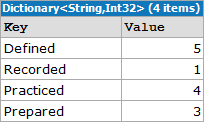
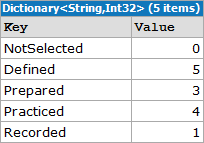
Edward’s traditional approach defines the target dictionary, iterates over the names in the enum to populate the dictionary with default values, then iterates over the list of enum values, updating the target dictionary with the new count.

var lessonStatusTotals = new Dictionary<string, int>();

foreach (var status in Enum.GetNames(typeof(LessonStatus)))
{
	lessonStatusTotals.Add(status, 0);
}
	
foreach (var status in lessonStatuses)
{
	lessonStatusTotals[status.ToString()]++;
}

TraditionalOutput

In my tests this form took an average of 0.00003 seconds over 100 invocations.  So how might it look if in LINQ?  It’s just a simple grouping operation, right?

var lessonStatusTotals =
	(from l in lessonStatuses
		group l by l into g
		select new { Status = g.Key.ToString(), Count = g.Count() })
	.ToDictionary(k => k.Status, v => v.Count);

GroupOnlyOutput

Wrong. This LINQ version isn’t functionally equivalent to the original. Did you see the problem?  Take another look at the output of both forms.  The dictionary created by the LINQ statement doesn’t include any enum values that don’t have corresponding entries in the list. Not only does the output not match but over 100 invocations this simple grouping query took an average of 0.0001 seconds or about three times longer than the original.  Let’s try again:

var summary = from l in lessonStatuses
				group l by l into g
				select new { Status = g.Key.ToString(), Count = g.Count() };
		
var lessonStatusTotals = 
	(from s in Enum.GetNames(typeof(LessonStatus))
	 join s2 in summary on s equals s2.Status into flat
	 from f in flat.DefaultIfEmpty(new { Status = s, Count = 0 })
	 select f)
	.ToDictionary (k => k.Status, v => v.Count);

JoinAndGroupOutput

In this sample we take advantage of LINQ’s composable nature and perform an outer join to join the array of enum values to the results of the query from our last attempt.  This form returns the correct result set but comes with an additional performance penalty.  At an average of 0.00013 seconds over 100 invocations, This version took almost four times longer and is significantly more complicated than the traditional form.

What if we try a different approach?  If we rephrase the task as “get the count of each enum value in the list” we can rewrite the query as:

var lessonStatusTotals = 
	(from s in Enum.GetValues(typeof(LessonStatus)).OfType<LessonStatus>()
	 select new
	 {
	 	Status = s.ToString(),
		Count = lessonStatuses.Count(s2 => s2 == s)
	 })
	.ToDictionary (k => k.Status, v => v.Count);

CountOutput

Although this form is greatly simplified from the previous one it still took an average of 0.0001 seconds over 100 invocations.  The biggest problem with this query is that it uses the Count() extension method in its projection.  Count() iterates over the entire collection to build its result.  In this simple example Count() will be called five times, once for each enum value.  The performance penalty will be amplified by the number of values in the enum and the number of enum values in the list so larger sequences will suffer even more.  Clearly this is not optimal either.

A final solution would be to use a hybrid approach.  Instead of joining or using Count we can compose a query that references the original summary query as a subquery.

var summary = from l in lessonStatuses
	group l by l into g
	select new { Status = g.Key.ToString(), Count = g.Count() };

var lessonStatusTotals =
	(from s in Enum.GetNames(typeof(LessonStatus))
	 let summaryMatch = summary.FirstOrDefault(s2 => s == s2.Status)
	 select new
	 {
	 	Status = s,
		Count = summaryMatch == null ? 0 : summaryMatch.Count
	 })
	.ToDictionary (k => k.Status, v => v.Count);

SubqueryOutput

At an average of 0.00006 seconds over 100 iterations this approach offers the best performance of any of the LINQ forms but it still takes nearly twice as long as the traditional approach.

Of the four possible LINQ alternatives to Edward’s original sample none of them really improve readability.  Furthermore, even the best performing query still took twice as long.  In this example we’re dealing with sub-microsecond differences but if we were working with larger data sets the difference could be much more significant.

Query Optimization Tips

Although LINQ generally doesn’t perform as well as traditional imperative programming there are ways to mitigate the problem.  Many of the usual optimization tips also apply to LINQ but there are a handful of LINQ specific tips as well.

Any() vs Count()

How often do we need to check whether a collection contains any items?  Using traditional collections we’d typically look at the Count or Length property but with IEnumerable<T> we don’t have that luxury.  Instead we have the Count() extension method.

As previously discussed, Count() will iterate over the full collection to determine how many items it contains.  If we don’t want to do anything beyond determine that the collection isn’t empty this is clearly overkill.  Luckily LINQ also provides the Any() extension method.  Instead of iterating over the entire collection Any() will only iterate until a match is found.

Consider Join Order

The order in which sequences appear in a join can have a significant impact on performance.  Due to how the Join() extension method iterates over the sequences the larger sequence should be listed first.

PLINQ

Some queries may benefit from Parallel LINQ (PLINQ).  PLINQ partitions the sequences into segments and executes the query against the segments in parallel across multiple processors.

Bringing it All Together

As powerful as LINQ can be at the end of the day it’s just another tool in the toolbox.  It provides a declarative, composable, unified, type-safe language to query and transform data from a variety of sources.  When used responsibly LINQ can solve many sequence based problems in an easy to understand manner.  It can simplify code and improve the overall readability of an application.  In other cases such as what we’ve seen in this article it can also do more harm than good.

With LINQ we sacrifice performance for elegance.  Whether the trade-off is worth while is a balancing act based on the needs of the system under development.  In software where performance is of utmost importance LINQ probably isn’t a good fit.  In other applications where a few extra microseconds won’t be noticed, LINQ is worth considering.

When it comes to using LINQ consider these questions:

  • Will using LINQ make the code more readable?
  • Am I willing to accept the performance difference?

If the answer to either of these questions is “no” then LINQ is probably not a good fit for your application.  In my applications I find that LINQ generally does improve readability and that the performance implications aren’t significant enough to justify sacrificing readability but your mileage may vary.

Upcoming Events in Indianapolis

There are a few interesting software development related events coming up in Indianapolis over the next few weeks.


Indy TFS User Group

Date/Time:
10/13/2010 6:30 PM

Location:
Microsoft Corporation
500 E. 96th St.
Suite 460
Indianapolis, IN 46240
[Map]

Web Site:
https://www.clicktoattend.com/ invitation.aspx?code=151376

The first meeting of the Indianapolis TFS User Group will feature Paul Hacker introducing many of the Application Lifecycle Management tools in Visual Studio 2010.

I’ve been reading Professional Application Lifecycle Management with Visual Studio 2010 and am pretty excited about many of the features.  I hope to use this session to expand upon what is included in the book.

This event is free to attend.  Follow the link to the right to register.

IndyNDA

Date/Time:
10/14/2010 6:00 PM

Location:
Management Information Disciplines, LLC
9800 Association Court
Indianapolis, IN 46280
[Map]

Web Site:
http://indynda.org/

The October IndyNDA meeting will be presented by the group’s president, Dave Leininger.  Dave will be discussing ways to graphically represent complex relationships in data.

Three special interest groups (SIGs) also meet immediately following the main event.  The SIGs were on hiatus last month so I’ll be giving my introduction to dynamic programming in C# talk this month.

IndyNDA meetings are free to attend thanks to the sponsors.  No registration is required.  Regular attendees should note the new location.

Indy GiveCamp

Date/Time:
11/5/2010 – 11/7/2010

Location:
Management Information Disciplines, LLC
9800 Association Court
Indianapolis, IN 46280
[Map]

Web Site:
http://www.indygivecamp.org/

“Indy GiveCamp is a weekend-long collaboration between local developers, designers, database administrators, and non-profits. It is an opportunity for the technical community to celebrate and express gratitude for the contributions of these organizations by contributing code and technical know-how directly towards the needs of the groups.”

I can’t be participate in this year’s event due to prior family commitments but I’ve heard enough good things about the GiveCamp events in other cities to know that it’s a great cause.  There is still a need for volunteers so if you can spare the weekend please volunteer.  One of 18 charities will thank you for it.

My IndyTechFest Experience

This past Saturday I, along with 400+ developers, admins, and DBAs attended IndyTechFest.  It was a long, intense day of sessions covering topics such as WPF, Silverlight, SQL Server, C#, VB, Testing, and Windows Phone 7.  I’ve had a few days to digest what I heard and wanted highlight some things from each of the sessions I attended.

This year’s conference was split into seven tracks each with five sessions and an all-day open space.  All of the tracks had at least one topic I was interested in and many time slots had conflicts but ultimately I stayed within the general .NET and Silverlight tracks.  My schedule for the day was:

  • Keynote: Are My Three Screens Cloudy?
  • WPF for Developers
  • Implementing MVVM for WPF
  • The State of Data Services: Open Data for the Open Web
  • C# Tips and Tricks
  • Silverlight Code Survey

For the most part I found value in each of the sessions I attended.  Thanks go out to the sponsors, organizers, and volunteers that made this event possible.

Keynote: Are My Three Screens Cloudy?

Presented By: Jesse Liberty

In many ways Jesse Liberty’s keynote was the highlight of the day.  I think my #1 takeaway for the day is that Jesse Liberty is awesome!  In the keynote Jesse briefly described his position within Microsoft, how he got there, and gave a quick history on the evolution of Silverlight.  He went on to describe what Microsoft sees as the “three screens” (computer, TV, and phone) and how Silverlight is the technology that will bring the three screens together through Windows, XBox360, and Windows Phone 7.

WPF For Developers

Presented By: Phil Japikse

This was the first of two Windows Presentation Foundation (WPF) sessions from Phil Japikse.  In this session Phil gave a good introduction to WPF for the non-initiated (like me).  He started by defining WPF, describing the advantages and disadvantages of WPF to WinForms, and discussing new features in .NET 4.0.  The majority of the session was demonstrating some of the more common features.

Some highlights:

  • Creating custom spell-check dictionaries with .lex files
  • Panels dock in XAML order
  • Controls tab in XAML order by default
  • INotifyPropertyChanged interface
  • INotifyCollectionChanged interface

The presentation and example code are both available on Phil’s Samples and Presentations page.

Implementing MVVM for WPF

Presented By: Phil Japikse

Expanding upon his first WPF session, Phil discussed how to implement the Model-View-ViewModel (MVVM) pattern in WPF.  This session was almost entirely demo showing the classes that represent each part of the pattern and how they interact.

The presentation and example code are both available on Phil’s Samples and Presentations page.

Additional Resources:

The State of Data Services: Open Data for the Open Web

Presented By: Dan Rigsby

Dan Rigsby gave a great introduction to OData, a protocol developed by Microsoft to facilitate data interchange between systems using existing Web technologies.  He started by describing REST and Atom/Pub, two technologies that make OData possible then went on to show OData in action.

REST (http://en.wikipedia.org/wiki/Representational_State_Transfer)

  • Embrace the URI
  • HTTP Verbs (GET, POST, etc…) translate to methods
  • Content-Type defines the object model
  • Status code is the result

Atom/Pub (http://atompub.org/)

  • Standards based XML syndication format for publishing and editing web resources
  • Preserves metadata
  • Provides constructs

OData (http://www.odata.org/)

  • “Open” Data
  • Formerly known “Astoria” and ADO.NET Data Services
  • Open protocol
  • WCF Data Services is Microsoft’s provider for creating and consuming OData
  • Netflix provides an OData interface to its video library

C# Tips and Tricks

Presented By: Mark Strawmyer

With all due respect to Mr. Strawmyer I was incredibly disappointed by this session.  The IndyTechFest program had this to say about the session:

This C# presentation focuses on tips and tricks for the C# developer.  It contains a mixture of C# specific features along with other handy how-to items such as shortcuts for working with the C# IDE that will make you more productive.

This session did not fit the description.  I understand the the previous session was a C# 4.0 overview and there was a strong desire to avoid duplication of information but only two of the tips/tricks mentioned were actually specific to C# and one of those was a C# 4.0 feature!

For the curious, the tips and tricks discussed were:

  • Optional & named parameters
  • Extension methods
  • ObsoleteAttribute
  • GC.Collect()
  • using keyword
  • Parallel extensions
  • Utilities

I really question offering up GC.Collect() as a tip, especially when it was provided with the caveat “you can do this but don’t.”  Is letting people know something is possible really a tip if it shouldn’t be done or is not doing it the tip?

To me, a C# tips and tricks presentation should include things such as lesser known/used operators, XML documentation & IntelliSense, compiler options, automatic properties, etc…

Silverlight Code Survey

Presented By: Jesse Liberty

This session was originally going to be “Application Development with Silverlight 4” but after some feedback from the morning’s keynote and the overlap with the MVVM session it was changed.  In this session Jesse did a quick run-through of creating a new Silverlight application, showing some basic data binding, and some basic animation.  Most of the demonstration is available on the Learn page of Silverlight.net.  Nevertheless, I wasn’t about to miss the opportunity to listen to Jesse present again.

In the Hallway

As with just about any conference lots of interesting things happen in the hallway between sessions.  I’ll sheepishly admit that I didn’t use this time as well as I could (should?) have but I really did enjoy playing with the Windows Phone 7 demo application at the Microsoft booth.  I was even clever enough to crash the app by clicking the emulator’s home button while a dialog box was open :)

Test Framework Philosophy

My development team is working to implement and enforce more formal development processes than we have used in the past.  Part of this process involves deciding on which unit test framework to use going forward.  Traditionally we have used NUnit and it has worked well for our needs but now that we’re implementing Visual Studio Team System we now have MSTest available.  This has sparked a bit of a debate as to whether we should stick with NUnit or migrate to MSTest.  As we examine the capabilities of each framework and weigh each of their advantages and disadvantages I’ve come to realize that the decision is a philosophical matter.

MSTest has a bit of a bad reputation.  The general consensus seems to be that MSTest sucks.  A few weeks ago I would have thoroughly agreed with that assessment but recently I’ve come to reconsider that position.  The problem isn’t that MSTest sucks, it’s that MSTest follows a different paradigm than some other frameworks as to what a test framework should provide.

My favorite feature of NUnit is its rich, expressive syntax.  I especially like NUnit’s constraint-based assertion model.  By comparison, MSTest’s assertion model is limited, even restrictive if you’re used to the rich model offered by NUnit.  Consider the following “classic” assertions from both frameworks:

NUnit MSTest
Equality/Inequality Assert.AreEqual(e, a)
Assert.AreNotEqual(e, a)
Assert.Greater (e, a)
Assert.LessOrEqual(e, a)
Assert.AreEqual (e, a)
Assert.AreNotEqual (e, a)
Assert.IsTrue(a > e)
Assert.IsTrue(a <= e)
Boolean Values Assert.IsTrue(a)
Assert.IsFalse(a)
Assert.IsTrue(a)
Assert.IsFalse(a)
Reference Assert.AreSame(e, a)
Assert.AreNotSame(e, a)
Assert.AreSame(e, a)
Assert.AreNotSame(e, a)
Null Assert.IsNull(a)
Assert.IsNotNull(a)
Assert.IsNull(a)
Assert.IsNotNull(a)
e – expected value
a – actual value

They’re similar aren’t they?  Each of the assertions listed are functionally equivalent but notice how the Greater and LessOrEqual assertions are handled in MSTest.  MSTest doesn’t provide assertion methods for these cases but instead relies on evaluating expressions to define the condition.  This difference above all else defines the divergence in philosophy between the two frameworks.  So why is this important?

Readability

Unit tests should be readable.  In unit tests we often break established conventions and/or violate the coding standards we use in our product code.  We sacrifice brevity in naming with Really_Long_Snake_Case_Names_So_They_Can_Be_Read_In_The_Test_Runner_By_Non_Developers.  We sacrifice DRY to keep code together.  All of these things are done in the name of readability.

The Readability Debate

Argument 1: A rich assertion model can unnecessarily complicate a suite of tests particularly when multiple developers are involved.

Rich assertion models make it possible to assert the same condition in a variety of ways resulting in a lack of consistency.  Readability naturally falls out of a week assertion model because the guess work of which form of an assertion is being used is removed.

Argument 2: With a rich model there is no guess work because assertions are literally spelled out as explicitly as they can be.
Assert.Greater(e, a) doesn’t require a mental context shift from English to parsing an expression.  The spelled out statement of intent is naturally more readable for developers and non-developers alike.

My Position

I strongly agree with argument 2.  When I’m reading code I derive as much meaning from the method name as I can before examining the arguments.  “Greater” conveys more contextual information than “IsTrue.”  When I see “IsTrue” I immediately need to ask “What’s true?” then delve into an argument which could be anything that returns a boolean value.  In any case I still need to think about what condition is supposed to be true.

NUnit takes expressiveness to another level with its constraint-based assertions.  The table below lists the same assertions as the table above when written as constraint-based assertions.

Equality/Inequality Assert.That(e, Is.EqualTo(a))
Assert.That(e, Is.Not.EqualTo(a))
Assert.That(e, Is.GreaterThan(a))
Assert.That(e, Is.LessThanOrEqualTo(a))
Boolean Values Assert.That(a, Is.True)
Assert.That(a, Is.False)
Reference Assert.That(a, Is.SameAs(e))
Assert.That(a, Is.Not.SameAs(e))
Null Assert.That(a, Is.Null)
Assert.That(a, Is.Not.Null)
e – expected value
a – actual value

Constraint-based assertions are virtually indistinguishable from English.  To me this is about as readable as code can be.

Even the frameworks with a weak assertion model provide multiple ways of accomplishing the same task.  Is it not true that Assert.AreEqual(e, a) is functionally equivalent to Assert.IsTrue(e == a)?  Is it not also true that Assert.AreNotEqual(e, a) is functionally equivalent to Assert.IsTrue(e !=a)?  Since virtually all assertions ultimately boil down to ensuring that some condition is true and throwing an exception when that condition is not true, shouldn’t weak assertion models be limited to little more than Assert.IsTrue(a)?

Clearly there are other considerations beyond readability when deciding upon a unit test framework but given that much of the power of a given framework is provided by the assertion model it’s among the most important.  To me, an expressive assertion model is just as important as the tools associated with the framework.

Your thoughts?

LINQ: IEnumerable to DataTable

Over the past several months I’ve been promoting LINQ pretty heavily at work.  Several of my coworkers have jumped on the bandwagon and are realizing how much power is available to them.

This week two of my coworkers were working on unrelated projects but both needed to convert a list of simple objects to a DataTable and asked me for an easy way to do it.  LINQ to DataSet provides wonderful functionality for exposing DataTables to LINQ expressions and converting the data into another structure but it doesn’t have anything for turning a collection of objects into a DataTable.  Lucky for us LINQ makes this task really easy.

First we need to use reflection to get the properties for the type we’re converting to a DataTable.

var props = typeof(MyClass).GetProperties();

Once we have our property list we build the structure of the DataTable by converting the PropertyInfo[] into DataColumn[].  We can add each DataColumn to the DataTable at one time with the AddRange method.

var dt = new DataTable();
dt.Columns.AddRange(
  props.Select(p => new DataColumn(p.Name, p.PropertyType)).ToArray()
);

Now that the structure is defined all that’s left is to populate the DataTable.  This is also trivial since the Add method on the Rows collection has an overload that accepts params object[] as an argument.  With LINQ we can easily build a list of property values for each object, convert that list to an array, and pass it to the Add method.

source.ToList().ForEach(
  i => dt.Rows.Add(props.Select(p =>; p.GetValue(i, null)).ToArray())
);

That’s all there is to it for collections of simple objects.  Those familiar with LINQ to DataSet might note that the example doesn’t use the CopyToDataTable extension method.  The main reason for adding the rows directly to the DataTable instead of using CopyToDataTable is that we’d be doing extra work.  CopyToDataTable accepts IEnumerable but constrains T to DataRow.  In order to make use of the extension method (or its overloads) we still have to iterate over the source collection to convert each item into a DataRow, add each row into a collection, then call CopyToDataTable with that collection.  By adding the rows directly to the DataTable we avoid the extra step altogether.

We can now bring the above code together into a functional example. To run this example open LINQPad, change the language selection to C# Program, and paste the code into the snippet editor.

class MyClass
{
  public Guid ID { get; set; }
  public int ItemNumber { get; set; }
  public string Name { get; set; }
  public bool Active { get; set; }
}

IEnumerable<MyClass> BuildList(int count)
{
  return Enumerable
    .Range(1, count)
    .Select(
      i =>
      new MyClass()
      {
        ID = Guid.NewGuid(),
        ItemNumber = i,
        Name = String.Format("Item {0}", i),
        Active = (i % 2 == 0)
      }
    );
}

DataTable ConvertToDataTable<TSource>(IEnumerable<TSource> source)
{
  var props = typeof(TSource).GetProperties();

  var dt = new DataTable();
  dt.Columns.AddRange(
    props.Select(p => new DataColumn(p.Name, p.PropertyType)).ToArray()
  );

  source.ToList().ForEach(
    i => dt.Rows.Add(props.Select(p => p.GetValue(i, null)).ToArray())
  );

  return dt;
}

void Main()
{
  var dt = ConvertToDataTable(
    BuildList(100)
  );

  // NOTE: The Dump() method below is a LINQPad extension method.
  //       To run this example outside of LINQPad this method
  //       will need to be revised.

  Console.WriteLine(dt.GetType().FullName);
  dt.Dump();
}

Of course there are other ways to accomplish this and the full example has some holes but it’s pretty easy to expand. An obvious enhancement would be to rename the ConvertToDataTable method and change it to handle child collections and return a full DataSet.

KalamazooX Recap

The KalamazooX conference was held on Saturday, April 10.  It lived up to the expectations set by all of the positive comments I’ve seen and heard about last year’s event.   This year’s event consisted of eleven sessions that lasted approximately 30 minutes each.  The sessions all focused on soft rather than technical skills.  It really was worth the trip.

Be a Better Developer

Presented By: Mike Wood

A few days before the conference I read through Mike’s blog posts about this subject and was looking forward to hearing him present the abbreviated version.  I highly recommend reading through the full series.

Key Points

  • Don’t be a code monkey
    • Code monkey’s are expendible minions
    • Stand out from the crowd
    • Thinking about programming can’t stop at 5:01 PM

If all your learning happens on the job, all you learn is the job.

  • “Shift” happens
    • Learn to deal with change
    • Keep up with changes in the field
    • “Steal” time to learn
      • Listen to podcasts during a commute
      • Study over lunch
    • Find a mentor
  • Be a salesman
    • Need to sell yourself and ideas
    • Don’t be a sleazy salesman

Additional Resources

Why Testing is Important

Presented By: Phil Japikse
As I mentioned in a previous post, Phil recently spoke about Behavior Driven Development (BDD) at the March IndyNDA meeting.  This session touched a bit on BDD but only briefly.

“If you don’t test, your customers will.”

Key Points

  • Unit Testing
    • Testing individual blocks leads to better certainty that the system as a whole will work
    • Helps close the developer/requirements mismatch by becoming a rapid feedback loop
    • Helps improve team trust through collective ownership
    • Provides a safety net for change
    • Helps with estimation by identifying points of impact
  • Test Driven Development
    • Less code – only develop enough to satisfy requirements
    • Higher code coverage – tests are written up front rather than never due to schedule constraints
    • Cleaner design – code is written in small increments

Women in Technology: Why You Should Care and How You Can Help

Presented By: Jennifer Marsman

Although Jennifer’s talk was focused on attracting women to technology and keeping them there she started off with a general discussion about diversity.  What I really appreciated about this portion of her talk was how she made a point to show that diversity doesn’t need to be restricted to race and that a group of white males from differing backgrounds counts as diversity as well.

Key Points

  • Two Problems
    • Recruiting
      • No interest
    • Retention
      • Reasons women leave the field
        • Lack of role models
        • Lack of mentors and career coaching
        • Sexual Harassment
  • Addressing Recruiting
    • Need to get them interested in the first place
      • Encourage daughters
      • Leverage obsessions
        • Wouldn’t it be cool to build facebook?
  • Addressing Retention
    • Understand that men can be mentors for women
    • Connect women to each other
    • Have women speak at conferences
      • Avoid having a “token” woman for PC reasons
    • Understand that harassement does exist
      • Often not blatantly but as the summation of many little things
      • Realize that men worry about it too

Additional Resources

What Tools Should Be In Your Workshop

Presented By: Tim Wingfield

I sat in on Tim’s Care About Your Craft talk at IndyCodeCamp last year and was happy to see him speaking at KalamazooX.  In this session Tim lists a number of tools that he believes should be in every developer’s toolbox.  He challenged everyone to start using some of these tools.  Lucky for me, my dev team and I already use many of them.

Tools For The Team

  • Whiteboard/Giant 3M Post-it sheets
  • IM/Twitter
  • Wiki
  • Issue/Change Tracking software
  • Source Control
    • Subversion
    • git
  • Build Server
    • Cruise Control
    • Team City
    • Hudson

Tools For The Individual

  • Text Editor
    • Notepad++
    • TextMate
    • vi/vim/emacs
  • Command Shell
  • Scripting Language
    • Python
    • Ruby
    • perl
  • Your Brain
    • Care about your craft
    • Think about what you’re doing
    • Read often
    • Do critical analysis

Additional Resources

Stone Soup, or a Culture of Change

Presented By: James Bender

James focused on being a change agent in your organization.  Large, sweeping changes are scary but by changing things incrementally we can often get to the large change with less disruption.

“Change where you work or change where you work.”

Stone Soup

  1. Find low-hanging fruit
    • Unit Testing
    • Refactoring toward SOLID
    • Abstraction
    • Agile practices
  2. Make small but meaningful changes
  3. Support and simmer
    • People need time and help to adjust
    • As results are noticed future changes will be met with less resistence

Tips

  • Don’t judge
  • Know your tools
  • Only introduce changes you believe in
  • Add value
  • Know when to stop
  • Evangelize about the changes
  • Build a network of like-minded people
  • Realize it may be difficult to reach everyone
  • When all else fails, try bribery
  • Be patient

Treating the Community Like a Pile of Crap Makes it Stronger

Presented By: Brian H. Prince

As odd as the session title sounds Brian’s talk was one of the most engaging sessions of the day.  In his talk he compared the development community with working with a compost or manure pile.  Over time, the top layers get crusty and the pile needs to be turned to keep it fresh.  The same holds true for communities.

Brian observed that community leaders tend to get burned-out after around 2-3 years.  Once the burn-out sets in many leaders stop participating and there’s often no one to take their place.  Community leaders need to plan for their succession.  They need to discover, engage, and groom the next generation of leaders to get them involved and keep the community alive.

Churn the pile of crap to attract new flies and keep the pile fresh or watch it dry up and disappear.

Agile+UX: The Great Convergence of User Centered Design and Iterative Development

Presented By: John Hwang

I didn’t take many notes from this session.  As interesting as the topic was it moved really quickly and to me it seemed to really be trying to compress way too much information into such a short time-span.  I might be interested in hearing more about this in a more expanded time slot but it didn’t really seem right for KalamazooX.

Toward the end of this session I received the first of several phone calls regarding a family emergency (more on that later) so I was a bit distracted.

How to Work Effectively with a Designer/ How to Work Effectively with a Developer

Presented By: Amelia Marschall & Jeff McWherter

Amelia and Jeff discussed overcoming some of the difficulties that are often encountered when developers and designers need to work together on a project.  I didn’t get many notes from this session either due to the aforementioned family emergency but I still managed a few. 

Key Points

  • Know each other’s abilities
    • All designers and developers are not created equal
      • Some designers know CSS and HTML, some don’t
      • Some developers are decent designers, others aren’t
  • Set boundaries
  • Set a workflow
  • Create code that a designer can read
  • Create designs a developer can implement
  • Do things to make the other person’s life easier
    • Educate each other
    • Ask questions

Additional Resources

Does Your Code Tell a Story?

Presented By: Alan Stevens

This was the last session I was able to attend.  After travelling eight hours one-way from Knoxville, TN (wow!) to present for a whopping 30 minutes Alan understandably requested that attendees to put away all of their electronic devices.  This was the first time I’d heard him speak and I’m truly glad I was able to stay for this one.  It was one of the highlights of the day.

There’s a big difference between having 10 years of experience and having 1 year of experience 10 times.

Key Points

  • Beauty is the ultimate defense against complexity
  • Read alot, write alot
  • Beauty is the ultimate defense against complexity
  • Write shitty first drafts
  • Beauty is the ultimate defense against complexity

Missed Sessions

During the Agile+UX session I received a call from my mother.  When she left a voicemail I knew something was wrong.  My wife had either broken or dislocated her ankle getting out of the car and was in an incredible amount of pain, and being taken by ambulance to Bronson Methodist Hospital in Kalamazoo.  I had to leave the conference early and as a result I missed the final two sessions.

  • Unwritten Rules of Resumes
  • Have You Hugged Your Brand Today?

I was sorry to have to leave early and my apologies to the speakers but family emergencies take priority.  When I got to the hospital the nurses were taking X-Rays of her ankle.  Amazingly her ankle was not broken but she really had dislocated the ankle bones and had to undergo conscious sedation to put them back in place.  The procedure was successful so no surgery was required.  She’ll be wearing a partial plaster splint for a few weeks.

The ER staff at Bronson was great.  Everyone we worked with was very attentive and did everything they could to make sure that my wife was as comfortable as she could be.  Should we ever be in need of medical services while in Kalamazoo I know where I’ll be looking.

Luckily she wasn’t carrying our 5 month old at the time and both my mom and aunt were there to help her.  We both appreciate their help.

For the curious, I snapped a picture of the ankle before the procedure.

Change Log 

4/12/2010

After sleeping a few hours and driving to work I remembered two things I had intended to include.  I added a paraphrased quote to the notes for both Mike Woods’ and Alan Stevens’ sessions.  I also promoted a quote from Phil Japikse’s session from being a bullet point.

LINQPad: An Essential Tool For .NET

A few days ago I was reading through my Twitter feed on my phone when I read a post about a tool called LINQPad.  This was the first time I’d heard of it so I hopped over to the LINQPad web site to see what it was all about.  After a few minutes of browsing I made a mental note to download and try it when I got back to my laptop.  I’m glad I did.

I’ve been using LINQPad for a little less than a week now and it quickly found a place in my toolkit right next to Visual Studio.  In fact, if I have VS open chances are good that LINQPad is also open.  What could a tool named “LINQPad” do to get such good placement in my toolkit?  Isn’t it just for playing with and learning LINQ?  In short, no.  LINQPad is much more than its name implies.

Capabilities

LINQPad does offer great support for LINQ.  Full support for LINQ to Objects, LINQ to XML, and LINQ to SQL is available out of the box.  One of the most powerful features is LINQPad’s ability to connect to a SQL Server database and automatically build classes to represent the tables and columns allowing the database to be queried using LINQ to SQL rather than traditional SQL.  No setup beyond entering the connection information is necessary.  Entity Framework and WCF Data Services are also supported.  But that’s just LINQ!  Didn’t I say it’s more than its name implies?

I find that the real power of LINQPad comes from its ability to execute any C# or VB expression, statement, or program.  This capability has some implications for ad-hoc testing and prototyping.  Instead of littering your development folder(s) with simple single-use console applications just use LINQPad to prove-out a piece of code then copy/paste the code into your project.  You can even add references to existing assemblies to expose the functionality to your ad-hoc code.

I mentioned that LINQPad supports execution of any C# or VB expression, statement, or program but what exactly does that mean?  Depending on the selected language option LINQPad will behave a bit differently.

Expression

The expression option allows a single C#/VB expression.  This is useful for testing regular expressions, playing with string formatting options, or anything else that can be expressed with a single line of code.

Statement(s)

More often than not our ad-hoc code will need more than one line.  This is where the statement(s) option comes in.  I’ve found this useful for prototyping and solidifying the body of a method and for executing database queries.

Program

The Program option is the most robust of the three.  It allows an entire program complete with a Main() method and classes to be written within LINQPad.  The possibilities here are endless.

Using LINQPad for ad-hoc testing should supplement rather than replace formal unit testing.  Formal unit testing included with the project’s build process is still very important for on-going development.

Availability

LINQPad is not an open source project but it is offered free of charge.  An auto-completion add-on is available for a small fee.  The software can be downloaded as either a stand-alone executable or a low-impact installer from the LINQPad web site.  All that’s really needed is .NET 3.5.

Given the power for the price I highly recommend grabbing a copy and at least trying it out.  Consider giving the LINQPad Challenge a try.  What do you have to lose?

What is this?

Recently I’ve been updating one of our older utilities to .NET 4.  A few days ago I stumbled across this line of C#:

if(this == null) return null;

I was dumbfounded.  When would that ever evaluate to true?  Worse yet, why was it repeated in two other places?

Out of curiosity (read: late night boredom) I did some research to see if there’s ever a case where the condition would be met and found a good discussion over on Stack Overflow.  There apparently are a few cases where this == null could actually be true:

  1. Overload the == operator to explicitly return true when comparing to null.
  2. Pass this to a base constructor as part of a closure.

Neither of these cases applied to this code.  We weren’t overloading the == operator and we certainly weren’t using it in a closure let alone a closure being passed to a base constructor.  The second case has apparently been fixed for .NET 4 so it definitely wouldn’t apply with the changes I was making.

As part of the Stack Overflow discussion Eric Lippert provided an interesting comment about why the C# compiler doesn’t complain about checking for this == null.   He basically says that the compiler doesn’t complain because they didn’t think about it because it’s obviously wrong.  So for those wondering, yes, I eliminated all three instances of this code from the utility.