Author: Dave Fancher

Dave Fancher is a Lead Software Engineer at Vibenomics in Fishers, Indiana, a Microsoft MVP Visual Studio & Development Technologies, author of The Book of F# from No Starch Press, and Pluralsight author. He has been building software with the .NET Framework since version 1.1. Dave is active within the Indiana software development community as a member of IndySA, a speaker at user groups throughout the state, and a two-time contributor to Indy GiveCamp. When not writing code he enjoys spending time with his family, watching movies, photography, and gaming on on his Xbox One.

TalkTime Updated

[11/21/2012]
Ok, sorry about that, folks. The resubmission went through and version 1.1 was pushed out to my phone this morning. Sorry about the mix-up!

[11/14/2012]
Oops! Due to a bonehead mistake on my part it doesn’t look like the XAP file actually updated. I’ve resubmitted with the updated file. Hopefully it’ll be approved in a few days. Sorry!

TalkTimeAbout two weeks ago I released TalkTime, my second Windows Phone app.  So far it has been downloaded nearly 500 times and is enjoying a 4 star rating (one “kind” reviewer gave it a two star review because it doesn’t have voice – whatever that’s supposed to mean for this app).  I’ve received some really good feedback and it didn’t take long for a recurring feature request to emerge.  Given the frequency of requests for overtime I decided to release version 1.1!

In addition to overtime, version 1.1 includes a few tweaks to the clock display, some icon adjustments under the light theme, and a Spanish localization fix.

If you’re one of the people who has already downloaded TalkTime (Thank you!) you should see the update in the store in the next 24 hours or so.  If you haven’t downloaded it yet and you’re looking for a free, simple, and easy-to-read app to keep track of time during a presentation (or anything else you can imagine) I encourage you to give it a shot.

Download TalkTime

Download TalkTime

F# Primitives

If you’re reading this I’m assuming that you have a background in software development (.NET in particular) so I won’t do more than show the keyword to .NET type mappings and highlight a few notable items.

As a .NET language F# supports the same primitives as the traditional .NET languages.  Also like other .NET languages, F# supports suffixes on most numeric types to remove ambiguity.  Using suffixes in your code can help the type inference engine resolve types, reducing the need for explicit type annotations.

Mappings

F# Keyword .NET Type Suffix
bool System.Boolean
unit N/A
void System.Void
char System.Char
string System.String
byte System.Byte uy
sbyte System.SByte y
int16 System.Int16 s
uint16 System.UInt16 us
int (or int32) System.Int32 l (optional)
uint (or uint32) System.UInt32 u
int64 System.Int64 L
uint64 System.UInt64 UL
nativeint System.IntPtr n
unativeint System.UIntPtr un
decimal System.Decimal m (or M)
float (or double) System.Double
float32 (or single) System.Single f (or F)

Although it is not a primitive type, F# also exposes System.BigInteger via the bigint keyword for computations with integers larger than 64-bits.

Unit

You should already be familiar with most of the types listed above but there’s one type that’s specific to F#.  The unit type, denoted by (), represents the absence of an actual value but should not be confused with null or void.  The unit value is generally used where a value would be required by the language syntax but not by the program logic such as the return value for functions that are invoked for their side-effect(s) rather than their result.

Type Conversions

One important way that F# differs from other .NET languages is that it does not allow implicit type conversions because of bugs that can arise due to type conversion errors.  Instead we can explicitly convert values using the built-in conversion functions.

(float 1) + 2.0 |> printfn "%A"

In the example we convert the int value to float by passing it to the float function and add it to the existing float value.

Introducing F#

If you’ve been watching my blog over the past few months you’ve probably noticed a few posts about F#.  If you’ve spoken to me about programming and the conversation has turned to F# you’ve probably had a hard time getting me to stop talking about it.  I’ve known about F# for a few years but despite wanting to learn it and a few false starts I really hadn’t done anything but glance at it until a few months ago.

I’ve been using C# as my primary language since I started with .NET but the past few years there has been something really bothering me about the language.  It wasn’t until one afternoon while mowing the lawn and listening to Hanselminutes #311 when I heard Phillip Trelford pinpoint one of my issues in a much more eloquent and entertaining manner than I could.  He likened writing C# to completing local government forms in triplicate.  C# has a way of making us describe the same thing multiple times.  The result is that we end up writing extra code to make the compiler happy rather than solving a problem.  It was with this newly found clarity that I decided to dive into F#.

Since getting serious about learning the language I’ve taken a PluralSight course, read Programming F#, referenced Real World Functional Programming a few times, and have begun doing most of my prototyping code with it.  I still have a lot to learn but I finally feel that I’ve reached a point where I’m comfortable enough with the language that I can start sharing my love a bit.

Just in case it isn’t apparent yet, this is the first in what will be an ongoing series about F#.  I’m by no means an F# expert and my intent isn’t to provide a comprehensive reference.  Instead I’m going to introduce the language, its features, and document some of the aspects I find most interesting as I continue to learn and explore.

What is F#?

Originally developed in 2005 at Microsoft Research, Cambridge, F# is a case-sensitive, statically typed, multi-paradigm language targeting the .NET framework. F# belongs to the ML family and is heavily influenced by OCaml in particular.  Like other languages in the ML family F# makes heavy use of type inference often making explicit type annotations unnecessary.

As an ML language, F# emphasizes functional programming and as such, it sports a variety of concepts from functional languages such as first-class functions and immutability.  However, it cannot be considered purely functional because it allows for side-effects including optional mutability.  Because it targets the .NET Framework, F# code compiles to MSIL.  F# assemblies can also consume or be consumed by other .NET assemblies.

Anatomy of an F# Application

If you’re diving in to F# from a traditional .NET background like me, F# is probably going to be a bit of a shock.  F# differs from traditional .NET languages in virtually every way including project organization and programming style.

Top-Down Evaluation

In traditional .NET languages it’s standard practice to include only one type per file.  In these projects the files are almost always organized into a neatly organized folder hierarchy that mirrors the namespaces in the project.  This is most definitely not the case with F# where related types are often contained within the same file and files are evaluated from top-down in the order they appear in the project.

Top-down evaluation is a critical concept in F# in that it enables a number of language features including its powerful type inference and entry point inference capabilities.  Top-down evaluation can be a source of frustration though if you forget to properly organize new files since you can only access types defined earlier in the same file or in a file higher up in list.

Modules & Namespaces

Whether explicitly defined through code or not, each file in an F# application must be part of a module or namespace.  Modules are roughly equivalent to static classes in C# program while namespaces are organizational units just like in other .NET languages.  When a module or namespace isn’t explicitly declared, the compiler generates a default module  named after the code file.  For example, if you have a file named MyFile.fs, the compiler will generate a module named MyFile.

Whitespace

Where other languages use a variety of syntactic elements to denote code blocks (semicolons, curly braces, BEGIN, END, etc…) F# uses whitespace (see whitespace note below).  Code blocks are created by indenting the contents of the block beyond the beginning of the block.  Consider the following code:

let add x y = x + y

printfn "%i" (add 1 2)

In the example we define an add function that accepts two values. The body of the function is indented two spaces beyond the definition. If we were to remove the indentation the compiler would greet us with a warning about possible incorrect indentation.

Whitespace: Spaces or Tabs?
F# actually allows us to code using either an explicit syntax or a lightweight syntax.  Lightweight syntax is generally considered more readable because it lets us omit some language elements by making whitespace significant to organize code into blocks.  Since indentation level is significant for code blocks in lightweight syntax and because tabs can indicate any number of spaces F# puts a quick end to the unending debate over tabs or spaces by explicitly forbidding tabs in the language specification (section 15.1 for those interested).

Values, Bindings, & Immutability

Another major way that F# differs from traditional .NET languages is due to its functional nature.  .NET has always had some support for limited functional programming.  Even since the early days of .NET we’ve had support for delegates with anonymous functions and lambda expressions coming much later.  For the most part though functional programming in .NET has been pretty limited.  F# changes all that by focusing on functional programming rather than changes in state.  As such, all values in F# are immutable by default.  In fact it is generally a misnomer to refer to values in F# as variables.

Mutability is often the reason for subtle bugs that arise because of inadvertent changes to program state.  By enforcing immutability the likelihood of this type of error is greatly reduced.  Another implication of the immutable nature of F# is that asynchronous and parallel processing is greatly simplified since we don’t need to worry (as much) about side-effects.

In F# we bind a name to a value using the let keyword.

let name = "Dave"

Once we have bound a name to a value in this manner that value cannot be changed. In many cases it’s possible to “shadow” the original value by defining another binding with the same name. With shadowing, the original value still exists but is not accessible.

let name = "Dave"
let name = "David"

Immutability isn’t always desirable though.  Consider the case of a property’s backing variable.  If the property is writable we’ll generally want to change the value of its backing variable.  In cases like that we can simply include the mutable keyword in the backing variable’s definition to make it mutable.

let mutable name = "Dave"

Changing a mutable value is simple but note that the assignment operator is an arrow:

let mutable name = "Dave"
name <- "David"

Return Values

Every expression in F# must return a value.  Because of this constraint it is assumed that the value returned from evaluating the last line of a function will be the return value so it is implicitly returned.  This is generally a great convenience but what if your function exists solely for it’s side-effect (such as printing something to the console)?

The unit type which is roughly equivalent to void in C# exists for this purpose.  To return unit from a function simply make the last line read ().

let add x y =
  printfn "%i" (x + y)
  ()

Sometimes we want to invoke a function for its side-effect and want to ignore the return value. If we were to forego binding the result to a name as is often the practice in other .NET languages the F# compiler will generate a warning about the ignored value. To work around the warning we can simply pipe the result (I’ll talk about piping in a future post) to the built-in ignore function.

let add x y = x + y

add 1 2 |> ignore

Nulls

F# only has a limited concept of null. In most cases, null isn’t permitted but there are certain circumstances such as when interoperating with other .NET languages where it’s necessary.  If it’s absolutely necessary for an F# type to support null the AllowNullLiteral attribute can be used but it should be used sparingly and generally only when other non-null options have been exhausted.

Type Inference

I have to make a confession that will annoy some static typing purists.  I use var whenever possible in C#.  I like static typing but I like the DRY principle even more and I hate compiler inflicted repetition.  I see no reason why I should have to continually tell the compiler what data type I’m working with.  By using var to tap into the type inference engine in C# I’m able to avoid some of the repetition.  F# takes type inference in .NET to a new level.

If you’ve been paying attention to the examples, particularly those involving functions, you’ve probably noticed that the code samples haven’t had any explicit mention of types.  F#’s type inference engine gives me everything I want: static typing without the repetition.  The type inference engine is so powerful that it often isn’t necessary to explicitly annotate types even in function signatures.  It’s easily one of those features that separates the language from the pack in my eyes.

Let’s consider the add method again:

let add x y = x + y

add 1 2 |> printfn "%A"

In this simple example the compiler is able to infer from usage that the arguments x and y are of type int. If we later decide that we need to pass float values we only need to change the type passed to the function:

let add x y = x + y

add 1.0 2.0 |> printfn "%A"

If it isn’t clear how much impact this inference can have on readability and maintainability consider the equivalent code in C#:

Func<int, int, int> add = (x, y) => x + y;

Console.WriteLine(add(1, 2));

Even in this contrived example the difference is obvious. If we wanted to change the C# version to use float we’d have to make five changes instead of two!

Unfortunately, the compiler isn’t always able to infer the types. In those cases we need to turn to type annotations and give the compiler some help. Here’s the add function modified to always accept int values:

let add (x : int) (y : int) = x + y

add 1 2 |> printfn "%A"

In this modified example, if we were to pass anything other than int values, the compiler would produce an error. We can even provide an annotation for the return type as follows:

let add (x : int) (y : int) : int = x + y

add 1 2 |> Console.WriteLine

At this point we’ve reached the same level of complexity as the C# version so the gains are minimal but when a function is used consistently the compiler should have no problem inferring the correct types.

Type annotations aren’t limited to function signatures either.  We can use a similar syntax to instruct the compiler to enforce a particular type with value bindings too:

let name : string = "Dave"

Generally speaking though, defining a binding in this manner is seldom required. Most of the time the inference engine will determine the correct type. In the case of numeric types we can use type suffixes to give the compiler a hint about the actual type:

let int32Value = 10
let int64Value = 10L
let byteValue = 10y

Next Steps

Having only highlighted some of the very high level concepts available in F# I’ve barely scratched the surface of what it can do.  I hope this has at least piqued your interest enough to continue looking at the language and consider making it part of your toolkit.  In the coming weeks I’ll be writing more posts taking a closer look at many of the language’s features including some of the functional types, pattern matching, function currying, and object-oriented capabilities

In the mean time if you’d like to explore on your own or engage with the community here are a few resources for you:

C# 5.0 Breaking Changes

In the Language Lab section of the November 2012 issue of Visual Studio Magazine Patrick Steele highlights some of the lesser known changes to C#. Among the changes are some new attributes to help obtain caller information without having to resort to directly accessing StackFrames but that’s not what I want to call attention to. The more important part of his article are some breaking changes that anyone moving to C# 5 should be aware of.

The first of the breaking changes relate to capturing the value of an iteration variable in a lambda expression. If you’ve ever written a loop where the body contained a lambda expression that directly used the iteration variable you’ve encountered some unexpected behavior.  Consider Patrick’s example:

var computes = new List<Func<int>>();

foreach(var i in Enumerable.Range(0, 10))
{
	computes.Add(() => i * 2);
}

foreach(var func in computes)
{
	Console.WriteLine(func());
}

Without knowing the old behavior one could reasonably assume that the second loop would print out 0 – 18 (by 2s of course) but that’s not what happens. Prior to C# 5.0 deferring execution of the lambda expression to the second loop causes the expression to use the last value of i (9) so the number 18 is printed 10 times. We can observe similar behavior in LINQ as it iterates over sequences. The way to work around it was to create a state variable and capture it in a closure like in this modified example:

var computes = new List<Func<int>>();

foreach(var i in Enumerable.Range(0, 10))
{
	var state = i;
	computes.Add(() => state * 2);
}

foreach(var func in computes)
{
	Console.WriteLine(func());
}

Under C# 5.0 using a state variable is no longer necessary. The compiler will handle capturing the value of the iteration variable when it’s created.

The other breaking change relates to how named and positional arguments are handled. I typically only use explicit, ordered parameters so the old behavior never really affected me but previous versions of the compiler would evaluate named arguments before evaluating the ordered parameters. This behavior wasn’t particularly intuitive so it has been changed in C# 5.0. The only time this would really be a problem is when the expression being evaluated affected subsequent expression evaluations but since the change does affect compiler behavior it’s important to be aware of.

All Good Things…

IndyNDAThis isn’t the post I wanted to write tonight but I knew the time was coming. The leadership of the Indianapolis .NET Developers Association (IndyNDA) announced in its LinkedIn group that its December meeting will be its last.

IndyNDA has had a good run. Having endured for nearly 12 years it has been a cornerstone of the Indianapolis development community. When I moved to Indianapolis seven years ago it was the go-to place for all things .NET. Having come from a small user group in Fort Wayne I was a bit overwhelmed by the size of IndyNDA meetings at first but it has been part of my life most of the time I’ve lived here, increasingly so over the past four years.

I credit IndyNDA for helping craft me into the developer I am today. Over time IndyNDA broke me out of my shell. Through IndyNDA I’ve learned about things I probably would never been exposed to; I’ve formed relationships with people I’d probably never have met; and I’ve had opportunities I’d probably never have found on my own. I can’t thank the people of IndyNDA enough for its impact on me.

While I’m sad to see the group end I understand. The world has changed a lot in the past decade. When IndyNDA started it was the only game in town. Back then we didn’t have social media outlets like Twitter, Facebook, and LinkedIn; we didn’t have answer sites like StackExchange; and we didn’t have webcasts of every major development conference. All of this comes at a price though and in this case it’s that groups like IndyNDA have diminished importance.

IndyNDA may be coming to an end but I have high hopes for the future of the Indianapolis development community. Per the announcement IndyTechFest will be making a comeback next year and there are certainly other events around town as evidenced by a quick Meetup search. In the meantime though I’d like to thank Brad Jones, Dave Leininger, Dan Rigsby, Joel Dart, Alex Gheith, and everyone else that has led the group through the years. Your contributions are appreciated.

Indy GiveCamp 2012 Recap

Between building a new phone app, playing with a new Surface, and attending exciting development community events, I almost completely forgot to write about this year’s Indy GiveCamp. A few weeks have passed since the event and my memory is a bit fuzzy so this will be a little sparse but I better capture what I can remember.

Indy GiveCamp was held October 5-7. Once again MID Technologies was kind enough to allow our group of more than 40 software professionals to use their facility for the weekend so we could help five organizations achieve their goals through better use of technology. As a bonus, we had enough unregistered volunteers to offset the number of no-show volunteers so we were able to assign a few people to work on the Indy GiveCamp site too.

This year’s non-profits were:

Indy Irish Fest's Old Home Page

Indy Irish Fest’s Old Home Page

I was the lead for the Indy Irish Fest project. Indy Irish Fest is an all-volunteer organization whose mission is to preserve, promote, and nurture Irish culture, arts, music and history. 2012 marked their 17th annual festival.

The organization has been living for years with a site that was becoming dated and increasingly difficult to maintain. It was cluttered and information was often hard to locate. Additionally, the site was static HTML built and modified with FrontPage. To make matters worse, sometime shortly before GiveCamp the FrontPage visual editor started choking on some HTML and forcing them to make changes to the HTML directly.

After a lot of discussion with Mary and Terry from Irish Fest about their goals for the site and with the help of the two volunteer designers we were able to modernize their site and transform it into one that they could use to better spread their message without the friction of FrontPage.

Indy Irish Fest's New Home Page

Indy Irish Fest’s New Home Page

We reorganized most of the content, promoting the most important things, and demoting some of the less important things. We made it easy for visitors to locate cultural events in the cultural calendar, to sign up for the mailing list, and find content through a search. We also made it easy for visitors to connect with the festival through various social media outlets with focus on Facebook and Twitter.

GiveCamp is one of the few outlets for software professionals to use their talents to give something back to their local community. I was excited to work with such talented people on the Irish Fest site and once again proud to be part of a larger effort where five organizations were given the help they needed to enter their next chapter.

I’m already planning on volunteering next year. If you can spare a weekend I really recommend joining in on the action. You won’t be disappointed.

TalkTime Now Available!

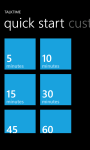
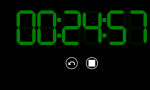
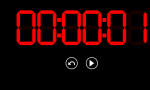
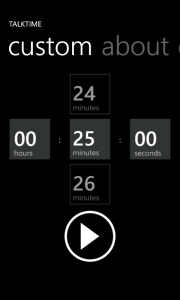
TalkTimeI’m pleased to announce that my second Windows Phone app is now available in the Windows Phone Store! TalkTime is a free (ad-supported) countdown timer intended primarily for speakers to gauge their time during a presentation or rehearsal. It features:

  • A large digital style display for easy viewing from a distance
  • Color cues for read-free time approximation
  • 8 preset options
  • Custom time entry
  • English and Spanish (Thanks, Esther!)

Even if you’re not a speaker, download it and give it a shot. Use your imagination and let me know what you’re using it for.

Download TalkTime

Download TalkTime

Publishing to your Blog from Word

One of the Surface reviews I saw recently expressed concern that the Live Essentials suite wouldn’t be available under Windows RT. I generally don’t use much from that suite but the idea that the functionality wouldn’t be available got me interested. Was the lack of Live Essentials actually worth fretting over or would the gap be filled by other by other solutions?

It turns out that although there’s still a bit of a gap with no movie maker but most of the functionality is indeed provided by other dedicated applications like mail, calendar, photos, and SkyDrive. What really surprised me though is that Word is a great substitute for Live Writer. Until a few days ago I had no idea that Word could be used to compose and publish blog posts to most of the major blogging platforms.

Out of the box, Word supports publishing to:

  • Blogger
  • SharePoint blog
  • Telligent Community
  • TypePad
  • WordPress

The documentation states that providers may be available in the Office marketplace.

Getting started is just a matter of creating a new document with the Blog post Template. The template was already installed for me in both Word 2010 and 2013 but if you don’t have it you should be able to find it in the online gallery.

The first time you use the Blog post template Word will tell you that you need to register your blog account and give you the option to register now or later. I opted to just get the registration over and get on with blogging. To register your account you just need to select your provider and enter your blog’s URL and your account credentials. Word will take care of the rest including creating or updating the post and uploading any media such as images to your media gallery.

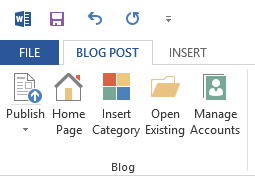
After your blog is registered and you’re ready to publish you can push the content to the provided by clicking the Publish button in the BLOG POST ribbon.

Word offers two options for publishing to WordPress: Publish or Publish as Draft. I didn’t look at the other providers so I don’t know what additional options they provide. I generally like to configure other options like scheduling and tags before publishing so I’ve been opting to publish as draft then open the my WordPress dashboard to complete the process.

Word also make it convenient to insert categories, open existing posts including drafts, and manage your blog accounts. Of course, if you don’t like the experience of blogging with Word, the browser is still a viable option.

Rising to the Surface

For better or worse I tend to be an early adopter of technology – especially when it comes from Microsoft. I tend to use the latest version of Visual Studio even if I have to use an Express release for a while. I still have an original Xbox sitting in a closet. I had an original Xbox 360 red ring on me. I’ve even been using Windows Phone since it was released. You can imagine my excitement leading up to this week’s release – the Microsoft Surface.

I placed my order for the 32 GB version within hours of the presale opening to ensure that I’d receive the device on the 26th. I lost track of the number of times I checked my order status the last few days but watching twitter made me nervous.

I saw stories where people who placed an order in the first hour were later told that it wouldn’t arrive for two weeks. I ultimately called customer service to see if mine was still on schedule and they assured me that it was. It wasn’t until a friend showed me how I could track the order on FedEx with the order number when I found that the package was en route from Memphis to Indianapolis and had a scheduled delivery time of 10:30 AM on the 26th that my mind was finally put at ease.

I also couldn’t let a little thing like pre-ordering stop me from checking out the opening of the Surface kiosk at the Fashion Mall at Keystone at the Crossing. Even my daughter was getting in on the action when my family was at the mall the day before. When my friend and I arrived at the mall in the morning we pushed our way through the short line of Apple devotees waiting for the Apple Store to open and made our way to the kiosk where we witnessed something beautiful… a line… for a Microsoft product!

While I was comparing the touch and type keyboards at the kiosk my wife called to tell me that FedEx had just made its delivery. Here I am nearly 14 hours later writing this blog post in Word 2013 on my Surface using the touch keyboard!

After using this device off and on for several hours (I had to get SOME work done today AND share it with my wife) I wanted to share some of my initial thoughts. I’m not going to give a rundown of features or anything like that since those have been written about ad nauseam on other sites (and don’t think I haven’t read most of them over the past week). Instead I’d rather use this space to talk about a few of the things I really like and a few of the things I’ve struggled with a bit. I’ve hardly scratched the surface (sorry) of this device so this will be far from exhaustive but and will just highlight a few things.

So, for me Surface, it’s not just a tablet, but it’s actually the best tablet that I’ve ever used. It’s also not just a laptop, but it’s the best laptop I’ve ever used, as well.

Steven Sinofsky, President, Windows Division

The Keyboard

As everyone familiar with the Surface knows, the keyboard is probably one of the biggest and most in your face things separating the device from its competition. As I mentioned earlier I actually tried out both keyboard styles at the kiosk. I saw several reviews raising concerns about the usability of the touch version so I wanted to do a side-by-side comparison.

The first one I tried was the touch. My first experience with it left me thinking it was a bit clumsy. I was struggling with it quite a bit. I definitely found the type version to be more responsive. Now that I’ve been using the touch version for a while though I’m pleased to say that it’s a decent (not quite great) keyboard. I’m still pretty convinced that the typing issues I’m experiencing at this point are a matter of adjusting to the form factor of the keyboard rather than actual problems with the keyboard.

As for responsiveness I’ve found the touch keyboard has no issues keeping up with me. By no means am I the fastest typist in the world but I think I move along at a pretty decent pace. So far I’ve experienced none of the lag issues that some reviewers described. The touch isn’t without its issues though.

First, the keyboard tends to attract smudges. This is of course a purely cosmetic complaint but seeing white smudges on the black matte finish really detracts from the overall appearance of the device.

On a more serious note though I’ve found that the device doesn’t always turn the keyboard back on when resuming from sleep or flipping the keyboard back into keyboard position. This is easily resolved by detaching and reattaching it but it’s an annoyance that shouldn’t happen.

Finally, I’m not a fan of the built-in touch pad. I’ve adjusted the pointer speed and that’s helped a bit but in general I think the touch pad itself is a little too small and the “buttons” being positioned at the very edge of the cover makes them a hard target for my thumbs to hit. Luckily this generally isn’t a problem due to the touch screen but as I’ll discuss in a little while, it doesn’t help everywhere.

Windows RT

I’ll readily admit that I’ve had my reservations about Windows RT. After my first day of using it though I’m truly surprised. The Windows 8 experience on a touch device is a thing of beauty. I was also really surprised about some of the apps/utilities that were installed. The one that surprised me the most was PowerShell. Yes, PowerShell is present on the RT device as is the traditional command prompt.

A few more of my favorites are here too. For instance, I just used the native remote desktop client to connect to my PC in the next room. I was really happy to see that the trusty snipping tool found its way into RT as well.

Multitasking on the surface is an amazing experience. As I’m writing this I have Xbox Music docked on the left side of the screen with Word taking up the right ~2/3 of the display. Switching out docked apps through swiping from the left edge just feels natural.

Of course, Windows RT has some well publicized potential shortcomings such as the lack of support for traditional Windows applications but so far I’m not finding this to be as much of a concern as I’d imagined. I saw several reviews where the reviewer was upset that the Live Essentials suite wasn’t available on Windows RT. I find this to be a non-issue because most of the functionality from that suite is available through other apps like Mail, Messaging, SkyDrive, and Word.

Not that this affects me a whole lot but I know a few people that it does, it’s important to note that there’s no Flash support in Windows RT so if you’re someone that plays a lot of Facebook games you’re rolling the dice as to whether or not they’ll actually work. Out of curiosity I tried a few games and found that Bejeweled Blitz ran (albeit slowly at first), many others did not.

One area of annoyance for me is despite how touch optimized much of the operating system is there are plenty of areas that almost require a mouse. These aren’t isolated to the deep, dark recesses of the system either. I’m talking about places like the tabs in the otherwise awesome task manager. I find things like that scattered throughout the system and it can be irritating if you need that functionality.

Office

Windows RT devices have a “touch enhanced” version Office 2013 Home and Student edition installed and to me this is another huge selling point. I’ve really only spent time in Word so far but if Word is any indication of how the others are then Windows RT owners are in for a treat.

So far the only real problem I have with the Office apps is that like Windows, there are a lot of places that really need the mouse.

Expansion Ports

Surface includes a few built-in expansion ports including a Micro SD reader, video-out, and a standard USB port. I haven’t tried any of them yet but I’m most interested in the video-out port. Unfortunately, but due to size considerations it uses a proprietary connector (ugh) but Apple fans can rest assured that I’ll at least cut back on teasing their constant “I NEED A DONGLE! DO YOU HAVE A DONGLE? DOES ANYBODY HAVE A DONGLE?” calls.

Battery Life & Charging

My wife and I have been using the Surface almost non-stop since I got home from work. After about four hours we had only used about half the battery so I’m going to call it acceptable but your mileage may vary.

When it comes to charging the connector is a little awkward but Microsoft really isn’t kidding when they say they want it to charge quickly. After unboxing the device I plugged in and in a little around an hour my charge had risen from 60% to 100%.

Final Thoughts

Though the Surface it still a little rough around the edges in a few places I really feel like this device is one of the few devices that has lived up to the hype in recent years. The Windows Store may not have the selection of its competitors at this time but I suspect that will change, particularly as the power of the unified Microsoft ecosystem is realized. I’m really excited to see how this platform evolves.

I’ve said this about Windows Phone and I’ll say it again about Surface, Windows 8, and Windows RT. After using them for even a little while everything else starts to feel antiquated.

The game has changed.

Using LoopingSelector and ILoopingSelectorDataSource

Custom Time EntryThis week I finished and submitted my second Windows Phone app. On one of the pages I wanted to allow users to enter a custom TimeSpan in a manner similar to entering a date or time. Of course, the SDK doesn’t directly provide the controls to replicate that experience so I turned to the LoopingSelector in the Silverlight Toolkit for Windows Phone for help. Unfortunately, documentation is pretty sparse so I’m hoping this can help someone else out.

(more…)