Author: Dave Fancher

Dave Fancher is a Lead Software Engineer at Vibenomics in Fishers, Indiana, a Microsoft MVP Visual Studio & Development Technologies, author of The Book of F# from No Starch Press, and Pluralsight author. He has been building software with the .NET Framework since version 1.1. Dave is active within the Indiana software development community as a member of IndySA, a speaker at user groups throughout the state, and a two-time contributor to Indy GiveCamp. When not writing code he enjoys spending time with his family, watching movies, photography, and gaming on on his Xbox One.

Replicating F#’s using Function in C#

Update – 5 April 2014

I’ve reconsidered the approach discussed here. This post is still worth reading for the context and motivation behind creating a Using method in C# but the updated approach works better and passes static code analysis. You can find the updated approach at the address below:

https://davefancher.com/2014/04/05/revisiting-the-using-function/

Thanks!

It didn’t take long for me to really appreciate the power offered by F#’s using function. Properly managing IDisposable instances in C# isn’t particularly problematic but the using statement really doesn’t offer a whole lot in the way of flexibility.  Sure, the block lets you create and dispose some IDisposable instance and put some arbitrary code within it but even before I entered the world of functional programming I found the syntax clunky, particularly when I only want the instance around long enough to get some value from it so I can do something with that value later. The obvious solution to the problem is to just use F# instead but unfortunately that’s not always a viable option in this C# dominated market.

Assuming that I have to work in C# I could address the situation by just putting all the code in the using block.

// C#
using(var img = Image.FromFile(@"C:\Windows\Web\Screen\img100.png"))
{
  Console.WriteLine("Dimensions: {0} x {1}", img.Width, img.Height);
}

Granted, in this contrived example I’m only writing the dimensions to the console so the image would be disposed quickly but what if I needed those dimensions somewhere else? There are a few approaches to take and honestly, I don’t like any of them all that much.

The first way would be to forego using altogether.

// C#
var img = Image.FromFile(@"C:\Windows\Web\Screen\img100.png");
var dims = Tuple.Create(img.Width, img.Height);
img.Dispose();

// Do something with dims elsewhere

This approach is probably the cleanest and is very similar to a use binding in F# but it requires discipline to remember to manually dispose of the object. In C# I’m so conditioned to define IDisposables within using blocks though that I seldom take this approach. In order to do this same task with a using statement there are basically two options, define a variable outside of the block and assign it inside the block or define a method to wrap the using statement. I generally prefer the later because it facilitates reuse and eliminates a state change.

Variable approach

// C#
Tuple<int, int> dims;
using(var img = Image.FromFile(@"C:\Windows\Web\Screen\img100.png"))
{
  dims = Tuple.Create(img.Width, img.Height);
}

// Do something with dims elsewhere

Method approach

// C#
private Tuple<int, int> GetDimensions()
{
  using(var img = Image.FromFile(@"C:\Windows\Web\Screen\img100.png"))
  {
    return Tuple.Create(img.Width, img.Height);
  }
}

// Do something with dims elsewhere

Now let’s see how this same example would look in F# with the using function.

// F#
let dims = using (Image.FromFile(@"C:\Windows\Web\Screen\img100.png"))
                 (fun img -> (img.Width, img.Height))

Look how clean that is! Wouldn’t it be nice to have something like that in C#? You’ve probably guessed if from nothing else than the title of this article that it’s entirely possible. Right now you might be thinking that you could just reference FSharp.Core and call the function from the Operators module but you’ll quickly find that more trouble than it’s worth. The using function’s signature is:

// F#
val using : resource:'T -> action:('T -> 'U) (requires 'T :> System.IDisposable)

The function accepts two arguments: resource, a generic argument constrained to IDisposable, and action, a function that accepts 'T and returns another (unconstrained) generic type, 'U. That second argument is what would prove problematic if you tried to call the function from C# since it compiles to FSharpFunc<T, TResult> instead of Func<T, TResult>. Fortunately though it’s really easy to replicate the functionality natively in C#.

Due to differences between C# and F# the C# version of the Using function needs to be overloaded to accept either a Func or an Action depending on whether you’re returning a value. You’ll see though that in either case the function is just wrapping up the provided IDisposable instance inside a using statement and invoking the delegate, passing the IDisposable as an argument. To make the code accessible you’ll want to put the IDisposableHelper class in one of your common assemblies.

// C#
public static class IDisposableHelper
{
  public static TResult Using<TResource, TResult> (TResource resource, Func<TResource, TResult> action)
    where TResource : IDisposable
  {
    using (resource) return action(resource);
  }

  public static void Using<TResource> (TResource resource, Action<TResource> action)
    where TResource : IDisposable
  {
    using (resource) action(resource);
  }  
}

Using the functions isn’t quite as elegant as in F# but it definitely gets the job done in a much more functional manner.

Not returning a value

// C#
IDisposableHelper.Using(
  Image.FromFile(@"C:\Windows\Web\Screen\img100.png"),
  img => Console.WriteLine("Dimensions: {0} x {1}", img.Width, img.Height)
);

Returning a value

// C#
var dims =
  IDisposableHelper.Using(
    Image.FromFile(@"C:\Windows\Web\Screen\img100.png"),
    img => Tuple.Create(img.Width, img.Height)
  );

Console.WriteLine("Dimensions: {0} x {1}", dims.Item1, dims.Item2);

I’d still prefer to use F# but when I can’t at least I can turn to this to make C# feel a little more like home.

IndySA – March 21, 2013

The March IndySA meeting is this Thursday.  I’m excited for the opportunity to spread around a bit more F# love as this month’s speaker.  If you’re looking for a fun way to fill the evening please join us at the SEP office in Carmel at 5:30 PM.  All of the logistics details are available on the meetup site.

I hope to see you there!

About the Talk

F# Needs Love Too

Originally developed by Microsoft Research, Cambridge, F# is an open-source, functional-first language in the ML family. Despite its lofty position as a first-class Visual Studio language for the past two releases and its cross-platform availability it hasn’t seen widespread adoption in the business world. In this talk we’ll take an introductory look at F#, exploring how its constructs and terse syntax can allow you to write more stable, maintainable code while keeping you focused on the problem rather than the plumbing.


GR DevDay

GR DevDay Speaker Badge

GR DevDay Speaker Badge

Last weekend I made the trek up to Grand Rapids, Michigan for the GR DevDay conference.  This was the second time I’d attended this conference but this time was special – it was my first time speaking at a conference!  I was honored to have my talk “F# Needs Love Too” selected and to have been included in line-up of speakers that included some familiar names like Eric Boyd, Jay Harris, Michael Eaton, David Giard, and Jennifer Marsman.

My talk was in the first time slot immediately following the keynote.  Considering I was up against some HTML5 and mobile development talks I was happy to see such interest in F#.  I thought the talk went well and spurred some good conversation.  Thanks to everyone that attended.  Hopefully you were inspired to take a closer look at the language and see how it can change the way you think about writing software.

Having the first time slot gave me the rest of the day to attend other sessions.  The sessions I selected were:

  1. Collaborate: Windows Phone and Windows 8 – Michael Perry
  2. Make Node.js Package. Become Famous. – Jay Harris
  3. Hot Data and Cool Cash – Joe Kunk
  4. Creating apps with high code reuse between Windows 8 and Windows Phone 8 – Jennifer Marsman

All of the talks were interesting in their own right.  Naturally I was most interested in the two Windows Phone 8/Windows 8 talks and they didn’t disappoint.  The other two sessions weren’t as immediately relevant to me but gave me some stuff to think about.

I’d like to thank the organizers for putting on yet another great conference.  I thought the event was every bit as good as the last one and was happy to be a part of it.

Custom Dark Colors for F# Depth Colorizer for VS2012

Custom F# Depth ColoringA few days ago I installed the F# Depth Colorizer extension for Visual Studio 2012. I really liked the idea but didn’t care much for the default colors used with the dark theme. Rather than alternating light and dark colors I thought it would look better with the background getting progressively lighter giving the illusion of each block being stacked on its container.

After a little tweaking I created the necessary registry entry and was pretty pleased with the result.  The image to the right shows the colors against the same code snippet used in the extension’s description.  If you’d like to use these colors just copy the registry information below into a .reg file and apply it. You’ll need to restart Visual Studio for the changes to take effect.

Windows Registry Editor Version 5.00

[HKEY_CURRENT_USER\Software\Microsoft\VisualStudio\11.0\Text Editor\FSharpDepthColorizer\Dark]
"Depth0"="0,0,0,0,0,0"
"Depth1"="15,15,15,15,15,15"
"Depth2"="30,30,30,30,30,30"
"Depth3"="45,45,45,45,45,45"
"Depth4"="55,55,55,55,55,55"
"Depth5"="65,65,65,65,65,65"
"Depth6"="75,75,75,75,75,75"
"Depth7"="80,80,80,80,80,80"
"Depth8"="85,85,85,85,85,85"
"Depth9"="90,90,90,90,90,90"

More information about the extension including how to customize the colors is available on Brian McNamara’s blog.

The Hacker News Effect

It has been known by many different names: the Reddit effect, the Slashdot effect, the Digg effect; but whatever the source the result is the same – a huge spike in traffic due to a popular site linking to a lesser known one. Didactic Code experienced this first hand for the first time when Why F#? gained some traction on Hacker News.

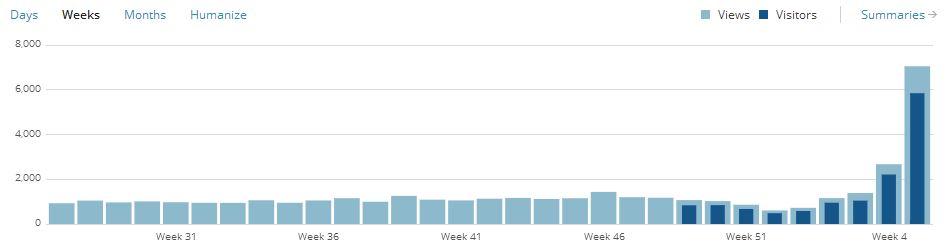
My blog traffic is predictable to the point that I occasionally joke about how I can tell what time it is by looking at the stats. Lately my quiet little node on the Web had been seeing around 200 views on weekdays and generally about 1/4 of that on weekends. Sunday evening though I noticed something unusual – my view count had climbed to over 1000. The blog stats showed the traffic was coming from Hacker News so naturally I started watching to see how high the numbers would climb. Sunday ended with 1,575 views and the momentum carried on well into Monday until after the article peaked at #13.

Hourly Traffic

Hourly Traffic

The hourly traffic graph from the WordPress banner shows traffic for the past 48 hours.  It maxed out at 705 views.

Daily Traffic

Daily Traffic

The daily traffic graph shows all traffic for the past 30 days. You can imagine my surprise when the traffic shot up on Sunday.

Weekly Traffic

Weekly Traffic

The weekly traffic graph shows 31 weeks of history. You can clearly see the annual dip around the holidays followed by this week’s spike.

Monthly Traffic

Monthly Traffic

The monthly graph is the most interesting to me because it shows how steadily my traffic has increased over the years and what an anomaly like this looks like in the life of a small blog.

For as much excitement as I got out of this I was really happy about the discussion the post generated here, on HN, and on Twitter.  I didn’t jump into the HN conversation but I really enjoyed reading the comments, particularly those comparing languages that I haven’t even thought about looking at.  So, to everyone that took the time to read my post and those that joined in on the conversation – thank you!

GR DevDay – March 2, 2013

If you’re looking for a great developer conference in the Grand Rapids, MI area I highly recommend checking out GR DevDay. This year the conference is being held on March 2 at Calvin College. The organizers have lined up a  great selection sessions covering a wide range of topics and technologies. Whether you’re developing for the cloud, desktop, or mobile spaces you’ll be sure to find something of interest.

I’m honored to be included among this year’s speakers. If you’re interested in an introduction to F# be sure to check out my session:

F# Needs Love Too!

Originally developed by Microsoft Research, Cambridge, F# is an open-source, functional-first language in the ML family. Despite its lofty position as a first-class Visual Studio language for the past two releases and its cross-platform availability it hasn’t seen widespread adoption in the business world. In this session we’ll take an introductory look at F#, exploring how its constructs and terse syntax can allow you to write more stable, maintainable code while keeping you focused on the problem rather than the plumbing.

I hope to see you there even if you don’t attend my session.
…but please do
…you know you want to!

BinaryReader Change in .NET 4.5

BinaryReader has always had what I consider a design flaw in the way it implemented IDisposable.  Even since the early days of .NET, the BinaryReader constructors have required a stream.  To me this means that the BinaryReader has a dependency on the stream thus something else is responsible for that stream’s lifecycle.  The problem is that when the BinaryReader was disposed it would also close the Stream!

It took until .NET 4.5 but Microsoft finally gave us a way to address this issue in the form of a third constructor overload.  With this constructor we can now specify whether we want to close the provided stream or leave it open.

Why F#?

If you’ve been following along with my posts over the past six months or so you can probably imagine that I’ve been asked some variation of this post’s title more than a few times. One question that I keep getting is why I chose F# over some other functional languages like Haskell, Erlang, or Scala. The problem with that question though is that it’s predicated on the assumption that I actually set out to learn a functional language. The truth is that moving to F# was more of a long but natural progression from C# rather than a conscious decision.

The story begins about two and a half years ago. I had pretty much burned out and was deep into what I can only begin to describe as a stagnation coma. I stopped attending user group meetings; I cut way back on reading; I pretty much stopped doing anything that would help me remain even remotely aware of what was going on in the industry.

It’s easy to explain how I got to this point. My employer at the time gave very little incentive to stay current. For instance, there were homegrown frameworks for nearly every aspect of the product. Who needs NHibernate (or other ORM) when you have a proprietary DAL? Why learn ASP.NET MVC when you have a proprietary system for page layout? What’s the point of diving into WPF when the entire application is Web-based? Introducing new technologies or practices was generally discouraged under the banner of being too risky.

It wasn’t until the company hired a new architect that I started to wake up. He brought a wealth of knowledge of fascinating technologies that I’d hardly heard of and his excitement reminded me of what I loved about technology. My passion for software development was reigniting and I started looking at many of the technologies that had passed me by.

The first technology that really caught my attention during this time was LINQ. I’d consider it my introduction to the wonderful world of functional programming. As cool as I thought its query syntax was, I was really interested in the method syntax. I remember reading early on (although I don’t remember where) that query syntax was only added to C# after users complained that method syntax was too cumbersome in the preview versions. I didn’t understand this sentiment at all because to me method syntax felt completely natural. Gradually I began to realize that the reason it felt so natural was because it works the way I think. Lambda expressions, higher-order functions, composability, all of these functional concepts just spoke to me.

Over time I started using more of C#’s functional aspects but found myself getting increasingly frustrated. For the longest time though I couldn’t quite pinpoint anything specific but something just didn’t feel right anymore. It wasn’t until I was mowing the lawn late on a summer afternoon when I had that “a ha!” moment that changed my life.

That afternoon my yard work podcast selection included Hanselminutes #311. In this episode Richard Minerich and Phillip Trelford were talking about a functional language called F# that had been around for a few years and was built upon the .NET framework. I’d seen a few mentions of F# here and there but before hearing this podcast I hadn’t given it much thought.

At one point the discussion turned to language productivity and Phillip remarked that writing C# feels like completing government forms in triplicate. As he elaborated I experienced a sudden burst of clarity into one of the major things that had been bothering me about C# – it’s verbosity! After listening to the rest of the podcast and hearing more about how the functional nature of the language made it less error prone and how things like default immutability helped alleviate some of the complexity of parallel programming I knew I had to give it a try.

A language that doesn’t affect the way you think about programming, is not worth knowing.
— Alan Perlis, Epigrams on Programming

Despite my love of F# most of my work is still in C# but learning F# has had an amazing impact on how I write C#. C# has been becoming more of a functional language with virtually every new release and I’ve been using many of those capabilities for a few years but the language is hardly built around them. That said, forgetting about all the times I’ve typed let instead of var or tried to define a default constructor in the class signature in the last week alone F# really has changed the way I work. I find myself writing more higher-order functions and making much better use of delegation; I’ve developed a strong preference for readonly member fields and properties; and I regularly find myself longing for some of F#’s constructs like tuples, records, discriminated unions, and pattern matching.

The truth is that for all of its strengths though I’m finding working in C# increasingly annoying especially as I continue to work with F#. In many ways, working with C# feels like interacting with a toddler. I feel like I have to hold its hand and guide it along with explicit instructions on what to do every step of the way – even if I’ve already told it something. On the other hand, F# feels like having a personal assistant. Its functional nature allows me to more or less describe what I want and it handles the details.

There are plenty of things that make me prefer F# over C# but I’d like to highlight a few in particular. I’ve already written extensively about some of these and will be writing more about others as time permits but here I’d like to look at them from a more comparative angle.

Terse Syntax

Even though F# is a functional-first language I think a great way to illustrate the language’s expressiveness is with an object-oriented. We’ll start with a simple class definition in C#.

public class CircleMeasurements
{
  private double _diameter;
  private double _area;
  private double _circumference;

  public CircleMeasurements(double diameter, double area, double circumference)
  {
    _diameter = diameter;
    _area = area;
    _circumference = circumference;
  }

  public double Diameter { get { return _diameter; } }
  public double Area { get { return _area; } }
  public double Circumference { get { return _circumference; }  }
}

// Usage
var measurements = new CircleMeasurements(5.0, 19.63495408, 15.70796327);

Look how much code was required to create a class with three properties. Even in this small example we had to tell the compiler what type to use for each value three times! I could have used auto-implemented properties to simplify it a bit but even then we still need to tell the compiler which type to use twice for each value. Now let’s take a look at the same class in F#:

type CircleMeasurements(diameter, area, circumference) =
  member x.Diameter = diameter
  member x.Area = area
  member x.Circumference = circumference

// Usage
let measurements = CircleMeasurements(5.0, 19.63495408, 15.70796327);

That’s it – four lines of code. Granted this compiles to something that resembles the C# class but we didn’t have to write any of it and thanks to the fantastic type inference system we didn’t have to tell the compiler multiple times which type to use for each value. Quite often though even this is more verbose than we actually need. Many times we can use another F# construct – a record type – to represent something we’d represent with a class in other .NET languages:

type CircleMeasurements = { Diameter : float; Area : float; Circumference : float }

// Usage
let measurements = { Diameter = 5.0; Area = 19.63495408; Circumference = 15.70796327 }

In addition to being even more concise than the corresponding class definition, record types have the added benefit of being structurally comparable so we can easily check for equality between two instances. Record types do require us to include the type annotations but we only need to explicitly tell the compiler what to use once for each value and the constructor and properties are each created implicitly.

Functional Style

I already mentioned that functional programming feels more natural to me and by design F# really shines when it comes to expressing and using functions. Traditional .NET development has always had some type of support for delegation and it has definitely improved over the years, particularly with the common generic delegate classes (e.g.: Func, Action) and lambda expressions but actually trying to use them in a more functional style is a pain. This is complicated by the fact that in some situations the C# compiler can’t infer whether a lambda expression is a delegate or an expression tree. Although in some regards I prefer the C# lambda expression syntax I definitely prefer F#’s syntactic distinction between delegates and code quotations.

While on the topic of functional programming I have to mention F#’s default immutability. Immutability is key to any functional language and has been shown to improve overall program correctness by eliminating side effects. C# has some support for immutability through readonly fields or by omitting setters from property definitions but either of these require a conscious decision to enable. Nearly everything in F# is immutable unless explicitly declared otherwise. Immutability also provides benefits when writing asynchronous code because if nothing is changing, there’s a reduced need for locking.

Discriminated Unions

If you haven’t read my post on discriminated unions yet, they’re a way to express simple object hierarchies (or even tree structures) in a concise manner. From a syntactic perspective they’re incredibly simple but trying to replicate them even for simple structures really isn’t particularly feasible in C#. Here’s a simple example:

In this example suit is another discriminated union.

type Card =
| Ace of Suit
| King of Suit
| Queen of Suit
| Jack of Suit
| ValueCard of Suit * int

Using this discriminated union we express the 7 of hearts as ValueCard(Heart, 7). For illustration of what it would take to represent this structure in C# I’m including a screenshot of ILSpy’s decompilation. Note that I’ve only included the signatures and even this five case discriminated union more than fills my screen. Just to drive the point home, fully expanded, this code is nearly 700 lines long! Granted there are a few CompilerGeneratedAttributes in there but they hardly count for a majority of the code.

Ultimately, the union type is an abstract class and each case is a nested class. The nested classes are each assigned a unique tag that’s used for type checking and code branching in some of the union type’s methods. Not included in the screenshot are implementations of several interfaces and overrides of Equals and GetHashCode.
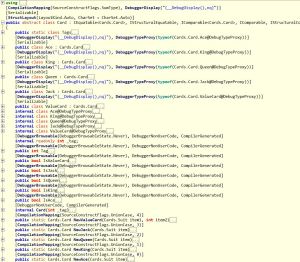
Decompiled Card Discriminated Union

Decompiled Card Discriminated Union

Collection Types & Comprehensions

C# has made great strides in regard to initializing various collection types but it still pales in comparison to the constructs offered by F#. Don’t get me wrong, collection initializers are a nice syntactic convenience but nearly every time I use it I think how much easier it would likely be with a comprehension. LINQ can address some of these shortcomings but even convenience methods like Enumerable.Range feel limiting. Yes, I could write some additional convenience methods to address some of the shortcomings but in F# I don’t have to.

Part of the beauty of comprehensions is that they generally apply regardless of which collection type you’re creating. Although each of the examples below create F# lists they can easily be modified to create sequences or arrays instead.

// Numbers 0 - 10
> [0..10];;
val it : int list = [0; 1; 2; 3; 4; 5; 6; 7; 8; 9; 10]

// Numbers 0 - 10 by 2
> [0..2..10];;
val it : int list = [0; 2; 4; 6; 8; 10]

// Charcters 'a' - 'z'
> ['a'..'z'];;
val it : char list =
  ['a'; 'b'; 'c'; 'd'; 'e'; 'f'; 'g'; 'h'; 'i'; 'j'; 'k'; 'l'; 'm'; 'n'; 'o';
   'p'; 'q'; 'r'; 's'; 't'; 'u'; 'v'; 'w'; 'x'; 'y'; 'z']

// Unshuffled deck
> let deck =
  [ for suit in [ Heart; Diamond; Spade; Club ] do
      yield Ace(suit)
      yield King(suit)
      yield Queen(suit)
      yield Jack(suit)
      for v in 2 .. 10 do
        yield ValueCard(suit, v)
  ];;

val deck : Card list =
  [Ace Heart; King Heart; Queen Heart; Jack Heart; ValueCard (Heart,2);
   ValueCard (Heart,3); ValueCard (Heart,4); ValueCard (Heart,5);
   ValueCard (Heart,6); ValueCard (Heart,7); ValueCard (Heart,8);
   ValueCard (Heart,9); ValueCard (Heart,10); Ace Diamond; King Diamond;
   Queen Diamond; Jack Diamond; ValueCard (Diamond,2); ValueCard (Diamond,3);
   ValueCard (Diamond,4); ValueCard (Diamond,5); ValueCard (Diamond,6);
   ValueCard (Diamond,7); ValueCard (Diamond,8); ValueCard (Diamond,9);
   ValueCard (Diamond,10); Ace Spade; King Spade; Queen Spade; Jack Spade;
   ValueCard (Spade,2); ValueCard (Spade,3); ValueCard (Spade,4);
   ValueCard (Spade,5); ValueCard (Spade,6); ValueCard (Spade,7);
   ValueCard (Spade,8); ValueCard (Spade,9); ValueCard (Spade,10); Ace Club;
   King Club; Queen Club; Jack Club; ValueCard (Club,2); ValueCard (Club,3);
   ValueCard (Club,4); ValueCard (Club,5); ValueCard (Club,6);
   ValueCard (Club,7); ValueCard (Club,8); ValueCard (Club,9);
   ValueCard (Club,10)]

Pattern Matching

faced with a 20th century computer
Scotty: Computer! Computer?
He’s handed a mouse, and he speaks into it
Scotty: Hello, computer.
Dr. Nichols: Just use the keyboard.
Scotty: Keyboard. How quaint.
— Star Trek IV

The above conversation enters my mind when I’m working with C#’s branching constructs, switch statements in particular.  F#’s pattern matching may bear a slight resemblance to C# switch statements but they’re so much more powerful.  switch statements limit us to simply branching on constant values but pattern matching allows value extraction, multiple cases, and refinement constraints for more precise control with a syntax much friendlier than your common if/else statement. Furthermore, like virtually everything else in F#, pattern matches are expressions so they return a value making them ideal candidates for inline conditional bindings.

Units of Measure

Every programmer works with code that uses different units of measure. In most languages dealing with units of measure is error prone because they require discipline from the developer to ensure that the correct units are always used. There are some libraries that attempt to address the problem but to my knowledge (please correct me if I’m wrong) F# is the only one to actually include it in the type system. F#’s unit of measure support is complete enough that it can often automatically convert values between units, particularly when a conversion expression is included with the type definition.

[<Measure>] type px
[<Measure>] type inch
[<Measure>] type dot = 1 px
[<Measure>] type dpi = dot / inch

let convertToPixels (inches : float<inch>) (resolution : float<dpi>) : float<px> =
  inches * resolution

let convertToInches (pixels : float<px>) (resolution : float<dpi>) : float<inch> =
  pixels / resolution

The biggest downfall of F#’s units of measure is that they’re a feature of the type system and compiler rather than a CLR feature. As such, the compiled code doesn’t have any unit information and we can’t enforce the units in cross-language scenarios.

Object Expressions

I haven’t written about object expressions yet but they’re definitely on my backlog. Object expressions provide a way to create ad-hoc (anonymous) types based on one or more interfaces or a base class. They’re useful in a variety of scenarios like creating one-off formatters or comparers and I think they can at least supplement, if not replace some mocking libraries. To illustrate we’ll use a somewhat contrived example of a logging service.

type LogMessageType =
| DebugMessage of string
| InfoMessage of string
| ErrorMessage of string

type ILogProvider =
  abstract member Log : LogMessageType -> unit

type LogService(provider : ILogProvider) =
  let log = provider.Log
  member this.LogDebug msg = DebugMessage(msg) |> log
  member this.LogInfo msg = InfoMessage(msg) |> log
  member this.LogError msg = ErrorMessage(msg) |> log

Here we use a discriminated union to define the message types the logging provider interface can handle. The log service itself provides a slightly friendlier API than the provider interface itself. Normally if we wanted to use the log service instance we’d have to define a concrete implementation of ILogProvider but object expressions allow us to easily define one inline.

let logger =
  LogService(
    { new ILogProvider with
      member this.Log msg =
        match msg with
        | DebugMessage(m) -> printfn "DEBUG: %s" m
        | InfoMessage(m) -> printfn "INFO: %s" m
        | ErrorMessage(m) -> printfn "ERROR: %s" m
    }
  )

In our object expression we use pattern matching to detect the message type, extract the associated string, and write an appropriate message to the console.

> logger.LogDebug "message"
logger.LogInfo "message"
logger.LogError "message";;
DEBUG: message
INFO: message
ERROR: message

What’s Not So Great?

I could continue on for a while with things I like about F# but this post is already long enough as it is. That said, I think it’s only fair to list out a few of the things I don’t like about the language.

Tooling Support

Probably the biggest gripe I have is the lack of tooling support around the language. So many tools and templates that I take for granted when working with C# simply aren’t available. Things like IntelliSense are pretty complete but if you’re just getting started with F# and looking to do more than a console application or library be prepared to spend some time looking for 3rd party templates and reading blog posts.

Language Interop

On a somewhat related note, even though F# compiles to MSIL and can reference or be referenced by other .NET assemblies there are some quirks that make language interoperability a but cumbersome. For instance, using extension methods defined in C# doesn’t work as cleanly as I thought they would. When I was experimenting with MassTransit I couldn’t get the UseMsmq, VerifyMsmqConfiguration, or a number of other extension methods to appear no matter what I tried. I ultimately had to call the static methods directly.

I’ve read that this is addressed in F# 3.0 but I haven’t done enough with 3.0 yet to confirm.

Project Structure

It’s not really fair to put this under the “what’s not so great?” heading but it seemed most appropriate. This isn’t so much an issue with the language as much as it’s a big mindset shift of a similar magnitude of switching from OO to functional. The structure of an F# project is significantly different than that of a C# (or even VB) project and is something I’m still struggling with.

In C# we generally organize code into folders representing namespaces and keep one type (class) per file. F# evaluates code from top down throughout the project so file sequence is significant. Furthermore, code is organized by modules rather than type. F# does have namespaces but even then they’re usually divided across one or more files and from my experience, not grouped by folder.

Wrap Up

No matter what language you work in, programming in a functional style provides benefits. You should do it whenever it is convenient, and you should think hard about the decision when it isn’t convenient.
— John Carmack, Functional Programming in C++

In general I’ve found that the more I learn and work with F# the more I like it. I regularly find myself reaching for it as my first choice, especially when it comes to new development. Although there are a few things that I don’t like about working in F# most of them just require more diligence on my part or are easily managed. I’ve only listed a few key areas where I think F# excels but I firmly believe that their strengths far outweigh any weaknesses.

Revisiting String Distances

Back in April I wrote about three different string distance algorithms.  If you’re not familiar with string distance algorithms I encourage you to read the original post but in short, these algorithms provide different ways to determine how many steps are required to translate one string into another.  Since the algorithms I wrote about aren’t particularly complex I thought translating them to F# would be a fun exercise.

In general the code is pretty similar to its C# counterpart but I was able to take advantage of a few F# constructs, tuples and pattern matching in particular.  These examples may or may not be the best way to implement the algorithms in F# (ok, I’ll be honest, they’re probably not) but they certainly show how well suited F# is to this type of work.

Hamming Distance

The Hamming distance algorithm simply counts how many characters are different in equal length strings.

let hammingDistance (source : string) (target : string) =
  if source.Length <> target.Length then failwith "Strings must be equal length"
 
  Array.zip (source.ToCharArray()) (target.ToCharArray())
  |> Array.fold (fun acc (x, y) -> acc + (if x = y then 0 else 1)) 0

hammingDistance "abcde" "abcde" |> printfn "%i" // 0
hammingDistance "abcde" "abcdz" |> printfn "%i" // 1
hammingDistance "abcde" "abcyz" |> printfn "%i" // 2
hammingDistance "abcde" "abxyz" |> printfn "%i" // 3
hammingDistance "abcde" "awxyz" |> printfn "%i" // 4
hammingDistance "abcde" "vwxyz" |> printfn "%i" // 5

Levenshtein Distance

The Levenshtein distance algorithm counts how many characters are different between any two strings taking into account character insertions and deletions.

open System
let levenshteinDistance (source : string) (target : string) =
  let wordLengths = (source.Length, target.Length)
  let matrix = Array2D.create ((fst wordLengths) + 1) ((snd wordLengths) + 1) 0

  for c1 = 0 to (fst wordLengths) do
    for c2 = 0 to (snd wordLengths) do
      matrix.[c1, c2] <-
        match (c1, c2) with
        | h, 0 -> h
        | 0, w -> w
        | h, w ->
          let sourceChar, targetChar = source.[h - 1], target.[w - 1]
          let cost = if sourceChar = targetChar then 0 else 1
          let insertion = matrix.[h, w - 1] + 1
          let deletion = matrix.[h - 1, w] + 1
          let subst = matrix.[h - 1, w - 1] + cost
          Math.Min(insertion, Math.Min(deletion, subst))
  matrix.[fst wordLengths, snd wordLengths]

levenshteinDistance "abcde" "abcde" |> printfn "%i" // 0
levenshteinDistance "abcde" "abcdz" |> printfn "%i" // 1
levenshteinDistance "abcde" "abcyz" |> printfn "%i" // 2
levenshteinDistance "abcde" "abxyz" |> printfn "%i" // 3
levenshteinDistance "abcde" "awxyz" |> printfn "%i" // 4
levenshteinDistance "abcde" "vwxyz" |> printfn "%i" // 5
levenshteinDistance "abcdefg" "abcde" |> printfn "%i" // 2
levenshteinDistance "abcdefg" "zxyde" |> printfn "%i" // 5
levenshteinDistance "abcde" "bacde" |> printfn "%i" // 2
levenshteinDistance "abcde" "baced" |> printfn "%i" // 4

Damerau-Levenshtein Distance

The Damerau-Levenshtein algorithm builds upon the Levenshtein algorithm by taking transpositions into account.

open System
let damerauLevenshteinDistance (source : string) (target : string) =
  let wordLengths = (source.Length, target.Length)
  let matrix = Array2D.create ((fst wordLengths) + 1) ((snd wordLengths) + 1) 0

  for h = 0 to (fst wordLengths) do
    for w = 0 to (snd wordLengths) do
      matrix.[h, w] <-
        match (h, w) with
        | x, 0 -> x
        | 0, y -> y
        | x, y ->
          let sourceChar, targetChar = source.[x - 1], target.[y - 1]
          let cost = if sourceChar = targetChar then 0 else 1
          let insertion = matrix.[x, y - 1] + 1
          let deletion = matrix.[x - 1, y] + 1
          let subst = matrix.[x - 1, y - 1] + cost

          let distance = Math.Min(insertion, Math.Min(deletion, subst))

          if x > 1 && w > 1 && sourceChar = target.[y - 2] && source.[x - 2] = targetChar then
            Math.Min(distance, matrix.[x - 2, y - 2] + cost)
          else
            distance
  matrix.[fst wordLengths, snd wordLengths]

damerauLevenshteinDistance "abcde" "abcde" |> printfn "%i" // 0
damerauLevenshteinDistance "abcde" "abcdz" |> printfn "%i" // 1
damerauLevenshteinDistance "abcde" "abcyz" |> printfn "%i" // 2
damerauLevenshteinDistance "abcde" "abxyz" |> printfn "%i" // 3
damerauLevenshteinDistance "abcde" "awxyz" |> printfn "%i" // 4
damerauLevenshteinDistance "abcde" "vwxyz" |> printfn "%i" // 5
damerauLevenshteinDistance "abcdefg" "abcde" |> printfn "%i" // 2
damerauLevenshteinDistance "abcdefg" "zxyde" |> printfn "%i" // 5
// Transpositions
damerauLevenshteinDistance "abcde" "bacde" |> printfn "%i" // 1
damerauLevenshteinDistance "abcde" "baced" |> printfn "%i" // 2

F# Enumerations

I was originally going to include this discussion about F# enumerations in the discriminated unions post because their syntax is so similar but the section quickly took on a life of its own. Enumerations in F# are the same as enumerations from other .NET languages so all of the same capabilities and restrictions apply.

Defining Enumerations

Defining an enumeration in F# is much like defining a discriminated union but here we bind an integral value. Unlike in C# though, F# doesn’t automatically generate values for each item so we need to give every case a value.

type DayOfWeek =
| Sunday = 0
| Monday = 1
| Tuesday = 2
| Wednesday = 3
| Thursday = 4
| Friday = 5
| Saturday = 6

Changing Base Type

We can also change the enumeration’s underlying type by changing the suffix of each value. For example, if we wanted to change the underlying type for the DayOfWeek enumeration to byte we could do so by appending a y to each value as follows:

type DayOfWeekByte =
| Sunday = 0y
| Monday = 1y
| Tuesday = 2y
| Wednesday = 3y
| Thursday = 4y
| Friday = 5y
| Saturday = 6y

Referencing Enumeration Values

As is the case with enumerations in other .NET languages enumeration values are referenced through the enumeration name.

> DayOfWeek.Friday
val it : DayOfWeek = Friday

FlagsAttribute

Also like in other .NET languages, F# enumerations support the FlagsAttribute to indicate that each value in the enumeration represents a bit position.

open System

[<Flags>]
type Border =
| None = 0
| Right = 1
| Top = 2
| Left = 4
| Bottom = 8;;

let showBorder = Border.Bottom ||| Border.Left

To determine whether a particular flag is set we can either use bit-math or we can use the enumeration’s HasFlag method. Since I generally prefer the code I don’t have to write so I generally favor built-in approach:

> showBorder.HasFlag Border.Top;;
val it : bool = false

> showBorder.HasFlag Border.Left;;
val it : bool = true

Conversion

For those times when we only have the underlying integer value and want to convert that value to the corresponding enum value we can use the built-in generic enum function:

> enum<DayOfWeek> 5
val it : DayOfWeek = Friday

Note: The signature of the enum function above is int32 -> 'U so it can only be used with enumerations based on int32. If your enumeration is based on another data type such as with the DayOfWeekByte example above you’ll need to use the generic EnumOfValue function from the Microsoft.FSharp.Core.LanguagePrimitives module instead.

Likewise, we can get the underlying value by calling the corresponding conversion function:

int DayOfWeek.Friday
// val it : int = 5

byte DayOfWeekByte.Friday
// val it : byte = 5uy