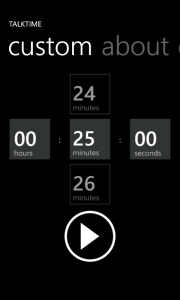
 This week I finished and submitted my second Windows Phone app. On one of the pages I wanted to allow users to enter a custom TimeSpan in a manner similar to entering a date or time. Of course, the SDK doesn’t directly provide the controls to replicate that experience so I turned to the LoopingSelector in the Silverlight Toolkit for Windows Phone for help. Unfortunately, documentation is pretty sparse so I’m hoping this can help someone else out.
.NET
.NET Rocks! Visual Studio 2012 Launch Road Trip in Indianapolis!

The details are still a bit sparse on this one but here’s a note to mark your calendar. On October 8 (Yes, the day after GiveCamp) IndyTechFest presents The .NET Rocks! Visual Studio 2012 Launch Road Trip in Indianapolis!
If you’re wondering what this is all about here you go:
Well, we’ve done it again! We went and rented a big 37′ RV and booked another United States (mostly) Road Trip for the launch of Visual Studio 2012. No charge for admission.
At each stop we will record a live .NET Rocks! show with a guest star, whom we will fly in for the occasion.
Following that, we (Richard Campbell and Carl Franklin) will each do a presentation around building modern applications on the Windows platform. Carl leans toward development and client-side technology and Richard leans toward DevOps and server-side technology.
There will be food, drink, geeking out, and hopefully some alert locals will know of a pub where we can adjourn after the event to continue the conversation.
If you’d like to attend be sure to register. I’ll update this space with more details as they’re made available. I hope to see you there!
10/8/2012 Update
I’m a little behind with this update since I was tied up with GiveCamp all weekend but the venue details are as follows:
IndyCoz
7960 Castleway Dr
Indianapolis, Indiana 46250
[Map]
[WPF] Formatting Content Controls
Over the past few years I haven’t done much UI work and what little I did was either with a proprietary Web framework or Windows Forms so I’m more than a little behind the curve with WPF. My most recent project has me learning WPF on the fly and although it’s a daunting task and I still have plenty to learn I’m finding it pretty straightforward. Every once in a while though something works completely different than I expect and throws me for a bit of a curve.
One such example just happened yesterday. I was trying to bind and format a value to a Button‘s Content property. I was trying to bind using the same syntax as binding to the Text property on a TextBox:
<Button Content="{Binding Percentage, StringFormat={}{0:P0}}" />
I was surprised though when the value bound properly but wasn’t formatted. After some investigation I learned that controls like Button that inherit from ContentControl can’t be formatted that way. Instead we need to use the ContentStringFormat to achieve the same effect:
<Button Content="{Binding Percentage}" ContentStringFormat="P0" />
With that change the value started showing up as the percentage just like I expected. Lesson learned.
Specifications, Expression Trees, and NHibernate
For my latest project we decided to follow a domain driven approach. It wasn’t until after we had built out much of the domain model that we decided to change course and embrace CQRS and event sourcing. By this point though we had already developed several specifications and wanted to adapt what we could on the query side.
Moles vs Fakes: The Differences
If you’re a fan of the Microsoft Moles framework you’ve probably heard that it’s being included in Visual Studio 2012 as Microsoft Fakes. As I was preparing my talk covering this isolation framework I noted some of the key differences between the two. Rather than going back and updating my original post regarding Moles (much of which is still applicable even with terminology changes) I thought I’d list those differences here. So without further ado:
- Assembly generation is driven by a .fakes file rather than a .moles file
- Isolation types are placed in a .Fakes assembly and .Fakes namespace
- Shim types replace Mole types
- Stub types are prefixed with “Stub”
- Shim types are prefixed with “Shim”
- ShimsContext replaces HostTypeAttribute for enabling profiling
- Profiling occurs in the IntelliTrace profiler rather than the Moles profiler
- Fakes allows shims for static constructors whereas Moles allowed erasing static constructors through an assembly attribute
- Fakes does not provide any support for finalizers whereas Moles allowed erasing finalizers through an assembly attribute
- Moles allowed controlling whether the profiler would run as a 32-bit or 64-bit process but this is now handled entirely by the IntelliTrace profiler
- The “classes” filter attribute was removed.
- Fakes supports isolating auto-implemented properties
- Fakes play much nicer with testing frameworks other than MSTest when run through Visual Studio
Visual Studio: Platform Based References
I’ve been needing to jump back and forth between 32 and 64 bit builds recently. Unfortunately a few of the 3rd party assemblies my project is using are platform specific so I found myself having to manually swap out the references to prevent BadImageFormatExceptions from popping up. Since Visual Studio doesn’t provide mechanism for this I started exploring external ways to get the right assembly.
On a previous project we where we had this problem we were building with NAnt. With this configuration it was somewhat straightforward to create a dependencies folder that held and organized the different assembly versions and prior to the build, copy the appropriate ones to a folder referenced by the projects. This ensured that we always built the project with the correct assemblies for the target platform. On this project though, I’m not using NAnt, I’m using MSBuild and I didn’t want to do a custom build task so I looked for another solution.
A 2 year old post from ryangerard.net provided the answer I was looking for. The solution involves a simple project file “hack” where under each property group we define a variable whose value is the path to the appropriate assembly.
Note: The element name you use should be meaningful to your project. I’ve used ThirdPartyAssemblyPath for illustration purposes.
<PropertyGroup Condition="'$(Configuration)|$(Platform)' == 'Debug|x86'">
  <!-- snipped -->
  <ThirdPartyAssemblyPath>(path to 32-bit assembly)</ThirdPartyAssemblyPath>
</PropertyGroup>
<PropertyGroup Condition="'$(Configuration)|$(Platform)' == 'Debug|x64'">
  <!-- snipped -->
  <ThirdPartyAssemblyPath>(path to 64-bit assembly)</ThirdPartyAssemblyPath>
</PropertyGroup>
We also need to update the actual reference element to use a hint path based on the variable the variable.
<Reference Include="">
  <HintPath>$(ThirdPartyAssemblyPath)</HintPath>
</Reference>
I was able to leverage a single variable for multiple references because I’m using several assemblies from the same vendor. Since they’re pretty well organized in the vendor’s installation folder I only had to define a single variable for the folder and left the .dll names in the reference definitions.
Once you’ve made these edits you can freely switch between target platforms. I’m not sure how sustainable this is in the long term or on larger projects but it’s definitely an option. Just be careful if you ever need to change that reference that you update the variables rather than the reference or you’ll find yourself right back where you started.
Upcoming Talks
If you’re interested in learning about the Fakes framework (formerly Microsoft Moles) that’s included with Visual Studio 2012 you have two opportunities to do so this week. Those in Fort Wayne, Indiana should attend tomorrow’s (June 12) NUFW meeting. If Indianapolis is more convenient, feel free to attend Thursday’s IndyNDA meeting instead. Of course, if you just want to heckle me attending both is also an option!
If either of these events interest you please check the appropriate group’s site for logistics. I hope to see you there!
Speaking in Fort Wayne
Ok, this should be the last post about speaking engagements for a while ;) I have something else in the works that’s going to take a lot of my attention for some time (more on that on Friday).
I’m pleased to announce that I’ll be returning to Fort Wayne in June to talk about the Microsoft Fakes framework (formerly the Moles framework). In this talk I’ll introduce the Fakes framework, discuss the use cases for the different isolation techniques, and show how to take advantage of them in your unit tests.
The meeting will be held on Tuesday, June 12 at the Northeast Indiana Innovation Center. Pizza and drinks will be available at 6:00 with the presentation starting at 6:30. For more information please check the NUFW site.
Theoris Innovation Series
On April 20, 2012 from 1:00 – 4:00 PM Theoris IT Services is hosting the next installment of its Theoris Innovation Series. For this event Alex Gheith and I will be discussing many of the modern features of C# including:
- LINQ
- Dynamic Programming
- Parallel Programming (including the upcoming async and await keywords)
This is a free event but please note that space is limited to the first 40 respondents. For more information, please check the event site.
Speaking in Bloomington
A new .NET User Group has formed at Indiana University and I have the honor of being their first speaker. Join us on Thursday, April 19 from 2:00 – 4:00 PM in room CG 2061 at the Kelley School of Business in Bloomington. For this event I’ll be covering Parallel Programming in .NET 4. We may even look at a few examples of the upcoming async and await keywords – time permitting, of course.
Be sure to check the IU .NET User Group page for logistics information including a remote viewing location and streaming information.
I hope you can attend!
 Didactic Code