.NET

Topics specific to .NET development.

Basic Dynamic Programming in .NET 4

.NET 4 adds some nice tools to the toolbox.  Chief among them is support for dynamic languages and dynamic features in strongly typed languages.  In this post we’ll examine how to use reflection to work with unknown data types then we’ll see how to use dynamics to accomplish the same task. Next, we’ll see an example of interacting with IronRuby from within a C# application.  Finally, we’ll take a brief look at two of the specialized classes in the System.Dynamic namespace.

Introducing Dynamic Programming

.NET has historically been a statically typed environment.  By virtue of being statically typed we get many benefits such as type safety and compile-time member checking.  There are times though that we don’t know the type of a variable when we’re writing the code.  Consider this code:

module Bank

type BankAccount() = class
  let mutable _balance = 0m

  member this.CurrentBalance
    with get() = _balance

  member this.Deposit(amount) =
    let lastBalance = _balance
    _balance <- _balance + amount
    ( lastBalance, _balance)

  member this.Withdrawal(amount) =
    let lastBalance = _balance
    let tmpBalance = _balance - amount
    if tmpBalance < 0m then raise(new System.Exception("Balance cannot go below zero"))
    _balance <- tmpBalance
    ( lastBalance, _balance)

  member this.Close() =
    let lastBalance = _balance
    _balance <- 0m
    ( lastBalance, _balance)
end

The code above defines a simple type in F#.  Don’t worry if you’re not familiar with it – all that’s important to understand here is that the BankAccount type has a parameterless constructor, a read-only CurrentBalance property, and three methods (Deposit, Withdrawal, and Close) that each return a two item tuple.

What if we want to work with this type from a C# assembly?  In many cases it will be possible to add a reference to the F# project but what if that isn’t possible?  What if we’re getting a reference to the type from an IoC container, a factory method, or a COM interop component that returns object?  In those cases we may not have enough information to cast the instance to a known type.

Reflecting on the Past

In the past when these situations would arise we had to resort to reflection to access an object’s members.  Aside from being costly, using reflection requires a lot of extra code and often involves additional casting.

var account = BankAccountFactory.GetBankAccount();

var accountType = account.GetType();
var depositMethod = accountType.GetMethod("Deposit");
var currentBalanceProperty = accountType.GetProperty("CurrentBalance");
var withdrawalMethod = accountType.GetMethod("Withdrawal");
var closeMethod = accountType.GetMethod("Close");

Console.WriteLine(Resources.CurrentBalanceFormat, ((Tuple<decimal, decimal>)depositMethod.Invoke(account, new object[] { 1000m })).Item2);
Console.WriteLine(Resources.CurrentBalanceFormat, ((decimal)currentBalanceProperty.GetValue(account, null)));
Console.WriteLine(Resources.CurrentBalanceFormat, ((Tuple<decimal, decimal>)withdrawalMethod.Invoke(account, new object[] { 250m })).Item2);
Console.WriteLine(Resources.CurrentBalanceFormat, ((Tuple<decimal, decimal>)withdrawalMethod.Invoke(account, new object[] { 100m })).Item2);
Console.WriteLine(Resources.CurrentBalanceFormat, ((Tuple<decimal, decimal>)depositMethod.Invoke(account, new object[] { 35m })).Item2);
Console.WriteLine(Resources.CurrentBalanceFormat, ((Tuple<decimal, decimal>)closeMethod.Invoke(account, new object[] { })).Item2);

Look at those pipes!  There’s a ton of code and most of it is just plumbing.  Before we can do anything useful with the BankAccount instance we need to get a MemberInfo (specifically PropertyInfo or MethodInfo) instance for each member we want to use.  Once we have the MemberInfo instances we need to call the Invoke or GetValue method passing the source instance, and other required arguments before casting the result of the call to the expected type! Isn’t there a better way?

Dynamic Language Runtime to the Rescue!

Prior to .NET 4 we were stuck with reflection but .NET 4 introduces the Dynamic Language Runtime (DLR) to help reduce this complexity.  The DLR is exposed to C# through the dynamic type.  Rather than declaring variables as type object we can define them as type dynamic.

Note: Please, please, pleeeease don’t confuse var with dynamic.  in C# var uses type inference to determine the actual type of the variable at compile-time whereas dynamic defers type resolution to the DLR at run-time.  Variables defined with var are still strongly typed.

The dynamic type is just like any other type in that it can be used for defining variables, fields, method return values, method arguments, etc… Variables defined as dynamic can be used like we’re working with directly with an instance of a known type. Let’s take the reflection example and revise it to use dynamics instead.

dynamic account = BankAccountFactory.GetBankAccount();

Console.WriteLine(Resources.CurrentBalanceFormat, account.Deposit(1000m).Item2);
Console.WriteLine(Resources.CurrentBalanceFormat, account.CurrentBalance);
Console.WriteLine(Resources.CurrentBalanceFormat, account.Withdrawal(250m).Item2);
Console.WriteLine(Resources.CurrentBalanceFormat, account.Withdrawal(100m).Item2);
Console.WriteLine(Resources.CurrentBalanceFormat, account.Deposit(35m).Item2);
Console.WriteLine(Resources.CurrentBalanceFormat, account.Close().Item2);
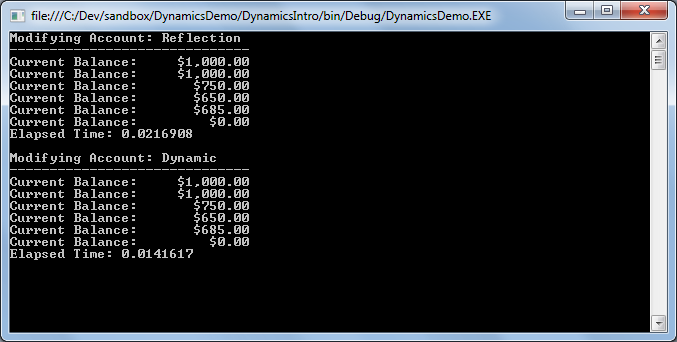
Reflection and Dynamic OutputAs you can see, the code is much more concise.  We don’t have any of the complexity required by remoting and dynamics typically performs better than reflection.  This convenience does come at a price though.

When we use dynamic types we lose all of the compile-time support that comes with a strongly typed environment.  That means we lose type safety, type checking, and even IntelliSense.  If something is wrong we won’t find out about it until run-time so it is especially important to have good tests around any code using dynamics.

Using Dynamic Languages

We’ve seen how to use the dynamic type so let’s take a look at using the DLR with an actual dynamic language (F# is functional, not dynamic).  In this example we’ll define a class using an IronRuby script hosted within a C# application.  We’ll then create and use an instance of that type.

var engine = Ruby.CreateEngine();
dynamic account = engine.Execute(
@"class BankAccount
	attr_reader :CurrentBalance

	def initialize()
		@CurrentBalance = 0.0
	end

	def Deposit(amount)
		@CurrentBalance = @CurrentBalance + amount
		@CurrentBalance
	end

	def Withdrawal(amount)
		@CurrentBalance = @CurrentBalance - amount
		@CurrentBalance
	end

	def Close()
		@CurrentBalance = 0.0
		@CurrentBalance
	end
end
return BankAccount.new"
);
Note: A full discussion of IronRuby is beyond the scope of this article.  For now just know that the Ruby class exposes the Microsoft Scripting classes.  The Ruby class itself is found in the IronRuby namespace in IronRuby.dll.

The IronRuby code snippet passed to engine.Execute defines a class very similar to the F# class we used earlier.  The ScriptEngine‘s Execute method evaluates the script and returns a dynamic that will be bound to the IronRuby type.  Once we have that reference we can use the DLR to manipulate the instance as follows:

Console.WriteLine(Resources.CurrentBalanceFormat, account.Deposit(1000m));
Console.WriteLine(Resources.CurrentBalanceFormat, account.CurrentBalance);
Console.WriteLine(Resources.CurrentBalanceFormat, account.Withdrawal(250m));
Console.WriteLine(Resources.CurrentBalanceFormat, account.Withdrawal(100m));
Console.WriteLine(Resources.CurrentBalanceFormat, account.Deposit(35m));
Console.WriteLine(Resources.CurrentBalanceFormat, account.Close());

With the exception that the IronRuby class doesn’t return a Tuple the C# code is identical to that used to work with the F# class. In both cases the DLR handles resolving properties, methods, and data types despite the fact that the underlying class is not only entirely different but is also completely unrelated. This illustrates how dynamics can also simplify working with similar classes that don’t share a common interface or base class.

The Microsoft Scripting classes don’t restrict us to using inline scripts.  We can also use the ScriptEngine‘s ExecuteFile method to invoke external scripts.  Unlike with the Execute method which returns dynamic ExecuteFile returns an instance of ScriptScope that can be used to dive back into the engine and provide more control for using the loaded script(s).

var scope = engine.ExecuteFile("IronRubySample.ir");
dynamic globals = engine.Runtime.Globals;
dynamic account = globals.BankAccount.@new();

Special Dynamic Types

In addition to declaring any unknown types as dynamic the .NET Framework now provides classes that allow dynamic behavior from the traditional .NET languages.  Each of these types are located in the System.Dynamic namespace and instances must be defined as type dynamic to avoid static typing and take advantage of their dynamic capabilities.

Of the classes in the System.Dynamic namespace we’ll only be looking at ExpandoObject and DynamicObject here.

ExpandoObject

ExpandoObject is a dynamic type that allows members to be added or removed at run-time.  The behavior of ExpandoObject is similar to that of objects in traditional dynamic languages.

public sealed class ExpandoObject : IDynamicMetaObjectProvider,
	IDictionary<string, Object>, ICollection<KeyValuePair<string, Object>>,
	IEnumerable>, IEnumerable, INotifyPropertyChanged

For the following examples assume we have an ExpandoObject defined as:

dynamic car = new ExpandoObject();
car.Make = "Toyota";
car.Model = "Prius";
car.Year = 2005;
car.IsRunning = false;

In their simplest form ExpandoObjects will only use properties:

Console.WriteLine("{0} {1} {2}", car.Year, car.Make, car.Model);

…but we can also add methods:

car.TurnOn = (Action)(() => { Console.WriteLine("Starting {0}", car.Model); car.IsRunning = true; });
car.TurnOff = (Action)(() => { Console.WriteLine("Stopping {0}", car.Model); car.IsRunning = false; });

Console.WriteLine("Is Running? {0}", car.IsRunning);
car.TurnOn();
Console.WriteLine("Is Running? {0}", car.IsRunning);
car.TurnOff();
Console.WriteLine("Is Running? {0}", car.IsRunning);

…and events:

var OnStarted =
	(Action<dynamic, EventArgs>)((dynamic c, EventArgs ea) =>
	{
		if (c.Started != null)
		{
			c.Started(c, new EventArgs());
		}
	});

var OnStopped =
	(Action<dynamic, EventArgs>)((dynamic c, EventArgs ea) =>
	{
		if (c.Stopped != null)
		{
			c.Stopped(c, new EventArgs());
		}
	});

car.Started = null;
car.Started += (Action<dynamic, EventArgs>)((dynamic c, EventArgs ea) => Console.WriteLine("{0} Started", c.Model));
car.Stopped = null;
car.Stopped += (Action<dynamic, EventArgs>)((dynamic c, EventArgs ea) => Console.WriteLine("{0} Stopped", c.Model));
car.TurnOn = (Action)(() => { car.IsRunning = true; OnStarted(car, EventArgs.Empty); });
car.TurnOff = (Action)(() => { car.IsRunning = false; OnStopped(car, EventArgs.Empty); });

Console.WriteLine("Is Running? {0}", car.IsRunning);
car.TurnOn();
Console.WriteLine("Is Running? {0}", car.IsRunning);
car.TurnOff();
Console.WriteLine("Is Running? {0}", car.IsRunning);

In addition to the standard IDynamicMetaObjectProvider interface ExpandoObject also implements several interfaces for accessing members as though they were a dictionary.  The DLR will handle adding members through its binding mechanism but we need to use the dictionary syntax to remove them.

var carDict = (IDictionary<string, object>)car;
Console.WriteLine("{0} {1} {2}", carDict["Year"], carDict["Make"], carDict["Model"]);

DynamicObject

While ExpandoObject allows us to dynamically add and remove members at run-time, DynamicObject allows us to control that behavior.

public class DynamicObject : IDynamicMetaObjectProvider

Since DynamicObject is an abstract class doesn’t expose a public constructor we must create a derived class to take advantage of its features.  A side effect of this we can also define members directly on the class and the DLR will handle resolving them correctly.

public class DynamicCar : System.Dynamic.DynamicObject
{
	public DynamicCar()
	{
		Extensions = new System.Dynamic.ExpandoObject();
	}

	private ExpandoObject Extensions { get; set; }

	public string Make { get; set; }
	public string Model { get; set; }
	public int Year { get; set; }

	public override bool TryGetMember(GetMemberBinder binder, out object result)
	{
		string name = binder.Name.ToLower();
		Console.WriteLine("Getting: {0}", name);
		return (Extensions as IDictionary<string, object>).TryGetValue(name, out result);
	}

	public override bool TrySetMember(SetMemberBinder binder, object value)
	{
		var name = binder.Name.ToLower();

		Console.WriteLine("Setting: {0} -> {1}", name, value);
		(Extensions as IDictionary<string, object>)[name] = value;
		return true;
	}

	public override bool TryInvokeMember(InvokeMemberBinder binder, object[] args, out object result)
	{
		Console.WriteLine("Invoking: {0}", binder.Name);
		return base.TryInvokeMember(binder, args, out result);
	}
}

Once the type is defined we create and use instances just like any other dynamic type:

dynamic car = new DynamicCar()
{
	Make = "Toyota",
	Model = "Prius",
	Year = 2005
};

car.IsRunning = false;
car.TurnOn = (Action)(() => car.IsRunning = true);
car.TurnOff = (Action)(() => car.IsRunning = false);

Console.WriteLine("Make: {0}", car.Make);
Console.WriteLine("Model: {0}", car.Model);
Console.WriteLine("Year: {0}", car.Year);
Console.WriteLine("IsRunning: {0}", car.IsRunning);
car.TurnOn();
car.TurnOff();

DynamicObject Output

Notice how we are able to take advantage of object initializer syntax because the members we’re setting are defined on the class itself rather than being dynamic.  We can still access those members normally later on despite the variable being defined as dynamic.

The output shows how we’ve changed the behavior of the dynamic members while the static members are unaffected.  In this example actions affecting the dynamic members display a message.

Can’t Everything be Dynamic?

It’s true that there’s nothing preventing us from declaring everything as dynamic but it’s usually not a good idea in statically typed languages like C#.  In addition to losing all compile-time support that comes from statically typed languages, code that uses dynamic typing generally performs worse than code using static typing.  Generally speaking, only use dynamics when you have a good reason.

LINQed Up (Part 3)

This is the third part of a series intended as an introduction to LINQ.  The series should provide a good enough foundation to allow the uninitiated to begin using LINQ in a productive manner.  In this post we’ll take a more detailed look at composing queries through a variety of examples and introduce some new concepts such as deferred execution.

In the previous post we covered some of the common query methods and introduced both method and query syntax.  By the end of this post you should have a solid foundation to begin composing your own queries within your applications.  The examples will use either method or query syntax depending upon their complexity.  Before we see the examples though we should take a closer look at query syntax.

Diving Into Query Syntax

As mentioned in the previous post query syntax allows us to compose LINQ expressions in a SQL-like manner.  This is accomplished through the use of several new or overloaded keywords that are converted into their method syntax equivalent at compile time.

Note: Not every method in the System.Linq.Enumerable class has a query syntax equivalent.

The main keywords used by query syntax are:

  • from
  • where
  • select
  • join
  • orderby [ascending | descending]
  • group by
  • let

Although the purpose of most of these keywords should be pretty clear it’s worth taking a closer look at each of them.

from

The from keyword identifies the sequence that will serve as the primary source for the query.  Every query built using query syntax must begin with a from clause.  By placing the from clause first we get full IntelliSense support on our query syntax queries.  Any type that implements IEnumerable can be used in the from clause.

Some queries will contain multiple from clauses.  This is a special syntax called SelectMany that is used to flatten multiple sequences into one.

where

LINQ query syntax provides a where clause that provides the same basic function as its SQL counterpart.  In the LINQ form we get the benefit of strong typing and IntelliSense.

Note: The criteria provided in the where clause can include any number of .NET operations but may be limited depending on the capabilities of the LINQ provider.

select

The select clause is used to project query results into a new sequence.  Select is capable of returning single values, well-known types, or anonymous types.  Select is the workhorse behind one of LINQ’s most powerful features: transforming data from one structure to another.

join

LINQ is capable of joining multiple sequences together much like SQL can join tables or views.  Part of what makes LINQ so powerful is its ability to join data from disparate sources in a single query.  This allows us to join simple .NET collections to XML or data returned from LINQ to SQL or Entity Framework.

One restriction on join joins in LINQ is that it requires an equality comparison.  To eliminate any ambiguity about what can be used Microsoft introduced the equals keyword to replace the == operator.

orderby

LINQ allows sorting in query syntax through the use of the orderby keyword.  By default items will be sorted in ascending order but that can be controlled through the ascending and descending keywords.  Multiple items can be sorted by separating them with a comma.

group by

Grouping in LINQ works a bit different than in SQL.  In SQL we simply specify one or more column names in the group by clause.  LINQ’s operates by projecting values into a System.Linq.IGrouping that is keyed upon the group and all group members as members of the group.  Since IGrouping implements IEnumerable it can be directly projected into another query.  Grouping can be performed upon either a data value or a calculated value.

let

The let keyword is a bit of an oddity.  Unlike the other query syntax keywords let doesn’t have a direct mapping to a method.  Instead, let is provided for convenience to declare query scoped variables to eliminate the need for repetitive operations within a query.

LINQ Examples

Now that we’ve covered the how LINQ works, its common methods, and syntax we should have a good foundation to see some examples of LINQ in action and understand what is happening.  In the following sections we’ll see how all of the pieces we’ve discussed so far fit together to make LINQ a powerful tool for solving a wide variety of set based problems.

Each of the examples assume the following data structures and data:

class Author
{
	public Author(string firstName, string lastName)
	{
		FirstName = firstName;
		LastName = lastName;
	}

	public string FirstName { get; set; }
	public string LastName { get; set; }
}

class Book
{
	public Book(int id, string title, string isbn13, int copyrightYear, params Author[] authors)
	{
		ID = id;
		Title = title;
		Isbn13 = isbn13;
		CopyrightYear = copyrightYear;
		Authors = authors;
	}

	public int ID { get; set; }
	public string Title { get; set; }
	public string Isbn13 { get; set; }
	public int CopyrightYear { get; set; }
	public IEnumerable<author> Authors { get; set; }
}

IEnumerable<book> GetLibrary()
{
	return new List<book>()
	{
		new Book(
			1,
			"Essential LINQ",
			"978-0-321-56416-0",
			2009,
			new Author("Charlie", "Calvert"),
			new Author("Dinesh", "Kulkarni")
		),
		new Book(
			2,
			"Programming F#",
			"978-0-596-15364-9",
			2010,
			new Author("Chris", "Smith")
		),
		new Book(
			3,
			"C# 4.0 in a Nutshell",
			"978-0-596-80095-6",
			2010,
			new Author("Joseph", "Albahari"),
			new Author("Ben", "Albahari")
		),
		new Book(
			4,
			"WPF in Action with Visual Studio 2008",
			"978-1-933-98822-1",
			2009,
			new Author("Arlen", "Feldman"),
			new Author("Maxx", "Daymon")
		),
	};
}
Note: I recommend using LINQPad to run these examples. If using LINQPad remember to change the language option to C# Program. If using Visual Studio to run the examples make sure your code file includes a using directive for System.Linq.

Starting Simple

This first example illustrates the most basic form of a LINQ statement.  Consider it the “Hello World” example.

var query = from b in GetLibrary()
			select b;

Even in this example we can see several of the LINQ concepts coming into play. First, query is defined using the var keyword indicating type inference. The compiler understands that GetLibrary() returns IEnumerable<Book> and the select clause is projecting instances of Book so in this case the inferred type of query is IEnumerable<Book>. We also see how the from clause defines the range variable and appears before the select clause.

Despite the simplicity of this query it LINQ really isn’t that effective here. This query can be better expressed by simply referring to GetLibrary() since all we’re doing is retrieving each item in the sequence.

Transformations

LINQ includes extension methods for converting sequences to lists, dictionaries, and arrays but it is by no means restricted to those types. Through the Select clause (or method) we can return either a new instance of a well-known type or define a new anonymous type on the fly.
Transform to Array

var arr = GetLibrary().ToArray();

Transform to XML
To really demonstrate the transformation capabilities we need to see a more complex example. Here we’ll take the entire structure returned by GetLibrary() into a well-formed XML document with LINQ to XML.

var query = new XElement("library",
						 from b in GetLibrary()
						 select new XElement("book",
						 					 new XAttribute("title", b.Title),
											 new XAttribute("isbn_13", b.Isbn13),
											 new XAttribute("copyright", b.CopyrightYear),
											 new XElement("authors",
											 			  from a in b.Authors
														  select new XElement("author",
														  					  new XText(String.Format("{0}, {1}", a.LastName, a.FirstName))
														 )
											 )
						 )
			);

Basic Filtering

Much of LINQ’s real power comes from the operations it can perform against sequences so what’s a better place to start than with it’s filtering capabilities.  Prior to LINQ if we wanted to operate against a subset of a sequence we needed to nest potentially complex logic in the body of a loop. With LINQ we can filter the sequence down to only the elements we care about before entering the loop.

var query = from b in GetLibrary()
			where b.ID == 1
			select b;

This example illustrates how easy it is to reduce a sequence to only the elements we care about. Here we’re reducing the full sequence down to only those elements with an ID of 1. Although it isn’t necessarily obvious, this query introduces a lambda expression. Let’s look at the same query using method syntax to bring out the lambda.

var query = GetLibrary().Where(b => b.ID == 1);

In either case we’ll get an IEnumerable<book> that contains only a single item. In situations like this where we know we’ll only get one item or we just want the first no matter how many items are returned we can turn to the First() or FirstOrDefault() extension methods. Each of these methods have an overload that accepts a lambda expression to filter the sequence they are acting upon. We can simplify the above queries to just get the single book we care about:

var query = GetLibrary().FirstOrDefault(b => b.ID == 1);

Filtering is also not limited to a single value nor is it restricted to values contained directly in a sequence.

var query = from b in GetLibrary()
			where b.CopyrightYear == 2009 && b.Authors.Count() > 1
			select b;

The example above reduces the sequence to only those books with a copyright year of 2009 and multiple authors. While the collection of authors is contained within each book the number of authors is determined by calling the Count() extension method.

Deferred Execution

Having seen a few queries and the role that lambda expressions play in them we have a perfect opportunity to explore deferred execution. In each of the above examples we define a variable named query and set it to the query. The query is not actually executed until it is enumerated. That is, even though we have defined the query we don’t actually determine what items make up the sequence until we force enumeration of the query by using it a loop or call a method that causes it to enumerate. To observe the effect consider the next example:

var title = "LINQ";

var query = from b in GetLibrary()
			where b.Title.Contains(title)
			select b;

title = "F#";

var book = query.FirstOrDefault();

The query references a local string variable named title that was initialized to “LINQ” prior to the definition of the query. We then change the value of title to “F#” before retrieving the first item from the new sequence. Because the value of the variable isn’t resolved in the query until the query is executed we get the book “Programming F#” rather than “Essential LINQ.”

Deferred execution is an important concept to understand in LINQ to Objects and critical for LINQ to SQL and Entity Framework.

Sorting

Sorting with LINQ is pretty straight forward. Results can be sorted on one or more values in ascending or descending order.
Single Value Ascending

var query = from b in GetLibrary()
			orderby b.Title
			select b.Title;

Single Value Descending

var query = from b in GetLibrary()
			orderby b.Title descending
			select b.Title;

Multiple Values

var query = from b in GetLibrary()
			orderby b.CopyrightYear descending, b.Title
			select new { b.ID, b.Title, b.CopyrightYear };

The same query can be expressed in method syntax as follows:

var query = GetLibrary()
				.OrderByDescending (b => b.CopyrightYear)
				.ThenBy (b => b.Title)
				.Select(b => new
					{
						b.ID,
						b.Title,
						b.CopyrightYear
					}
				);

Joins

Sequences from one or more data sources may be joined together in a single query.  The data sources don’t even need to be of the same type.

LINQ supports both inner and outer joins. To demonstrate the join capabilities we’ll introduce an XElement that we can join to using part of each book’s ISBN.

Note: The XElement class is part of LINQ to XML and can be found in the System.Xml.Linq namespace. The LINQ to XML classes offer many advantages over the traditional XML classes in that they were specifically designed for queries and composition.
XElement GetPublishers()
{
	return new XElement("publishers",
						new XElement("publisher",
									 new XAttribute("id", 321),
									 new XText("Addison-Wesley")),
						new XElement("publisher",
									 new XAttribute("id", 933),
									 new XText("Manning")),
						new XElement("publisher",
									 new XAttribute("id", 596),
									 new XText("O'Reilly")),
						new XElement("publisher",
									 new XAttribute("id", 7653),
									 new XText("Tor Books")),
						new XElement("publisher",
									 new XAttribute("id", 312),
									 new XText("St. Martin's Griffin")));
}

Inner Join
In the next example we retrieve all of the publisher elements from our XML document. Since we don’t have the publisher ID available directly within the Book class we extract it from the ISBN and specify that the extracted publisher id is equal to the id attribute of each element. We then project a new anonymous type that includes values from both sequences.

var query = from b in GetLibrary()
			join p in GetPublishers().Descendants("publisher") on int.Parse(b.Isbn13.Split('-')[2]) equals int.Parse(p.Attribute("id").Value)
			select new { PublisherName = p.Value, b.Title };

Outer Join
Outer joins are a bit more complicated than inner joins but only slightly. In addition to specifying the join values we need to project the results of the join into another sequence that we then select from using the DefaultIfEmpty extension method.

var query = from p in GetPublishers().Descendants("publisher")
			let publisherID = int.Parse(p.Attribute("id").Value)
			join b in GetLibrary() on publisherID equals int.Parse(b.Isbn13.Split('-')[2])
				into bookPublishers
			from bp in bookPublishers.DefaultIfEmpty()
			select new
			{
				PublisherID = publisherID,
				PublisherName = p.Value,
				Book = bp
			};

SelectMany

SelectMany allows us to flatten multiple sequences. Using our Books data we can flatten the structure to extract a single sequence containing all the authors.

var query = from b in GetLibrary()
			from a in b.Authors
			orderby a.LastName
			select a;

Grouping

Grouping query results by a value is fairly straight-forward. With grouping we need to identify the source sequence, specify the group ing value, then project the grouped results into another IGrouping sequence. In this example we’ll see how to group books by copyright year.

var query = from b in GetLibrary()
			group b by b.CopyrightYear into y
			select y;

Next Steps

Having read through and (hopefully) trying the examples you should have a good understanding of how to implement LINQ in your projects. While LINQ is great for simplifying code it does come at a price. In the next post we’ll examine some of the performance implications of using LINQ and look at how to optimize some queries.

LINQed Up (Part 2)

This is the second part of a series intended as an introduction to LINQ.  The series should provide a good enough foundation to allow the uninitiated to begin using LINQ in a productive manner.  In this post we’ll look at some of the common query methods in Enumerable and what LINQ looks like.

In the previous post we defined LINQ and discussed some of the features of the .NET Framework that make LINQ possible.  This post will build upon that foundation.  By the end of this post you should understand the basics of LINQ and understand how it can fit into your development toolbox.

Common Query Methods

The Enumerable class in the System.Linq namespace is central to LINQ’s functionality in that it defines all of the core extension methods that make up LINQ.  There are tons of methods in the Enumerable class but for the purpose of this post we’ll focus on just a few.  Most of the methods here have at least one overload.  We’ll examine each method taking a more generalized approach to introduce the methods and divide them into a few categories.

Sequence Operations

The methods in this section work across an entire sequence.

Method Name Description
Where Primary method used to filter a sequence.
Select Primary method used to project results from the query
Join Allows combining sequences into a single query.  Similar to a SQL join.
OrderBy/OrderByDescending Sorts a sequence.
All Indicates whether every element in a sequence meet the specified criteria.
Any Indicates whether any element in a sequence meet the specified criteria.
Count Gets the number of elements in a sequence.

Element Retrieval Operations

Each of the methods below allow retrieval of a specific element in a sequence and have two forms.  The basic form will throw an exception if the element cannot be found while the OrDefault version will return default(T).

Method Name Description
First/FirstOrDefault Retrieves the first element in a sequence.
ElementAt/ElementAtOrDefault Retrieves the element at the specified position in a sequence.
Last/LastOrDefault Retrieves the last element in a sequence.

What Does LINQ Look Like?

LINQ statements can be written in either of two forms: query syntax and method (dot) syntax.  While these forms are functionally equivalent they each have their place and the decision about which form to use will often come down to readability and is typically situational.  There is no reason to use one form exclusively.

Each of the following examples will use a sequence that contains the first ten numbers in the Fibonacci sequence.

var fibonacci = new int[] { 1, 1, 2, 3, 5, 8, 13, 21, 34, 55 };

Where We’re Coming From

Before looking at each LINQ syntax it’s helpful to see an example of what LINQ aims to address.  Consider the following code that builds a sequence of the even numbers found in the Fibonacci sequence defined above:

var evenNumbers = new List();
foreach(var i in fibonacci)
{
	if(i % 2 == 0)
	{
		evenNumbers.Add(i);
	}
}

This code, while not particularly complex involves a number of steps to accomplish a relatively simple task.  First we define a List<int> to hold the even numbers.  We then enter a loop where we check whether each value is even before adding it to the list.  This is imperative programming at its finest.  The focus of the code is on how rather than what.  Of the eight lines of code only one line is really relevant to the problem of finding even numbers in the source sequence.  LINQ addresses the imperative nature of this code by providing a functional framework to let us focus on the what rather than the how.

Method Syntax

Method syntax is a fluent interface that allows building queries using method calls.  As its name implies, method syntax calls the LINQ extension methods directly passing lambda expressions as parameters.  Compare the code below with the traditional example above.

var evenNumbers = fibonacci.Where(i => i % 2 == 0);

In this example we remove all of the imperative code and replace it with a single method call and let LINQ do all of the heavy lifting.  When the Where method executes it calls the supplied lambda expression for each value in the source sequence.  The lambda expression must return a boolean value that informs the Where method whether or not the current value meets the criteria.

Method syntax tends to be more readable for simple queries such as this example.

Query Syntax

Alternatively, query syntax introduces a SQL-like syntax for writing queries.  Here is the same example repeated using query syntax:

var evenNumbers =
    from i in fibonacci
    where i % 2 == 0
    select i;

Query syntax tends to be more verbose than method syntax but is well suited for composing more complex queries such as those that use joins.

Notice the SQL like structure of the above query. One important difference to note between SQL and query syntax is that the from and where clauses are in the opposite order as they would be in a SQL query.  In fact, query syntax requires the from clause to appear first.  By placing the from clause at the beginning of the query we get all of the benefits of IntelliSense within Visual Studio.  Ultimately though, query syntax is just some syntactic sugar.  When the code is compiled any queries using query syntax are parsed and converted to method syntax.

Next Steps

Now that we’ve seen some of the common LINQ methods and understand how to compose LINQ statements with both method and query syntax we can look at how to use the various methods.  The next post will go in-depth showing how to compose LINQ statements using the common methods and introduce some new concepts such as deferred execution.

LINQed Up (Part 1)

This is the first of a series intended as an introduction to LINQ. The series should provide a good enough foundation to allow the uninitiated to begin using LINQ in a productive manner. In this post we’ll look at what LINQ is and how it works.

My director and I were recently talking about questions he has been asking candidates for senior level .NET development positions. He mentioned that he has been asking the candidates to describe LINQ and some situations where it would be useful.  The response from each of the candidates has ranged from a blank stare to something along the lines of “it means you don’t need to write SQL anymore.”  Those responses are the inspiration for this series.

The blank stares are discouraging but the statements that constrain LINQ to a very specific use case illustrate a fundamental lack of understanding of the technology. It is true that LINQ can greatly simplify interaction with a database through LINQ to SQL or Entity Framework but those are only a small part of what LINQ can do.  In fact, the majority of the places I’ve used LINQ have no database interaction whatsoever.  LINQ has so many applications beyond database access that I find myself using at least some part of it in most of my projects and often in some unexpected places.

Let’s start with a trip through the basics.

What is LINQ?

Language INtegrated Query (LINQ) was introduced with the .NET Framework v3.5. MSDN has this to say about it:

LINQ is a set of extensions to the .NET Framework that encompass language-integrated query, set, and transform operations. It extends C# and Visual Basic with native language syntax for queries and provides class libraries to take advantage of these capabilities.

Although the description is accurate I think the language regarding “native language syntax for queries” is what leads people to mistakenly believe that the only use for LINQ is with a database. After all, we’ve been conditioned to think that queries are database operations.  That said, I offer an alternative definition:

LINQ is a set of extensions to the .NET Framework that encompass language-integrated query, set, and transform operations. It extends C# and Visual Basic with native language syntax for querying data from a variety of sources and provides class libraries to take advantage of these capabilities.

The idea that LINQ makes it possible to query data from a variety of sources is critically important to using it to its full potential. It means that LINQ is not constrained to working with databases but actually comes in several flavors:

  • LINQ to Objects
  • LINQ to XML
  • LINQ to SQL (and Entity Framework)
  • LINQ to DataSets
  • LINQ to Twitter
  • etc…

Essentially any data source can be queried with LINQ as long as there’s a corresponding provider. In addition to providing a common query language for disparate data sources these sources can be queried in a unified manner through the use of joins and subqueries.  LINQ also gives us some really powerful transformation capabilities.  Essentially LINQ is a domain specific language for working with sets of data.

How Does LINQ Work?

LINQ is made possible by several additions to the .NET Framework and in order to truly appreciate its power and elegance we need to first look at:

  • Extension Methods
  • Delegates/Lambda Expressions
  • Type Inference
  • Anonymous Types

Since these are all features of the .NET framework and/or compiler their usage is not restricted to LINQ.  Most of them are actually quite useful outside of LINQ as well.

Extension Methods

Central to the functionality of LINQ are extension methods. Extension methods allow adding capabilities to types without needing to derive a new type. They must be static methods within a static class. The type being extended must be the first parameter of the method and is modified using an overload of the this keyword.  Because extension methods add capabilities to an existing type without relying on inheritance we can even write extension methods for sealed classes.

LINQ introduces the class System.Linq.Enumerable that contains extension methods that extend the IEnumerable interface.  Microsoft could have added the signatures to the interface but that would be a breaking change and everything that previously built against IEnumerable would no longer compile until the implementations of those were provided.  By using extension methods Microsoft was able to introduce all of the LINQ query methods into the framework without breaking anything.

Activating LINQ is merely a matter of importing the System.Linq namespace.  Once the namespace is imported the extension methods are available to any type that implements IEnumerable including lists, arrays, and even strings.  There’s even a trick for using the non-generic IEnumerable with LINQ that we’ll discuss in a later post.

Delegates/Lambda Expressions

While extension methods provide the methods that make LINQ possible delegates make them work.  Most of the extension methods in the Extensible class accept one or more delegates as parameters.  Delegates have always been available in .NET but their usage and syntax has evolved over the years.

Before C# 2.0 the only way to use delegates was to have a named method.  C# 2.0 introduced anonymous methods using the delegate keyword.

Handling an event with the delegate syntax

var t = new System.Timers.Timer(1000);
t.Elapsed += delegate(object sender, System.Timers.ElapsedEventArgs ea) { Console.WriteLine("Timer elapsed"); };

t.Start();
System.Threading.Thread.Sleep(10000);
t.Stop();

Notice how the event is handled by an inline anonymous method rather than a separate named method.  LINQ makes heavy use of delegates to control query behavior. Having to include a full method signature to pass to a method would make LINQ statements virtually unreadable so clearly something else was needed. This is where lambda expressions come in to play.

C# 3.0 added support for lambda expressions. Lambda expressions are functionally equivalent to the delegate syntax above but are more developer friendly. In C# lambda expressions use the => (goes to) operator. The left side contains the list of parameters and the right side contains the method body.

Handling an event with a lambda expression

var t = new System.Timers.Timer(1000);
t.Elapsed += (s, ea) => Console.WriteLine("Timer elapsed");

t.Start();
System.Threading.Thread.Sleep(10000);
t.Stop();

In both examples the timer’s elapsed event is handled by an anonymous method and both handle the event exactly the same way but in the lambda example we have the much more concise and easier to read syntax.  The key difference between the traditional delegate syntax and a lambda expression is the lack of any type information in the parameter list of the lambda expression.  This lack of type information is a great segue into the next technology important to LINQ: type inference.

Type Inference

Type inference allows the compiler to determine the type of a variable, return type, or generic type. By letting the compiler do its job with type inference we can remove a lot of the explicit nature of type identification. Type inference gives us the ability to use anonymous types and use the var keyword to declare variables (and is required to use anonymous types).

Using the var keyword to declare variables is the subject of debate. One side is opposed to its use saying that code is too ambiguous whereas the other side likes the simplicity and convenience of it. I fall into the later group because I’ve found that as I’m first developing something I may change variable or return types multiple times as the design is flushed out.  By using the var keyword I typically only have to change the type on one place rather.  The var keyword is also required when using anonymous types.  If there’s ever any question about what type is being resolved, just hover over var in Visual Studio.

Don’t confuse use of the var keyword with the dynamic keyword in .NET 4.0 or JavaScript’s var. Variables declared with the var keyword are still strongly typed, we’re just letting the compiler figure out what the type really is.

Anonymous Types

Finally, we have anonymous types. Anonymous types are dynamically defined types with no formal definition outside of their usage.  At compile time the compiler will generate a read-only type based on the inline definition of the type.  The type name is not known until compile time and the generated type name is not valid within C# so the only way to declare a variable of an anonymous type is through the var keyword described above. Although they’re not required to use LINQ anonymous types add a lot of capabilities for projecting results from a query.

Creating an anonymous type with two properties

var anon = new { IntegerValue = 1, StringValue = "A String" };

Due to the way anonymous types are defined there are some restrictions on their use. Although there are some ways around this the rule of thumb is that anonymous types can only be used within the scope where they are declared.

Next Steps

We’ve covered what LINQ is and the main pieces of the .NET Framework make it possible.  In the next post we’ll look at the common query methods and how to construct queries.

IndyNDA: MongoDB & Reactive Extensions

The June 10 IndyNDA meeting was one of the most interesting I’ve attended in months.  First, Dennis Burton gave a high-level introduction to MongoDB then for the C# SIG Joel Dart gave a fairly detailed introduction to Reactive Extensions.  I’ve heard a lot of buzz about both of these technologies lately but really haven’t done much investigation on my own so I was glad to see them both in action.  I was inspired to look deeper into both technologies after the presentations.

MongoDB

MongoDB has been getting quite a bit of press lately.  There was even a session devoted to it at IndyTechFest.  Even though I had heard a bit about it and knew it falls under the NoSQL heading I really didn’t know much more than that.  What’s wrong with relational databases?  What does it mean to be NoSQL?  Where does Mongo fit in?  Dennis did a great job answering each of these questions and more.

What’s Wrong With Relational Databases?

Nothing.  The relational model is alive and well and has a definite place in the world of software development.  The problem is that the relational model was originally described in 1970 and hasn’t changed significantly since then but the world has and the types of applications we’re building have changed with it.

Think about some of the decisions that need to be made for a new application (assuming .NET):

  • Which language should it be written in?  C#?  VB?  C++?  F#?
  • What type of UI should it have?  WinForms?  WPF?  Silverlight?
  • If it needs interprocess communication should it use remoting or WCF?

We answer all of these questions and more, then we say “oh, and we need a relational database” regardless of whether it’s the right tool for the job.  Relational databases have been the default answer to the question of how to store the data for years.  The NoSQL family of databases offers an alternative to the relational model that may or may not be the best solution to the problem.

What Does it Mean to be NoSQL?

NoSQL is exactly as it sounds.  NoSQL databases don’t use SQL for storing or accessing data.  MongoDB is a document oriented database.  Unlike a relational database which stores related objects separately and brings them together with joins a document oriented database stores related objects together.  This differentiation does require a change in mindset and terminology.

Relational Document Oriented
Database Database
Table Collection
Row Document

With MongoDB there is no predefined schema.  Databases can be implicitly created just by referencing them.  The same goes for collections.  Need a new collection?  Just specify a name and add a document.  The lack of a predefined schema also means that documents stored within a collection don’t need to follow a consistent structure although they typically will.

Where Does Mongo Fit in?

Mongo is designed for speed and scalability.  This makes it ideal for applications where performance is critical.  The MongoDB web site states that it is well suited for content management, caching, high-volume, and areas requiring a flexible data structure.  That said, given the emphasis on speed and scalability it is not well suited for environments requiring complex transactions such as banking systems nor is it good for problem-specific business intelligence systems.  MongoDB also has very limited support for user security leaving the responsibility for managing security up to the application.

Additional Resources

I’ve starting learning MongoDB and will probably have more posts to go along with what I’m discovering but until then:

Reactive Extensions for .NET (RxNet)

Reactive Extensions (Rx) for .NET is another technology I’ve heard some whispers about but hadn’t really looked into.  So, what is Rx?

The Microsoft DevLabs site states “Rx is a library for composing asynchronous and event-based programs using observable collections.”  What this means is that we can now use a superset of LINQ to respond to events or other asynchronous operations in a declarative rather than imperative manner.

Rx introduces the IObservable<T> and IObserver<T> interfaces which are essentially the opposite of IEnumerable<T> and IEnumerator<T>.  IEnumerable<T> and IEnumerator<T> work with pull-based operations where there is a predefined set of data to work with whereas IObservable<T> and IObserver<T> work with push-based operations where the entire set of data cannot be known in advance.  There is also a specialized ISubject<T> interface that simplifies error handling and completion.

Joel’s first demo really drove home the point of why Rx is often referred to as LINQ to Events.  In this demo he showed a Silverlight application with a red square that he was able to drag around with the mouse.  Rather than having to respond to each MouseDown, MouseUp, and MouseMove event individually and set state flags to manage what should happen within each event handler he showed how Rx enabled handling each of those events within a single LINQ statement that would calculate and project the delta of the mouse pre and post positions and pass the delta to a separate function responsible for updating the position of the box.

Rx really offers a powerful new way to work with asynchronous and event-based programs.  I can already see a few places in some current projects where it would be really handy.  Rx also isn’t restricted to .NET.  There’s already an Rx library for JavaScript!  I’m really looking forward to getting some time for further investigation.

Additional Resources

My IndyTechFest Experience

This past Saturday I, along with 400+ developers, admins, and DBAs attended IndyTechFest.  It was a long, intense day of sessions covering topics such as WPF, Silverlight, SQL Server, C#, VB, Testing, and Windows Phone 7.  I’ve had a few days to digest what I heard and wanted highlight some things from each of the sessions I attended.

This year’s conference was split into seven tracks each with five sessions and an all-day open space.  All of the tracks had at least one topic I was interested in and many time slots had conflicts but ultimately I stayed within the general .NET and Silverlight tracks.  My schedule for the day was:

  • Keynote: Are My Three Screens Cloudy?
  • WPF for Developers
  • Implementing MVVM for WPF
  • The State of Data Services: Open Data for the Open Web
  • C# Tips and Tricks
  • Silverlight Code Survey

For the most part I found value in each of the sessions I attended.  Thanks go out to the sponsors, organizers, and volunteers that made this event possible.

Keynote: Are My Three Screens Cloudy?

Presented By: Jesse Liberty

In many ways Jesse Liberty’s keynote was the highlight of the day.  I think my #1 takeaway for the day is that Jesse Liberty is awesome!  In the keynote Jesse briefly described his position within Microsoft, how he got there, and gave a quick history on the evolution of Silverlight.  He went on to describe what Microsoft sees as the “three screens” (computer, TV, and phone) and how Silverlight is the technology that will bring the three screens together through Windows, XBox360, and Windows Phone 7.

WPF For Developers

Presented By: Phil Japikse

This was the first of two Windows Presentation Foundation (WPF) sessions from Phil Japikse.  In this session Phil gave a good introduction to WPF for the non-initiated (like me).  He started by defining WPF, describing the advantages and disadvantages of WPF to WinForms, and discussing new features in .NET 4.0.  The majority of the session was demonstrating some of the more common features.

Some highlights:

  • Creating custom spell-check dictionaries with .lex files
  • Panels dock in XAML order
  • Controls tab in XAML order by default
  • INotifyPropertyChanged interface
  • INotifyCollectionChanged interface

The presentation and example code are both available on Phil’s Samples and Presentations page.

Implementing MVVM for WPF

Presented By: Phil Japikse

Expanding upon his first WPF session, Phil discussed how to implement the Model-View-ViewModel (MVVM) pattern in WPF.  This session was almost entirely demo showing the classes that represent each part of the pattern and how they interact.

The presentation and example code are both available on Phil’s Samples and Presentations page.

Additional Resources:

The State of Data Services: Open Data for the Open Web

Presented By: Dan Rigsby

Dan Rigsby gave a great introduction to OData, a protocol developed by Microsoft to facilitate data interchange between systems using existing Web technologies.  He started by describing REST and Atom/Pub, two technologies that make OData possible then went on to show OData in action.

REST (http://en.wikipedia.org/wiki/Representational_State_Transfer)

  • Embrace the URI
  • HTTP Verbs (GET, POST, etc…) translate to methods
  • Content-Type defines the object model
  • Status code is the result

Atom/Pub (http://atompub.org/)

  • Standards based XML syndication format for publishing and editing web resources
  • Preserves metadata
  • Provides constructs

OData (http://www.odata.org/)

  • “Open” Data
  • Formerly known “Astoria” and ADO.NET Data Services
  • Open protocol
  • WCF Data Services is Microsoft’s provider for creating and consuming OData
  • Netflix provides an OData interface to its video library

C# Tips and Tricks

Presented By: Mark Strawmyer

With all due respect to Mr. Strawmyer I was incredibly disappointed by this session.  The IndyTechFest program had this to say about the session:

This C# presentation focuses on tips and tricks for the C# developer.  It contains a mixture of C# specific features along with other handy how-to items such as shortcuts for working with the C# IDE that will make you more productive.

This session did not fit the description.  I understand the the previous session was a C# 4.0 overview and there was a strong desire to avoid duplication of information but only two of the tips/tricks mentioned were actually specific to C# and one of those was a C# 4.0 feature!

For the curious, the tips and tricks discussed were:

  • Optional & named parameters
  • Extension methods
  • ObsoleteAttribute
  • GC.Collect()
  • using keyword
  • Parallel extensions
  • Utilities

I really question offering up GC.Collect() as a tip, especially when it was provided with the caveat “you can do this but don’t.”  Is letting people know something is possible really a tip if it shouldn’t be done or is not doing it the tip?

To me, a C# tips and tricks presentation should include things such as lesser known/used operators, XML documentation & IntelliSense, compiler options, automatic properties, etc…

Silverlight Code Survey

Presented By: Jesse Liberty

This session was originally going to be “Application Development with Silverlight 4” but after some feedback from the morning’s keynote and the overlap with the MVVM session it was changed.  In this session Jesse did a quick run-through of creating a new Silverlight application, showing some basic data binding, and some basic animation.  Most of the demonstration is available on the Learn page of Silverlight.net.  Nevertheless, I wasn’t about to miss the opportunity to listen to Jesse present again.

In the Hallway

As with just about any conference lots of interesting things happen in the hallway between sessions.  I’ll sheepishly admit that I didn’t use this time as well as I could (should?) have but I really did enjoy playing with the Windows Phone 7 demo application at the Microsoft booth.  I was even clever enough to crash the app by clicking the emulator’s home button while a dialog box was open :)

LINQ: IEnumerable to DataTable

Over the past several months I’ve been promoting LINQ pretty heavily at work.  Several of my coworkers have jumped on the bandwagon and are realizing how much power is available to them.

This week two of my coworkers were working on unrelated projects but both needed to convert a list of simple objects to a DataTable and asked me for an easy way to do it.  LINQ to DataSet provides wonderful functionality for exposing DataTables to LINQ expressions and converting the data into another structure but it doesn’t have anything for turning a collection of objects into a DataTable.  Lucky for us LINQ makes this task really easy.

First we need to use reflection to get the properties for the type we’re converting to a DataTable.

var props = typeof(MyClass).GetProperties();

Once we have our property list we build the structure of the DataTable by converting the PropertyInfo[] into DataColumn[].  We can add each DataColumn to the DataTable at one time with the AddRange method.

var dt = new DataTable();
dt.Columns.AddRange(
  props.Select(p => new DataColumn(p.Name, p.PropertyType)).ToArray()
);

Now that the structure is defined all that’s left is to populate the DataTable.  This is also trivial since the Add method on the Rows collection has an overload that accepts params object[] as an argument.  With LINQ we can easily build a list of property values for each object, convert that list to an array, and pass it to the Add method.

source.ToList().ForEach(
  i => dt.Rows.Add(props.Select(p =>; p.GetValue(i, null)).ToArray())
);

That’s all there is to it for collections of simple objects.  Those familiar with LINQ to DataSet might note that the example doesn’t use the CopyToDataTable extension method.  The main reason for adding the rows directly to the DataTable instead of using CopyToDataTable is that we’d be doing extra work.  CopyToDataTable accepts IEnumerable but constrains T to DataRow.  In order to make use of the extension method (or its overloads) we still have to iterate over the source collection to convert each item into a DataRow, add each row into a collection, then call CopyToDataTable with that collection.  By adding the rows directly to the DataTable we avoid the extra step altogether.

We can now bring the above code together into a functional example. To run this example open LINQPad, change the language selection to C# Program, and paste the code into the snippet editor.

class MyClass
{
  public Guid ID { get; set; }
  public int ItemNumber { get; set; }
  public string Name { get; set; }
  public bool Active { get; set; }
}

IEnumerable<MyClass> BuildList(int count)
{
  return Enumerable
    .Range(1, count)
    .Select(
      i =>
      new MyClass()
      {
        ID = Guid.NewGuid(),
        ItemNumber = i,
        Name = String.Format("Item {0}", i),
        Active = (i % 2 == 0)
      }
    );
}

DataTable ConvertToDataTable<TSource>(IEnumerable<TSource> source)
{
  var props = typeof(TSource).GetProperties();

  var dt = new DataTable();
  dt.Columns.AddRange(
    props.Select(p => new DataColumn(p.Name, p.PropertyType)).ToArray()
  );

  source.ToList().ForEach(
    i => dt.Rows.Add(props.Select(p => p.GetValue(i, null)).ToArray())
  );

  return dt;
}

void Main()
{
  var dt = ConvertToDataTable(
    BuildList(100)
  );

  // NOTE: The Dump() method below is a LINQPad extension method.
  //       To run this example outside of LINQPad this method
  //       will need to be revised.

  Console.WriteLine(dt.GetType().FullName);
  dt.Dump();
}

Of course there are other ways to accomplish this and the full example has some holes but it’s pretty easy to expand. An obvious enhancement would be to rename the ConvertToDataTable method and change it to handle child collections and return a full DataSet.

LINQPad: An Essential Tool For .NET

A few days ago I was reading through my Twitter feed on my phone when I read a post about a tool called LINQPad.  This was the first time I’d heard of it so I hopped over to the LINQPad web site to see what it was all about.  After a few minutes of browsing I made a mental note to download and try it when I got back to my laptop.  I’m glad I did.

I’ve been using LINQPad for a little less than a week now and it quickly found a place in my toolkit right next to Visual Studio.  In fact, if I have VS open chances are good that LINQPad is also open.  What could a tool named “LINQPad” do to get such good placement in my toolkit?  Isn’t it just for playing with and learning LINQ?  In short, no.  LINQPad is much more than its name implies.

Capabilities

LINQPad does offer great support for LINQ.  Full support for LINQ to Objects, LINQ to XML, and LINQ to SQL is available out of the box.  One of the most powerful features is LINQPad’s ability to connect to a SQL Server database and automatically build classes to represent the tables and columns allowing the database to be queried using LINQ to SQL rather than traditional SQL.  No setup beyond entering the connection information is necessary.  Entity Framework and WCF Data Services are also supported.  But that’s just LINQ!  Didn’t I say it’s more than its name implies?

I find that the real power of LINQPad comes from its ability to execute any C# or VB expression, statement, or program.  This capability has some implications for ad-hoc testing and prototyping.  Instead of littering your development folder(s) with simple single-use console applications just use LINQPad to prove-out a piece of code then copy/paste the code into your project.  You can even add references to existing assemblies to expose the functionality to your ad-hoc code.

I mentioned that LINQPad supports execution of any C# or VB expression, statement, or program but what exactly does that mean?  Depending on the selected language option LINQPad will behave a bit differently.

Expression

The expression option allows a single C#/VB expression.  This is useful for testing regular expressions, playing with string formatting options, or anything else that can be expressed with a single line of code.

Statement(s)

More often than not our ad-hoc code will need more than one line.  This is where the statement(s) option comes in.  I’ve found this useful for prototyping and solidifying the body of a method and for executing database queries.

Program

The Program option is the most robust of the three.  It allows an entire program complete with a Main() method and classes to be written within LINQPad.  The possibilities here are endless.

Using LINQPad for ad-hoc testing should supplement rather than replace formal unit testing.  Formal unit testing included with the project’s build process is still very important for on-going development.

Availability

LINQPad is not an open source project but it is offered free of charge.  An auto-completion add-on is available for a small fee.  The software can be downloaded as either a stand-alone executable or a low-impact installer from the LINQPad web site.  All that’s really needed is .NET 3.5.

Given the power for the price I highly recommend grabbing a copy and at least trying it out.  Consider giving the LINQPad Challenge a try.  What do you have to lose?

What is this?

Recently I’ve been updating one of our older utilities to .NET 4.  A few days ago I stumbled across this line of C#:

if(this == null) return null;

I was dumbfounded.  When would that ever evaluate to true?  Worse yet, why was it repeated in two other places?

Out of curiosity (read: late night boredom) I did some research to see if there’s ever a case where the condition would be met and found a good discussion over on Stack Overflow.  There apparently are a few cases where this == null could actually be true:

  1. Overload the == operator to explicitly return true when comparing to null.
  2. Pass this to a base constructor as part of a closure.

Neither of these cases applied to this code.  We weren’t overloading the == operator and we certainly weren’t using it in a closure let alone a closure being passed to a base constructor.  The second case has apparently been fixed for .NET 4 so it definitely wouldn’t apply with the changes I was making.

As part of the Stack Overflow discussion Eric Lippert provided an interesting comment about why the C# compiler doesn’t complain about checking for this == null.   He basically says that the compiler doesn’t complain because they didn’t think about it because it’s obviously wrong.  So for those wondering, yes, I eliminated all three instances of this code from the utility.

IndyTechFest

Last year I made the mistake of missing IndyTechFest.  That’s not a mistake I care to repeat and one I certainly will not be making this year since my registration is already confirmed.

This year’s event includes forty sessions broken out into seven tracks.  The sessions are of interest to developers, architects, and DBAs and include topics such as Silverlight, WPF, Visual Studio, Windows and SQL Azure, Windows Phone 7 Series, Database Maintenance, SharePoint, Iron Ruby, and many, many more.  The list of speakers is equally impressive and is topped off with a keynote from Jesse Liberty, a Developer Community Program Manager for Silverlight.

Registration is limited to 500 attendees and with more than 400 spaces already spoken for time is running out!

I hope to see you there.