Breaking Free at IndyMobileDev

On June 3, I presented Break Free with Managed Functional Programming: an Introduction to F# at the Indianapolis Mobile .NET Developers group. Brad Pillow was kind enough to record the entire presentation and post it to YouTube. The slides are a bit hard read in the video but I’ve posted them to SlideShare (and embedded them below the video) so you can follow along.

Enjoy!

IndyMobileDev – June 3

On Tuesday, 3 June, I’ll be presenting Break Free with Managed Functional Programming: An Introduction to F# at the Indianapolis Mobile .NET Developers meeting. The meeting is held at Launch Fishers and begins at 7:00 PM. Immediately following my talk, Brad Pillow will showcase how F# fits into mobile development using Xamarin Studio. You can find full logistics details and a registration link on the group’s meetup page.

It should be a fun evening and I hope to see you there!

Clean Code, Evolved

Bob Martin’s 2008 book, Clean Code, is considered by many to be one of the “must read” books for software developers, and for good reason: The guidelines discussed in the book aim to decrease long-term software maintenance costs by improving code readability. One of the most beautiful aspects of Clean Code is that although it was written with an emphasis on Java development, the guidelines are applicable to software development in general.

Clean Code was written to combat the plague of unmaintainable code that creeps into software projects. You know the kind: intertwined dependencies, useless comments, poor names, long functions, functions with side-effects, and so on. Each of these things make code difficult to read but some are more nefarious because they make code fragile and difficult to reason about. The end result is code that is difficult and expensive to maintain or extend.

In March I had the good fortune to speak at Nebraska Code Camp. I was really excited about the way the schedule worked out because I was able to sit in on Cory House’s talk about Clean Code. As Cory walked through the points I remembered reading the book and pondered its impact on how I write code. Eventually, my thoughts drifted to the climate that necessitated such a book and its continued relevance today. In the days following Cory’s talk, I reread Clean Code and further developed my thoughts on these subjects. (Confession: I skipped the chapters on successive refinement, JUnit internals, and refactoring SerialDate this time around.) What I came to realize is that while the Clean Code guidelines are an important step toward improving code quality, many of them simply identify deficiencies in our tools and describe ways to avoid them. Several of the guidelines gently nudge us toward functional programming but they stop short of fixing the problems, instead relying on programmer discipline to write cleaner code.

There is no doubt that understanding and embracing the Clean Code guidelines leads to higher code quality but relying on developer discipline to enforce them isn’t enough. We need to evolve Clean Code. (more…)

Introducing TsPath

Years ago I dabbled a bit with SVG. I didn’t really have much opportunity to do anything of consequence with it but one thing that stuck with me from that experience was its path geometry DSL. This DSL let us define shapes as a string-based sequence of commands consisting of a character and some numeric arguments. For instance, to draw a square we could write something like this:

M20,20 L20,30 30,30 30,20 Z

What this does is moves the cursor to 20,20 and draws 3 lines before connecting the end of the final line back to the start. It’s not necessarily the prettiest language but it certainly does its job and makes it store certain types of image resources right where they’re used.

Knowing a bit about the path language proved useful several years later when I was able to render some simple icons in WPF using a very similar language. By using the path DSL I was able to avoid managing a library of images since the strings could be placed inline in the XAML.

About a week ago I decided to start taking a serious look at TypeScript. As I was building out a simple application I found myself in a similar situation as I’d encountered with the WPF project; I wanted to include some images but didn’t want to maintain an image library. I immediately thought that <CANVAS> might provide the functionality I was looking for.

<CANVAS> provides a fairly rich API (through the HTML Canvas 2D Context) that lets us do some really impressive things. What really struck me as I looked over the API was that despite exposing methods that clearly trace their roots to the type of drawing I was looking to do, there was no corresponding DSL. In order to use <canvas> the way I wanted, I couldn’t use the convenient string syntax I’d come to love over the years. I’d have to instead construct shapes manually with a series of tedious method calls. This seemed like a great exercise for TypeScript and thus, TsPath was born.

TsPath is a simple parser that reads a path string (such as the one shown above) and generates a series of functions that draw the represented shape. All of the functionality is abstracted behind a single method, CanvasExtensions.drawPath, so all you need to do is pass it a reference to the canvas, the path string, and some rendering options and you’re done!

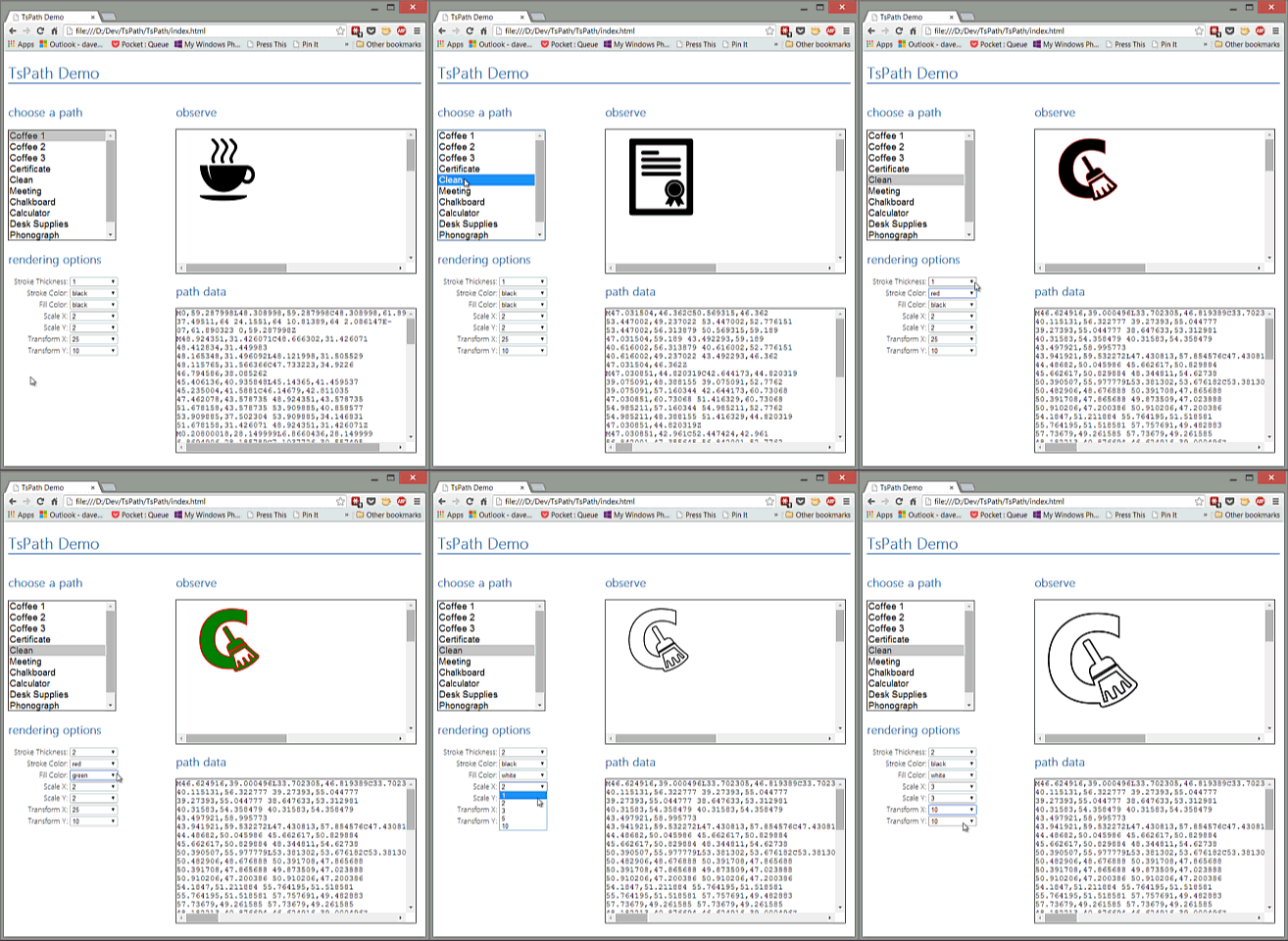
If TsPath sounds like something you’d find useful, hop on over to GitHub and take a look. There you’ll find the TypeScript source, the compiled JavaScript, and a sample HTML page (pictured below) to help you get started.

At this time, TsPath supports the following commands:

  • F – Fill Mode
  • L – Line To
  • C – Cubic Bezier Curve
  • Q – Quadratic Bezier Curve
  • A – Elliptical Arc
  • Z – Close Path

TsPath is available under the MIT license so feel free to use it as you wish. Of course, if you happen to find a bug or have suggestions for improvement I’d love to see some pull requests.

Enjoy!
TsPath Demo

Revisiting the Using Function

A little over a year ago I wrote about replicating F#’s using function for use in C#. Since I wrote that piece I’ve reconsidered the approach a bit. At the time, my team wasn’t using static code analysis (I know, shame on us) so I didn’t consider that passing the IDisposable instance to the function directly can sometimes cause the static analysis to raise warning CA2000.

To recap the previous post on this subject, here’s the original version of the method:

public static TResult Using<TResource, TResult>(TResource resource, Func<TResource, TResult> action)
    where TResource : IDisposable
{
    using (resource) return action(resource);
}

With this approach, Using requires you to supply an IDisposable instance. When using a factory method such as Image.FromFile as shown next, the warning isn’t raised:

var dimensions =
    IDisposableHelper.Using(
        Image.FromFile(@"C:\Windows\Web\Screen\img100.png"),
        img => new Size(img.Width, img.Height));

Quite often, though, we create instances directly via the new operator. Consider reading the contents of a file with a StreamReader, like this:

var contents =
    IDisposableHelper.Using(
        new StreamReader(@"C:\dummy.txt"),
        reader => reader.ReadToEnd());

Creating an IDisposable instance with the new operator results in the CA2000 warning. We know that we’re disposing the StreamReader but it still fails the static analysis checks. We could suppress the warning but we can easily avoid it altogether by redefining the Using method as follows:

public static TResult Using<TResource, TResult>(Func<TResource> resourceFactory, Func<TResource, TResult> action)
    where TResource : IDisposable
{
    using (var resource = resourceFactory()) return action(resource);
}

Now, instead of accepting an IDisposable instance directly, Using accepts a factory function that returns the IDisposable instance. Then, inside the Using method, we invoke the factory function and assign the result to resource. All that remains is to update the offending code to reflect the signature change:

var contents =
    IDisposableHelper.Using(
        () => new StreamReader(@"C:\dummy.txt"),
        reader => reader.ReadToEnd());

This revised approach gives us another benefit – it defers creating the IDisposable instance until Using is executing and keeps it scoped to the actual using block within the method.
Welcome, Kevin Miller!

My good friend and technical reviewer for The Book of F#, Kevin Miller, has recently started blogging over at structuredsight.com! Much of his day-to-day work involves managing build, deployment, and migration processes, so he’s primarily writing about some of the challenges he’s faced with migrating multiple SQL Server instances and query optimizations, but he also has some fun articles comparing programming languages, too.

Please take a moment and welcome Kevin to the party. I know he’d love to hear from you.

More VS2013 Scroll Bar Magic

Yesterday I wrote about map mode, an exciting enhancement to Visual Studio 2013’s vertical scroll bar. If you haven’t enabled the feature yet, go do it, I’ll wait.

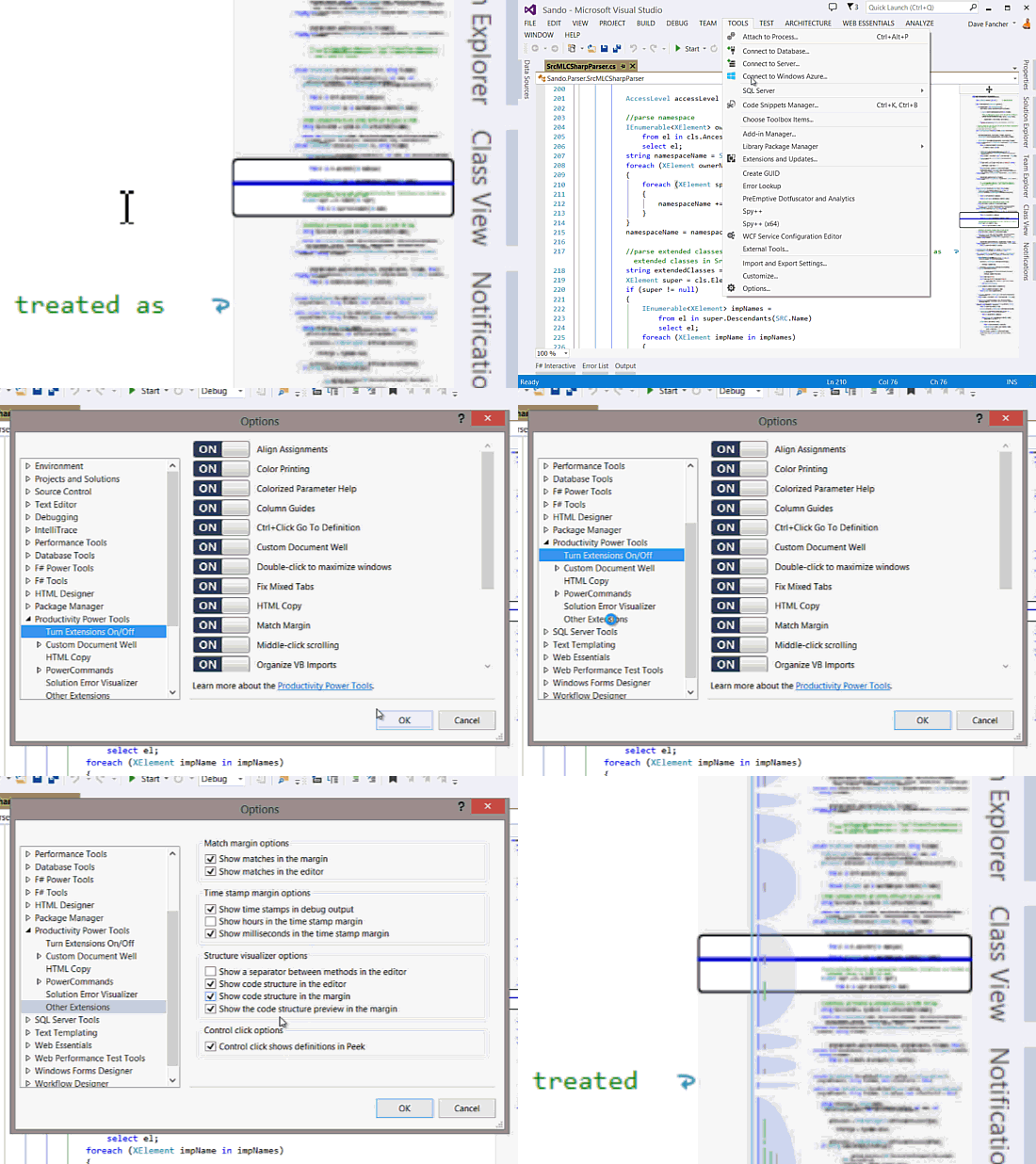
If you had the Productivity Power Tools extension installed prior to enabling the feature, you may have noticed that there are some extra annotations in the scroll bar. These annotations, shown in the form of vertical lines and “bubbles” illustrate scope and nesting level.

You can control whether these annotations are displayed by changing the “Show code structure in the margin” setting under Productivity Power Tools/Other extensions in the options dialog. So far, I think they’re pretty helpful so I plan on leaving them enabled; at least for a while.

EnableCodeStructure

VS2013 Scroll Bar Map Mode

At Nebraska Code Camp this past weekend, Mike Douglas talked a bit about the developer productivity enhancements included in VS2013. One of the features that I’d missed until his talk was the vertical scroll bar’s map mode.

Beyond the now familiar annotations for changes, errors, and cursor position, the scroll bar’s map mode shows a low-resolution depiction of the structure of the code in the current file. This can be helpful for ascertaining the context of a particular piece of code or identifying duplicated code by observing patterns in the structure, among other things.

Perhaps just as useful is that when map mode is enabled, the scroll bar can also show a tooltip containing a preview of the code at any point on the map. To see the tooltip, simply hover over a point of interest.

I’ve only just started to use this feature but I think it’ll aid immensely in code discovery.

EnableScrollbarMap

Passing Arguments by Reference in F#

This past weekend I had the good fortune of speaking about F# at GR DevDay in Grand Rapids, Michigan. As part of this particular talk, I highlight how the F# compiler deals with calls to methods with out parameters. Naturally, this prompted a question about how it handles ref parameters. I don’t use ref parameters very often (ok, ever – I seem to have an aversion to side-effects!) so I had to admit that I’d never given it much thought and couldn’t immediately recall how to do it. I’m here today with the answer to the question.

Consider a C# function with the following signature:

public void DoSomethingWithRefParam(ref int refParam)

Just as with out parameters, F# doesn’t have any direct way to pass arguments by reference. Instead, we need to use a reference cell. Coming from C#, you might think the following F# code would be adequate.

// Bad, does not work
let v = 10
x.DoSomethingWithRefParam (ref v)

This code compiles but it’s not quite right. When it executes, any changes that DoSomethingWithRefParam makes to the reference cell will not be reflected in v. Why? Remember, the ref operator creates an instance of FSharpRef<_> which is a type that carries a mutable value. It is the mutable value which is passed by reference to the method. By including the ref operator in the call to DoSomethingWithRefParam as we would in C#, we’re not passing v by reference but instead wrapping the value of v in a reference cell to which we have no reference outside of the method call. To make this code work, we need to change the definition of v as follows:

let v = ref 10
x.DoSomethingWithRefParam v

Now, v is a reference cell and any changes made to its wrapped value in DoSomethingWithRefParam will be reflected whenever we access it later in the code.

Thank You!

The Book of F# wouldn’t have been possible without contributions from many people and while the acknowledgements section is nice, several individuals deserve something a bit more public. In particular, I need to thank:

  • Bill Pollock – publisher, editor
  • Alison Law – production editor
  • Seph Kramer – editor
  • Kevin Miller – technical reviewer
  • Tomas Petricek – technical reviewer
  • Bryan Hunter – foreword
  • Brian Kline – target audience reviewer

I owe each of you an enormous debt of gratitude.

Geographic and economic factors make it impractical to hold a large release party but a few of us were able to get together around the finished product (along with dinner and a few beverages).

Kevin Miller (left), Brian Kline (right), and I celebrate the book release at Red Lion Grog House in Indianapolis’ Fountain Square.