Christmas came a bit early for my team this year when we were told that the company had purchased licenses for both Reflector AND ReSharper! Naturally I installed both right away. Of course we’re all familiar with Reflector but haven’t used it lately since it’s no longer free. ReSharper on the other hand is new to many of us. I know lots of great developers that swear by it but I’ve never really had a chance to dive in and try it out. I generally think I’m pretty savvy with C# syntax but after just two days ReSharper has already taught me a few syntax tricks that I’ve adopted.
.NET
System.Diagnostics.Debugger
I hardly ever use the classes in the System.Diagnostics namespace. As much as I’d like everyone to believe that it’s because I’m such a rockstar that I don’t need them, it’s really just that I generally use other techniques. With Visual Studio providing so many tools for debugging I’ve rarely had reason to dig into this namespace much. Sure, I’ve used the Debug, Trace, and EventLog classes but I haven’t taken the time to investigate what else is in there.
Cast or GetHashCode?
I really hate to resurrect this issue but after some recent conversations I think it’s necessary. We have a lot of code – particularly in the deep, dark recesses of our application that no one dares touch – that uses GetHashCode() to retrieve the underlying value of an enumeration item.
I’ve been slowly working to eliminate this technique from the system but it works, has been in use for eight or so years, and old habits die hard. An unfortunate side effect though, is that less experienced developers see this pattern repeated throughout the code, internalize the practice, and propagate it. If GetHashCode() works why should we care?
JustDecompile Revisited
This post is long overdue. Several months ago I took a look at a beta release (2011.1.516.2) of JustDecompile, the upcoming decompilation solution from Telerik. At the time I referred to it as unusable due to the number of problems I encountered with both the UI and, more importantly, its ability to reliably decompile an assembly.
Not long after I wrote that post Tsviatko Yovtchev from the JustDecompile team contacted me and through comments and email we discussed the problems I’d encountered. I sent him some of the assemblies that JustDecompile failed to process correctly. Since then the team has released several updates and addressed many of the problems I experienced. I wanted to take another look and see how the project has evolved. Has Telerik solved the problems I experienced? Read on to find out.
JustDecompile – First Impressions
I have posted a new review of JustDecompile that looks at a later beta release.
With Red Gate now charging for .NET Reflector and updating the free version to expire at the end of May I’ve been starting to think about alternate decompilation tools. A few days ago I saw an article on InfoQ about Telerik’s JustDecompile tool and thought I’d take a look. So how does JustDecompile fare?
(more…)
Not Another Regular Expression
I haven’t done anything with the System.Drawing namespace directly in a long time. So long in fact that before today I honestly can’t remember the last time I needed anything in there. When I needed to update the border color on an old ASP.NET DataGrid and the compiler informed me that I couldn’t use a hex string I was a bit surprised. I needed a way to convert that string to a System.Drawing.Color.
In my haste the first thing I did was start writing a method to parse out the string and get the integer values to pass in to Color.FromArgb. Because I needed to account for both the 3-digit and 6-digit formats in both uppercase and lowercase characters with or without the leading hash I started hacking out a regular expression.
I haven’t had much reason to use regular expressions for a long time either but apparently (and amazingly) I can apparently remember their syntax better than I can remember what’s in System.Drawing because with minimal documentation referencing this is what I came up with:
var re = new Regex(
	@"^#?(?([\dA-F]{3}$)(?<r>[\dA-F])(?<g>[\dA-F])(?<b>[\dA-F])|(?<r>[\dA-F]{2})(?<g>[\dA-F]{2})(?<b>[\dA-F]{2}))$",
 RegexOptions.IgnoreCase
);
As irritating and confusing as the syntax is I’m always amazed at how powerful regular expressions are. There’s really quite a bit going on in this example so let’s take a look at what it’s matching. I won’t talk about the RegexOptions piece because that should be pretty self-explanatory but otherwise we can break this one down into a few pieces starting with the most basic.
We start and end with the ^ and $ characters. These ensure that the string we’re checking is respectively the first and last thing on the line. Immediately following the opening ^ we see the #? pattern that says a valid match will start with no more than one instance of the # character.
Throughout the expression we repeatedly see the [\dA-F] pattern. On its own this pattern matches a single hexadecimal digit (0-9, A-F). When we need to match multiple consecutive hexadecimal digits we follow the pattern with a quantifier like {2} or {3}.
The remaining constructs in the expression deal with groups and conditional matching (formally called alternation). These constructs look similar and are closely related. In this example we’re using two types grouping patterns and an alternation pattern. It’s probably best to start with the outermost construct and work our way in.
In this example alternation construct follows the (?(expression)yes-part|no-part) syntax. I like to think of this conditional matching construct as the regular expression version of the ternary operator. The expression is a zero-width assertion construct (non-advancing) that is used to determine whether the yes-part or no-part pattern should be matched. Most of the time the construct for a zero-width assertion begins with (?= but in this case the assertion is is implied and the .NET regular expression parser allows us to omit the ?=. In this example our zero-width assertion is ([\dA-F]{3}$). That is, we’re evaluating whether the string matches exactly 3 hexadecimal digits followed by the end of the line. In short, if the string is a 6-digit format the parser will match the “yes” part otherwise it will match the “no” part. The reason we’re asserting the end of line here too is that we want to ensure that a 6-digit color doesn’t fall in to the “yes” part.
Note: Alternatively we could assert [\dA-F]{6} and swap the yes/no parts.
The “yes” and “no” parts are very similar in that they both consist of three named capturing groups: “r”, “g”, and “b”. The named capturing groups are identified by the (?<name>pattern) syntax and instruct the parser to remember the values for use later in the pattern through backreferences or returning to C# via the Groups collection on the Match object. Since we’ve really covered what the pattern does we won’t go into detail here. We just need to recognize that when we’re matching a 3-digit color we capture the individual digits whereas when we have a 6-digit color we capture pairs of digits. By using the same names in both parts our C# code can be completely ignorant of how the expression captured them.
Note: Regular expressions also allow for unnamed capturing groups that can be referred to by their ordinal index. Even though they add clutter to an already potentially confusing string I usually stick to the named capturing groups because they make it easier to remember which group I’m working with.
This regular expression did the trick nicely. I was able to extract the individual color components from both 3-digit and 6-digit color codes and fail out of anything that didn’t match by checking the match’s Success property. Unfortunately this was only part of the conversion process. I still needed to convert the values from the 3-digit pattern over to their 6-digit equivalent and pass the integer values to Color.FromArgb. At this point I got to thinking “there has to be an easier way” as though the regular expression wasn’t enough.
No matter how far you have gone on a wrong road, turn back.
– Turkish Proverb
Remember that I said that I haven’t done anything with the System.Drawing namespace directly in a long time… It turns out that there’s a ColorTranslator class in System.Drawing that provides a nice FromHtml method. FromHtml takes a hex string and returns the equivalent System.Drawing.Color. Problem solved.
Parallel Programming in .NET 4
Over the years software development has relied on increasing processor clock speeds to achieve better performance. For better or worse though the trend has changed to adding more processing cores. Generally speaking, software development hasn’t adjusted to account for this transition. As a result many applications aren’t taking full advantage of the underlying platform and therefore they’re not performing as well as they could. In order to take advantage of multi-core and multi-processor systems though we need to change the way we write code to include parallelization.
Historically, parallel programming has been viewed as the realm of highly specialized software where only experts dared to tread. Parallel programming aims to improve performance by executing multiple operations simultaneously. The .NET framework has always supported some level of parallel programming. It has included threads and locks all the way back to the early days of the framework. The problem with threads and locks though is that using them correctly is difficult and error prone. Where do I need locks? Can I lock on this? Should I use lock, ReaderWriterLock, or ReaderWriterLockSlim? How do I return a result from another thread? What’s the signature for the ThreadStart delegate passed to the Thread constructor? These questions haven’t even started to touch on pooling, deadlocks, exception handling, cancellations, or a multitude of other considerations. .NET 4 doesn’t eliminate these classes but builds upon them.
(more…)
Building Strings Fluently
Last night I was reading the second edition of Effective C#. Item 16 discusses avoiding creation of unnecessary objects with part of the discussion using the typical example of favoring StringBuilder over string concatenation. The tip itself was nothing new, StringBuilder has been available since the first versions of the .NET framework, but it did remind me of something I “discovered” a few months ago.
Back in late July Esther and I took a week vacation. We rented a two story loft on a marina in southwest Michigan. It was incredibly relaxing and apparently more refreshing than I realized at the time. When I returned to the office the following Monday I was looking at a block of code that was doing a lot of string concatenation and decided to rewrite it to use a StringBuilder instead. When using a StringBuilder I follow the familiar pattern seen in most books and even in the MSDN documentation:
var sb = new StringBuilder();
sb.Append("Hello, Dave");
sb.AppendLine();
sb.AppendFormat("Today is {0:D}", DateTime.Now);
Console.WriteLine(sb.ToString());
For some reason though as I was writing code this particular Monday I noticed something that I hadn’t noticed before. I realized that StringBuilder, a class I’ve been using for nearly 10 years, implements a fluent interface! All of those familiar methods like Append, AppendFormat, Insert, Replace, etc… each return the StringBuilder instance meaning we can chain calls together!
Armed with this new knowledge I started thinking about all the places that code can be simplified just by taking advantage of the fluent interface. No longer do I need to define a variable for the StringBuilder and pass it to something. Instead, I can create the instance inline, build it up, then pass it along.
Console.WriteLine(
		(new StringBuilder())
		.Append("Hello, Dave")
		.AppendLine()
				.AppendFormat("Today is {0:D}", DateTime.Now)
		.ToString()
);
Hoping I hadn’t been completely oblivious for so long I hopped over to the .NET 1.1 documentation and what I found was astonishing – this functionality has been there all along. I asked a few trusted colleagues if they knew about it and incredibly none of them had realized it either! How did we miss this for so long?
LINQed Up (Part 4)
This is the fourth part of a series intended as an introduction to LINQ. The series should provide a good enough foundation to allow the uninitiated to begin using LINQ in a productive manner. In this post we’ll look at the performance implications of LINQ along with some optimization techniques.
LINQed Up Part 3 showed how to compose LINQ statements to accomplish a number of common tasks such as data transformation, joining sequences, filtering, sorting, and grouping. LINQ can greatly simplify code and improve readability but the convenience does come at a price.
LINQ’s Ugly Secret
In general, evaluating LINQ statements takes longer than evaluating a functionally equivalent block of imperative code.
Consider the following definition:
var intList = Enumerable.Range(0, 1000000);
If we want to refine the list down to only the even numbers we can do so with a traditional syntax such as:
var evenNumbers = new List<int>();

foreach (int i in intList)
{
	if (i % 2 == 0)
	{
		evenNumbers.Add(i);
	}
}
…or we can use a simple LINQ statement:
var evenNumbers = (from i in intList
					where i % 2 == 0
					select i).ToList();
I ran these tests on my laptop 100 times each and found that on average the traditional form took 0.016 seconds whereas the LINQ form took twice as long at 0.033 seconds. In many applications this difference would be trivial but in others it could be enough to avoid LINQ.
So why is LINQ so much slower? Much of the problem boils down to delegation but it’s compounded by the way we’re forced to enumerate the collection due to deferred execution.
In the traditional approach we simply iterate over the sequence once, building the result list as we go. The LINQ form on the other hand does a lot more work. The call to Where() iterates over the original sequence and calls a delegate for each item to determine if the item should be included in the result. The query also won’t do anything until we force enumeration which we do by calling ToList() resulting in an iteration over the result set to a List<int> that matches the list we built in the traditional approach.
Not Always a Good Fit
How often do we see code blocks that include nesting levels just to make sure that only a few items in a sequence are acted upon? We can take advantage of LINQ’s expressive nature to flatten much of that code into a single statement leaving just the parts that actually act on the elements. Sometimes though we’ll see a block of code and think “hey, that would be so much easier with LINQ!” but not only might a LINQ version introduce a significant performance penalty, it may also turn out to be more complicated than the original.
One such example would be Edward Tanguay’s code sample for using a generic dictionary to total enum values. His sample code builds a dictionary that contains each enum value and the number of times each is found in a list. At first glance LINQ looks like a perfect fit – the code is essentially transforming one collection into another with some aggregation. A closer inspection reveals the ugly truth. With Edward’s permission I’ve adapted his sample code to illustrate how sometimes a traditional approach may be best.
For these examples we’ll use the following enum and list:
public enum LessonStatus
{
	NotSelected,
	Defined,
	Prepared,
	Practiced,
	Recorded
}

List<LessonStatus> lessonStatuses = new List<LessonStatus>()
{
	LessonStatus.Defined,
	LessonStatus.Recorded,
	LessonStatus.Defined,
	LessonStatus.Practiced,
	LessonStatus.Prepared,
	LessonStatus.Defined,
	LessonStatus.Practiced,
	LessonStatus.Prepared,
	LessonStatus.Defined,
	LessonStatus.Practiced,
	LessonStatus.Practiced,
	LessonStatus.Prepared,
	LessonStatus.Defined
};
Edward’s traditional approach defines the target dictionary, iterates over the names in the enum to populate the dictionary with default values, then iterates over the list of enum values, updating the target dictionary with the new count.
var lessonStatusTotals = new Dictionary<string, int>();

foreach (var status in Enum.GetNames(typeof(LessonStatus)))
{
	lessonStatusTotals.Add(status, 0);
}

foreach (var status in lessonStatuses)
{
	lessonStatusTotals[status.ToString()]++;
}

In my tests this form took an average of 0.00003 seconds over 100 invocations. So how might it look if in LINQ? It’s just a simple grouping operation, right?
var lessonStatusTotals =
	(from l in lessonStatuses
		group l by l into g
		select new { Status = g.Key.ToString(), Count = g.Count() })
	.ToDictionary(k => k.Status, v => v.Count);
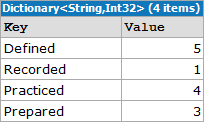
Wrong. This LINQ version isn’t functionally equivalent to the original. Did you see the problem? Take another look at the output of both forms. The dictionary created by the LINQ statement doesn’t include any enum values that don’t have corresponding entries in the list. Not only does the output not match but over 100 invocations this simple grouping query took an average of 0.0001 seconds or about three times longer than the original. Let’s try again:
var summary = from l in lessonStatuses
				group l by l into g
				select new { Status = g.Key.ToString(), Count = g.Count() };

var lessonStatusTotals =
	(from s in Enum.GetNames(typeof(LessonStatus))
	 join s2 in summary on s equals s2.Status into flat
	 from f in flat.DefaultIfEmpty(new { Status = s, Count = 0 })
	 select f)
	.ToDictionary (k => k.Status, v => v.Count);

In this sample we take advantage of LINQ’s composable nature and perform an outer join to join the array of enum values to the results of the query from our last attempt. This form returns the correct result set but comes with an additional performance penalty. At an average of 0.00013 seconds over 100 invocations, This version took almost four times longer and is significantly more complicated than the traditional form.
What if we try a different approach? If we rephrase the task as “get the count of each enum value in the list” we can rewrite the query as:
var lessonStatusTotals =
	(from s in Enum.GetValues(typeof(LessonStatus)).OfType<LessonStatus>()
	 select new
	 {
	 	Status = s.ToString(),
		Count = lessonStatuses.Count(s2 => s2 == s)
	 })
	.ToDictionary (k => k.Status, v => v.Count);

Although this form is greatly simplified from the previous one it still took an average of 0.0001 seconds over 100 invocations. The biggest problem with this query is that it uses the Count() extension method in its projection. Count() iterates over the entire collection to build its result. In this simple example Count() will be called five times, once for each enum value. The performance penalty will be amplified by the number of values in the enum and the number of enum values in the list so larger sequences will suffer even more. Clearly this is not optimal either.
A final solution would be to use a hybrid approach. Instead of joining or using Count we can compose a query that references the original summary query as a subquery.
var summary = from l in lessonStatuses
	group l by l into g
	select new { Status = g.Key.ToString(), Count = g.Count() };

var lessonStatusTotals =
	(from s in Enum.GetNames(typeof(LessonStatus))
	 let summaryMatch = summary.FirstOrDefault(s2 => s == s2.Status)
	 select new
	 {
	 	Status = s,
		Count = summaryMatch == null ? 0 : summaryMatch.Count
	 })
	.ToDictionary (k => k.Status, v => v.Count);
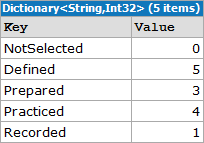
At an average of 0.00006 seconds over 100 iterations this approach offers the best performance of any of the LINQ forms but it still takes nearly twice as long as the traditional approach.
Of the four possible LINQ alternatives to Edward’s original sample none of them really improve readability. Furthermore, even the best performing query still took twice as long. In this example we’re dealing with sub-microsecond differences but if we were working with larger data sets the difference could be much more significant.
Query Optimization Tips
Although LINQ generally doesn’t perform as well as traditional imperative programming there are ways to mitigate the problem. Many of the usual optimization tips also apply to LINQ but there are a handful of LINQ specific tips as well.
Any() vs Count()
How often do we need to check whether a collection contains any items? Using traditional collections we’d typically look at the Count or Length property but with IEnumerable<T> we don’t have that luxury. Instead we have the Count() extension method.
As previously discussed, Count() will iterate over the full collection to determine how many items it contains. If we don’t want to do anything beyond determine that the collection isn’t empty this is clearly overkill. Luckily LINQ also provides the Any() extension method. Instead of iterating over the entire collection Any() will only iterate until a match is found.
Consider Join Order
The order in which sequences appear in a join can have a significant impact on performance. Due to how the Join() extension method iterates over the sequences the larger sequence should be listed first.
PLINQ
Some queries may benefit from Parallel LINQ (PLINQ). PLINQ partitions the sequences into segments and executes the query against the segments in parallel across multiple processors.
Bringing it All Together
As powerful as LINQ can be at the end of the day it’s just another tool in the toolbox. It provides a declarative, composable, unified, type-safe language to query and transform data from a variety of sources. When used responsibly LINQ can solve many sequence based problems in an easy to understand manner. It can simplify code and improve the overall readability of an application. In other cases such as what we’ve seen in this article it can also do more harm than good.
With LINQ we sacrifice performance for elegance. Whether the trade-off is worth while is a balancing act based on the needs of the system under development. In software where performance is of utmost importance LINQ probably isn’t a good fit. In other applications where a few extra microseconds won’t be noticed, LINQ is worth considering.
When it comes to using LINQ consider these questions:
- Will using LINQ make the code more readable?
- Am I willing to accept the performance difference?
If the answer to either of these questions is “no” then LINQ is probably not a good fit for your application. In my applications I find that LINQ generally does improve readability and that the performance implications aren’t significant enough to justify sacrificing readability but your mileage may vary.
Basic Dynamic Programming in .NET 4
.NET 4 adds some nice tools to the toolbox. Chief among them is support for dynamic languages and dynamic features in strongly typed languages. In this post we’ll examine how to use reflection to work with unknown data types then we’ll see how to use dynamics to accomplish the same task. Next, we’ll see an example of interacting with IronRuby from within a C# application. Finally, we’ll take a brief look at two of the specialized classes in the System.Dynamic namespace.
Introducing Dynamic Programming
.NET has historically been a statically typed environment. By virtue of being statically typed we get many benefits such as type safety and compile-time member checking. There are times though that we don’t know the type of a variable when we’re writing the code. Consider this code:
module Bank

type BankAccount() = class
  let mutable _balance = 0m

  member this.CurrentBalance
    with get() = _balance

  member this.Deposit(amount) =
    let lastBalance = _balance
    _balance <- _balance + amount
    ( lastBalance, _balance)

  member this.Withdrawal(amount) =
    let lastBalance = _balance
    let tmpBalance = _balance - amount
    if tmpBalance < 0m then raise(new System.Exception("Balance cannot go below zero"))
    _balance <- tmpBalance
    ( lastBalance, _balance)

  member this.Close() =
    let lastBalance = _balance
    _balance <- 0m
    ( lastBalance, _balance)
end
The code above defines a simple type in F#. Don’t worry if you’re not familiar with it – all that’s important to understand here is that the BankAccount type has a parameterless constructor, a read-only CurrentBalance property, and three methods (Deposit, Withdrawal, and Close) that each return a two item tuple.
What if we want to work with this type from a C# assembly? In many cases it will be possible to add a reference to the F# project but what if that isn’t possible? What if we’re getting a reference to the type from an IoC container, a factory method, or a COM interop component that returns object? In those cases we may not have enough information to cast the instance to a known type.
Reflecting on the Past
In the past when these situations would arise we had to resort to reflection to access an object’s members. Aside from being costly, using reflection requires a lot of extra code and often involves additional casting.
var account = BankAccountFactory.GetBankAccount();

var accountType = account.GetType();
var depositMethod = accountType.GetMethod("Deposit");
var currentBalanceProperty = accountType.GetProperty("CurrentBalance");
var withdrawalMethod = accountType.GetMethod("Withdrawal");
var closeMethod = accountType.GetMethod("Close");

Console.WriteLine(Resources.CurrentBalanceFormat, ((Tuple<decimal, decimal>)depositMethod.Invoke(account, new object[] { 1000m })).Item2);
Console.WriteLine(Resources.CurrentBalanceFormat, ((decimal)currentBalanceProperty.GetValue(account, null)));
Console.WriteLine(Resources.CurrentBalanceFormat, ((Tuple<decimal, decimal>)withdrawalMethod.Invoke(account, new object[] { 250m })).Item2);
Console.WriteLine(Resources.CurrentBalanceFormat, ((Tuple<decimal, decimal>)withdrawalMethod.Invoke(account, new object[] { 100m })).Item2);
Console.WriteLine(Resources.CurrentBalanceFormat, ((Tuple<decimal, decimal>)depositMethod.Invoke(account, new object[] { 35m })).Item2);
Console.WriteLine(Resources.CurrentBalanceFormat, ((Tuple<decimal, decimal>)closeMethod.Invoke(account, new object[] { })).Item2);
Look at those pipes! There’s a ton of code and most of it is just plumbing. Before we can do anything useful with the BankAccount instance we need to get a MemberInfo (specifically PropertyInfo or MethodInfo) instance for each member we want to use. Once we have the MemberInfo instances we need to call the Invoke or GetValue method passing the source instance, and other required arguments before casting the result of the call to the expected type! Isn’t there a better way?
Dynamic Language Runtime to the Rescue!
Prior to .NET 4 we were stuck with reflection but .NET 4 introduces the Dynamic Language Runtime (DLR) to help reduce this complexity. The DLR is exposed to C# through the dynamic type. Rather than declaring variables as type object we can define them as type dynamic.
Note: Please, please, pleeeease don’t confuse var with dynamic. in C# var uses type inference to determine the actual type of the variable at compile-time whereas dynamic defers type resolution to the DLR at run-time. Variables defined with var are still strongly typed.
The dynamic type is just like any other type in that it can be used for defining variables, fields, method return values, method arguments, etc… Variables defined as dynamic can be used like we’re working with directly with an instance of a known type. Let’s take the reflection example and revise it to use dynamics instead.
dynamic account = BankAccountFactory.GetBankAccount();

Console.WriteLine(Resources.CurrentBalanceFormat, account.Deposit(1000m).Item2);
Console.WriteLine(Resources.CurrentBalanceFormat, account.CurrentBalance);
Console.WriteLine(Resources.CurrentBalanceFormat, account.Withdrawal(250m).Item2);
Console.WriteLine(Resources.CurrentBalanceFormat, account.Withdrawal(100m).Item2);
Console.WriteLine(Resources.CurrentBalanceFormat, account.Deposit(35m).Item2);
Console.WriteLine(Resources.CurrentBalanceFormat, account.Close().Item2);
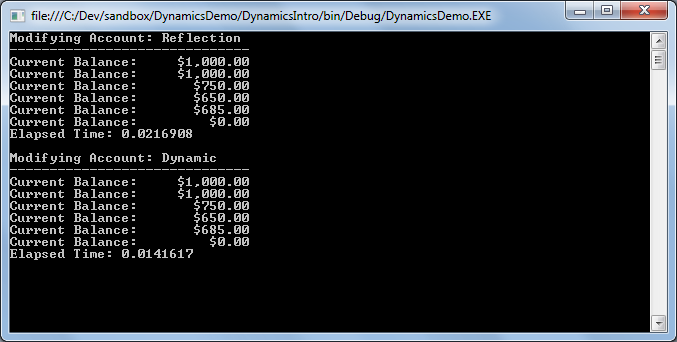 As you can see, the code is much more concise. We don’t have any of the complexity required by remoting and dynamics typically performs better than reflection. This convenience does come at a price though.
When we use dynamic types we lose all of the compile-time support that comes with a strongly typed environment. That means we lose type safety, type checking, and even IntelliSense. If something is wrong we won’t find out about it until run-time so it is especially important to have good tests around any code using dynamics.
Using Dynamic Languages
We’ve seen how to use the dynamic type so let’s take a look at using the DLR with an actual dynamic language (F# is functional, not dynamic). In this example we’ll define a class using an IronRuby script hosted within a C# application. We’ll then create and use an instance of that type.
var engine = Ruby.CreateEngine();
dynamic account = engine.Execute(
@"class BankAccount
	attr_reader :CurrentBalance

	def initialize()
		@CurrentBalance = 0.0
	end

	def Deposit(amount)
		@CurrentBalance = @CurrentBalance + amount
		@CurrentBalance
	end

	def Withdrawal(amount)
		@CurrentBalance = @CurrentBalance - amount
		@CurrentBalance
	end

	def Close()
		@CurrentBalance = 0.0
		@CurrentBalance
	end
end
return BankAccount.new"
);
Note: A full discussion of IronRuby is beyond the scope of this article. For now just know that the Ruby class exposes the Microsoft Scripting classes. The Ruby class itself is found in the IronRuby namespace in IronRuby.dll.
The IronRuby code snippet passed to engine.Execute defines a class very similar to the F# class we used earlier. The ScriptEngine‘s Execute method evaluates the script and returns a dynamic that will be bound to the IronRuby type. Once we have that reference we can use the DLR to manipulate the instance as follows:
Console.WriteLine(Resources.CurrentBalanceFormat, account.Deposit(1000m));
Console.WriteLine(Resources.CurrentBalanceFormat, account.CurrentBalance);
Console.WriteLine(Resources.CurrentBalanceFormat, account.Withdrawal(250m));
Console.WriteLine(Resources.CurrentBalanceFormat, account.Withdrawal(100m));
Console.WriteLine(Resources.CurrentBalanceFormat, account.Deposit(35m));
Console.WriteLine(Resources.CurrentBalanceFormat, account.Close());
With the exception that the IronRuby class doesn’t return a Tuple the C# code is identical to that used to work with the F# class. In both cases the DLR handles resolving properties, methods, and data types despite the fact that the underlying class is not only entirely different but is also completely unrelated. This illustrates how dynamics can also simplify working with similar classes that don’t share a common interface or base class.
The Microsoft Scripting classes don’t restrict us to using inline scripts. We can also use the ScriptEngine‘s ExecuteFile method to invoke external scripts. Unlike with the Execute method which returns dynamic ExecuteFile returns an instance of ScriptScope that can be used to dive back into the engine and provide more control for using the loaded script(s).
var scope = engine.ExecuteFile("IronRubySample.ir");
dynamic globals = engine.Runtime.Globals;
dynamic account = globals.BankAccount.@new();
Special Dynamic Types
In addition to declaring any unknown types as dynamic the .NET Framework now provides classes that allow dynamic behavior from the traditional .NET languages. Each of these types are located in the System.Dynamic namespace and instances must be defined as type dynamic to avoid static typing and take advantage of their dynamic capabilities.
Of the classes in the System.Dynamic namespace we’ll only be looking at ExpandoObject and DynamicObject here.
ExpandoObject
ExpandoObject is a dynamic type that allows members to be added or removed at run-time. The behavior of ExpandoObject is similar to that of objects in traditional dynamic languages.
public sealed class ExpandoObject : IDynamicMetaObjectProvider,
	IDictionary<string, Object>, ICollection<KeyValuePair<string, Object>>,
	IEnumerable>, IEnumerable, INotifyPropertyChanged
For the following examples assume we have an ExpandoObject defined as:
dynamic car = new ExpandoObject();
car.Make = "Toyota";
car.Model = "Prius";
car.Year = 2005;
car.IsRunning = false;
In their simplest form ExpandoObjects will only use properties:
Console.WriteLine("{0} {1} {2}", car.Year, car.Make, car.Model);
…but we can also add methods:
car.TurnOn = (Action)(() => { Console.WriteLine("Starting {0}", car.Model); car.IsRunning = true; });
car.TurnOff = (Action)(() => { Console.WriteLine("Stopping {0}", car.Model); car.IsRunning = false; });

Console.WriteLine("Is Running? {0}", car.IsRunning);
car.TurnOn();
Console.WriteLine("Is Running? {0}", car.IsRunning);
car.TurnOff();
Console.WriteLine("Is Running? {0}", car.IsRunning);
…and events:
var OnStarted =
	(Action<dynamic, EventArgs>)((dynamic c, EventArgs ea) =>
	{
		if (c.Started != null)
		{
			c.Started(c, new EventArgs());
		}
	});

var OnStopped =
	(Action<dynamic, EventArgs>)((dynamic c, EventArgs ea) =>
	{
		if (c.Stopped != null)
		{
			c.Stopped(c, new EventArgs());
		}
	});

car.Started = null;
car.Started += (Action<dynamic, EventArgs>)((dynamic c, EventArgs ea) => Console.WriteLine("{0} Started", c.Model));
car.Stopped = null;
car.Stopped += (Action<dynamic, EventArgs>)((dynamic c, EventArgs ea) => Console.WriteLine("{0} Stopped", c.Model));
car.TurnOn = (Action)(() => { car.IsRunning = true; OnStarted(car, EventArgs.Empty); });
car.TurnOff = (Action)(() => { car.IsRunning = false; OnStopped(car, EventArgs.Empty); });

Console.WriteLine("Is Running? {0}", car.IsRunning);
car.TurnOn();
Console.WriteLine("Is Running? {0}", car.IsRunning);
car.TurnOff();
Console.WriteLine("Is Running? {0}", car.IsRunning);
In addition to the standard IDynamicMetaObjectProvider interface ExpandoObject also implements several interfaces for accessing members as though they were a dictionary. The DLR will handle adding members through its binding mechanism but we need to use the dictionary syntax to remove them.
var carDict = (IDictionary<string, object>)car;
Console.WriteLine("{0} {1} {2}", carDict["Year"], carDict["Make"], carDict["Model"]);
DynamicObject
While ExpandoObject allows us to dynamically add and remove members at run-time, DynamicObject allows us to control that behavior.
public class DynamicObject : IDynamicMetaObjectProvider
Since DynamicObject is an abstract class doesn’t expose a public constructor we must create a derived class to take advantage of its features. A side effect of this we can also define members directly on the class and the DLR will handle resolving them correctly.
public class DynamicCar : System.Dynamic.DynamicObject
{
	public DynamicCar()
	{
		Extensions = new System.Dynamic.ExpandoObject();
	}

	private ExpandoObject Extensions { get; set; }

	public string Make { get; set; }
	public string Model { get; set; }
	public int Year { get; set; }

	public override bool TryGetMember(GetMemberBinder binder, out object result)
	{
		string name = binder.Name.ToLower();
		Console.WriteLine("Getting: {0}", name);
		return (Extensions as IDictionary<string, object>).TryGetValue(name, out result);
	}

	public override bool TrySetMember(SetMemberBinder binder, object value)
	{
		var name = binder.Name.ToLower();

		Console.WriteLine("Setting: {0} -> {1}", name, value);
		(Extensions as IDictionary<string, object>)[name] = value;
		return true;
	}

	public override bool TryInvokeMember(InvokeMemberBinder binder, object[] args, out object result)
	{
		Console.WriteLine("Invoking: {0}", binder.Name);
		return base.TryInvokeMember(binder, args, out result);
	}
}
Once the type is defined we create and use instances just like any other dynamic type:
dynamic car = new DynamicCar()
{
	Make = "Toyota",
	Model = "Prius",
	Year = 2005
};

car.IsRunning = false;
car.TurnOn = (Action)(() => car.IsRunning = true);
car.TurnOff = (Action)(() => car.IsRunning = false);

Console.WriteLine("Make: {0}", car.Make);
Console.WriteLine("Model: {0}", car.Model);
Console.WriteLine("Year: {0}", car.Year);
Console.WriteLine("IsRunning: {0}", car.IsRunning);
car.TurnOn();
car.TurnOff();

Notice how we are able to take advantage of object initializer syntax because the members we’re setting are defined on the class itself rather than being dynamic. We can still access those members normally later on despite the variable being defined as dynamic.
The output shows how we’ve changed the behavior of the dynamic members while the static members are unaffected. In this example actions affecting the dynamic members display a message.
Can’t Everything be Dynamic?
It’s true that there’s nothing preventing us from declaring everything as dynamic but it’s usually not a good idea in statically typed languages like C#. In addition to losing all compile-time support that comes from statically typed languages, code that uses dynamic typing generally performs worse than code using static typing. Generally speaking, only use dynamics when you have a good reason.
 Didactic Code