 A few weeks ago I started learning F#. As I moved from the simple examples that were easily executable in F# Interactive or LINQPad though I found myself wanting to write formal unit tests to make sure I was understanding the concepts correctly. I decided to write my tests in F# for more practice and because its syntax makes it an attractive choice but in order to keep the learning curve under control a bit I thought it best to stick with a familiar test framework – NUnit. Using NUnit with F# is pretty trivial but being so new to the language I ran into a few small obstacles.
Importing Types
In order to use NUnit we need to import the types from the NUnit.Framework namespace. Importing the types is accomplished with the open keyword which looks and behaves much like the using directive in C#.
open NUnit.Framework
Don’t get too excited yet though because the compiler is probably yelling at you.
Most F# tutorials that I’ve seen provide examples that are easily run within F# Interactive (FSI), LINQPad, or a single F# Application (exe) project. They generally only include a few types and almost never span multiple files let alone multiple assemblies or languages. This is great for introducing concepts but as soon as you move to a more complex library project (like one for testing) the compiler will politely inform you of a problem depending on where you’ve placed the declaration:
Files in libraries or multiple-file applications must begin with a namespace or module declaration, e.g. ‘namespace SomeNamespace.SubNamespace’ or ‘module SomeNamespace.SomeModule’
If you’ve placed the directive at the beginning of the file before declaring a namespace or declaration you’ll see the above error. To fix this problem I like to take the namespace route because I’m just trying to group my testing types and it follows the organization pattern I’d be using were I writing the tests in C#.
namespace StringCalculatorKata.Logic.Tests

open NUnit.Framework

[]
type StringCalculatorTests() =
  []
  member x.Add_EmptyString_ReturnsZero() =
    // Test Code Omitted
  [<TestCase("1", Result=1)>]
  [<TestCase("2", Result=2)>]
  member x.Add_SingleNumber_ReturnsThatNumber calcString =
    // Test Code Omitted
Applying Attributes
With the types imported we can identify our fixtures and tests. The good news is that we accomplish this with attributes just like with other .NET languages. The bad news is that although it’s simple, it’s not immediately obvious. If you’re reading this you should already know that TestFixtureAttribute applies to the classes that hold your tests and that TestAttribute and TestCaseAttribute identify tests. But how does that translate to F#?
One answer is to define a type and decorate it with the appropriate attributes. You’ll want to make sure you’re applying the test attributes to member bindings rather than let bindings here because let bindings compile to internal members whereas member bindings compile to public members by default.
[]
type StringCalculatorTests() =
  []
  member x.Add_EmptyString_ReturnsZero() =
    // Test Code Omitted
  [<TestCase("1", Result=1)>]
  [<TestCase("2", Result=2)>]
  member x.Add_SingleNumber_ReturnsThatNumber calcString =
    // Test Code Omitted
Were you aware though that since .NET 2.0 you could apply TestFixtureAttribute to a static class as well? If you prefer this approach you can define your fixture as a module since modules compile down to static classes.
[]
module StringCalculatorTests =
  []
  let Add_EmptyString_ReturnsZero() =
    // Test Code Omitted
  [<TestCase("1", Result=1)>]
  [<TestCase("2", Result=2)>]
  let Add_SingleNumber_ReturnsThatNumber calcString =
    // Test Code Omitted
Aside from being a module definition, notice that the attributes are applied to let bindings in the module. Module level let bindings compile to public static members by default.
Assertions
So far I’ve been careful to avoid including assertions in the sample code. Not to worry, assertions in F# are the same as they’d be in any other language but you do need to be aware of a syntactic nuance that affects many of the assertion methods.
In short, the compiler’s overload resolution mechanism requires you call them using a syntactic tuple form (syntax that looks like a tuple but isn’t) rather than the curried form that’s so common in F#. This means that instead of separating the individual parameters with spaces you need to call the method like you would in C#:
type StringCalculatorTests() =
    []
    member x.Add_EmptyString_ReturnsZero() =
        let calc = new StringCalculator()
        let result = calc.Add ""
        Assert.That(0, Is.EqualTo 0)
Of course, if you’re using TestCaseAttribute with the optional Result parameter you’ll be able to eliminate the manual assertion altogether in many cases:
[]
type StringCalculatorTests() =
  [<TestCase("1", Result=1)>]
  [<TestCase("2", Result=2)>]
  member x.Add_SingleNumber_ReturnsThatNumber calcString =
    let calc = new StringCalculator()
    calc.Add calcString
 I’m pleased to announce that my second Windows Phone app is now available in the Windows Phone Store! TalkTime is a free (ad-supported) countdown timer intended primarily for speakers to gauge their time during a presentation or rehearsal. It features: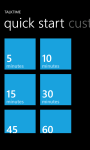






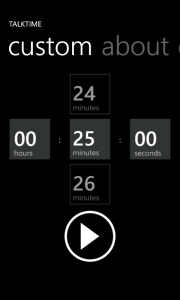 This week I finished and submitted my second Windows Phone app. On one of the pages I wanted to allow users to enter a custom TimeSpan in a manner similar to entering a date or time. Of course, the SDK doesn’t directly provide the controls to replicate that experience so I turned to the LoopingSelector in the


 Didactic Code