Software Development

All things programming.

IndyNDA – Panel Discussion on Technical Screening

The January IndyNDA meeting is this Thursday!  Join us for a panel discussion on technical screening.  Mark Huebner will moderate the discussion with our panelists including Ed Herceg (Robert Half Technology), Dale Brubaker (Interactive Intelligence), and yours truly.  Audience participation is encouraged.

Some say companies and recruiting firms are using tests based on incorrect assumptions on how developers do their work. C# and jQuery and JavaScript and VB and the .NET framework continue to offer new capabilities. The complexity has generally not been a problem for you because you make liberal use of IntelliSense, online help, books online, reference books, Google searches, and technical online forums. You know how to quickly find information when you can’t remember specific syntax. So, can you pass that technical screening test? Should you need to be tested? Let’s find out

Don’t forget about the C# and JavaScript SIGs after the main event either.  I’m not sure what the JavaScript group is covering but for the C# group Alex Gheith and I will be leading a discussion over a few of the items in chapter 1 of Effective C# by Bill Wagner.

As always registration begins at 5:30 with the main event starting at 6:00.  Thanks to our sponsors food and drink will be provided before the meeting.

Please be aware that our meeting location has changed.  For January and February we’ll be meeting in the 2nd floor conference room in Parkwood 9.  For those that remember when we had meetings in the 5th floor conference room in the same building rest assured, the 2nd floor conference room is better suited to our needs.

I hope to see you there!

VS2010: Box Selections

When I first saw the box selection capabilities in Visual Studio 2010 I thought “that’s kind of neat but I’ll probably never use it” and promptly moved on.  I couldn’t have been more mistaken.  In fact, nearly two years later, box selection has become one of those features that I use almost daily.  What surprises me now though is how many developers I run into that still don’t know about them.

Box selections let us quickly make the same change to multiple lines simultaneously.  Creating them is easy – just hold shift+alt and use the arrow keys or hold the alt key while left drag the mouse to define a rectangle.  If you just want to insert the same text onto multiple lines you can define a zero-length box by expanding the box vertically in either direction.

Non-virtual Properties

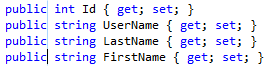
So what makes box selections so useful?  Some of the things I find them most useful for are changing modifiers and making local variables implicitly typed.  To illustrate, let’s take a look at a few non-virtual properties that we’d like to make virtual.

Zero-Length Selection

Making these properties virtual without a box selection certainly isn’t difficult but it’s definitely tedious.  A box selection lets us make them all virtual at the same time so we can get on with the task at hand.  The thin blue line immediately following the public modifier on each property identifies the zero-length box that serves as the point where we’ll insert in the virtual modifier.

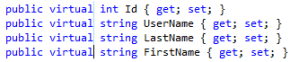
Virtual PropertiesTo insert the virtual modifier we just need to type (or paste) “virtual.”  Here you can see that each property is now virtual and the zero-length box has moved to the end of the inserted text.  What if we decide later though that these properties shouldn’t be virtual after all?
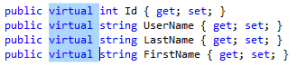
Box SelectionWe can use box selections to remove the virtual modifier from each property just as easily.  In the example to the left we see a box selection highlighting the virtual modifier on each line.  Non-virtual Properties 2To remove the text we can simply delete it.  This will leave us with a zero-length box where the virtual modifiers used to be.  We can then simply click or arrow away to clear the box selection.

Box selections can go a long way toward increasing your productivity by reducing some of the more tedious aspects of programming.  The few seconds they save here and there can really add up over the course of a day.  More importantly though, that time can be spent on the real problems we’re trying to solve.

Further Reading

How to: Select and Change Text

New Year, New Name

I’ve been thinking about this for a while but the new year seemed like a good time for a fresh start.  I’ve changed the name of the blog.

The best-laid plans of mice and men often go awry

When I named this site Two years ago I was really serious about both software development and photography and fully intended to use this space to explore both subjects.  Over time though I began thinking that I should focus on one or the other.  Given that programming is my chosen profession it was only natural that I take the site that direction.  For that reason that I decided to retire “The Programmer’s Lens” as the name of the site.  I think the new name, Didactic Code, more accurately reflects the purpose of the blog.

Didactic: intended to convey instruction and information as well as pleasure and entertainment
Merriam-Webster Dictionary

This space is a learning tool.  I’m not ashamed to admit that I write for myself just as much as I do for others.  Writing about these topics is the most effective way for me learn about them.  I also like to share what I’ve learned so when others find benefit in my writings that’s just icing on the cake.

I’ve left the handful of photography related posts intact (not that they get any traffic) but I’ll no longer consider photography as part of this blog.  Should you be interested in my photos feel free to peruse my Flickr photostream.

So what do you think of the change?  Do you like the new name or should I change it back?

Happy New Year!

The WordPress.com stats helper monkeys prepared a report for this blog’s activity in 2011.  It’s pretty cool to watch my little part of the Web grow.  I already have a few posts and talks in the works for this year and as always, I’m still on the lookout for new topics.

Here’s an excerpt from the report:

The concert hall at the Syndey Opera House holds 2,700 people. This blog was viewed about 22,000 times in 2011. If it were a concert at Sydney Opera House, it would take about 8 sold-out performances for that many people to see it.

2011 was a good year for me and my family.  We wish everyone the best for the new year.

Some C# Syntax Tricks

Christmas came a bit early for my team this year when we were told that the company had purchased licenses for both Reflector AND ReSharper!  Naturally I installed both right away.  Of course we’re all familiar with Reflector but haven’t used it lately since it’s no longer free.  ReSharper on the other hand is new to many of us.  I know lots of great developers that swear by it but I’ve never really had a chance to dive in and try it out.  I generally think I’m pretty savvy with C# syntax but after just two days ReSharper has already taught me a few syntax tricks that I’ve adopted.

(more…)

Archiving with Mercurial

Recently I’ve been working with a third party component vendor to resolve a defect. They requested that I create a sample project illustrating the issue and send it to them as a zip archive. Building the project was easy but I didn’t want to send all of the extra stuff that goes along with it. In other words, I wanted a snapshot of the current revision but without the source control bindings.  I knew how to do this with Subversion but how did Mercurial handle it?

(more…)

More Fiddler Troubles

Last week I posted about a coworker having some trouble with Fiddler. Whenever he’d visit a page the only thing that Fiddler would show was oscex-en.url.trendmicro.com. At the time I thought it was a problem our virus scanner setting itself as a proxy and interfering with the process filters.  He actually wasn’t using filters so that wasn’t the problem.

Earlier this week another coworker stopped by my cube and said he’d heard rumor about me troubleshooting some fiddler issues…  And he had his laptop…  Uh oh…

(more…)

[AgileIndy] Effective Retrospectives

Early last week my wife and I had an exchange that went something like this:

Esther: Did you know that AgileIndy is meeting on Tuesday evening?
Me: [blank stare]
Me: [silence]
Me: I didn’t know there was an AgileIndy!

Naturally I was a bit surprised (and proud) that she knew about a local software development group that I’d never heard of so i asked how she found out about it.  It turns out that she had been looking for some local events on Meetup and AgileIndy was one of the featured groups.

This “discovery” was very timely since I’m transitioning to a new team that’s going to be more agile than our teams have traditionally been.  Despite having read a few books and attending a few events like Cincinnati Day of Agile I’m still very new to it so I hopped onto the site, found their page and after reading a bit about it I decided I should go.

(more…)

My Standard .hgignore File

Since I started using Mercurial a few months ago I’ve fallen in love with it.  There was a bit of a learning curve for getting up and running but I found that the Tortoise tools are really intuitive and eliminated some of the pain.  Most importantly though, Mercurial addresses the single biggest problem I had when working away from home – no repository access.

(more…)

Fiddler Troubles

This morning I was included on an email asking a few of us if we’ve been able to use Fiddler.  He said when he tried to use it he saw it do its update check then make a request to oscex-en.url.trendmicro.com but it wouldn’t capture anything else regardless of which sites he visited.

I’ve been using Fiddler a lot lately to help test a new RESTful WCF service I’m prototyping and hadn’t been having any trouble with it but then I remembered that I didn’t have filters enabled.  I clicked over to the Filters tab and checked the “Show only Internet Explorer” traffic, refreshed a page, then nothing…  Fiddler wasn’t capturing anything.  What gives?  This worked the last time I used it.

(more…)