Google Apps and Mobile Phones

I’ve been using Google Apps for my personal email and calendar solution for a little under a year. With a little DNS magic in my WordPress configuration I get to use gmail with my davefancher.com domain and host my blog here at WordPress. I’ve been really happy with this configuration since I started using it.  Recently the Google Apps service got even better since they expanded it to include most of their other services like reader and youtube. One of the things that this change brought though was an account migration. Today I encountered my first problem and it was a result of the service enhancement.

This evening I went to look at my inbox on my phone (Samsung Focus) and was presented with a not so nice message about using a Google Apps account that isn’t configured to work with mobile devices. The error code was 85010020. The instructions included in the message weren’t particularly helpful but after a bit of searching I ran across a post that gave a bit more info that wasn’t particularly clear but at least provided some direction.  In case anyone else runs into this I wanted to provide a bit more detail and hopefully reduce the pain of trying to find the settings.

As the post I mentioned says there are two things that need to be done to allow syncing mobile devices:

  1. The Google Sync service must be selected for the domain
  2. Google Sync must be enabled for the domain
Both of these settings are found in the Google Apps control panel.  If you’re experiencing this problem follow these steps to resolve it:
  1. Log in to your Google Apps control panel.  This should be http://www.google.com/a/
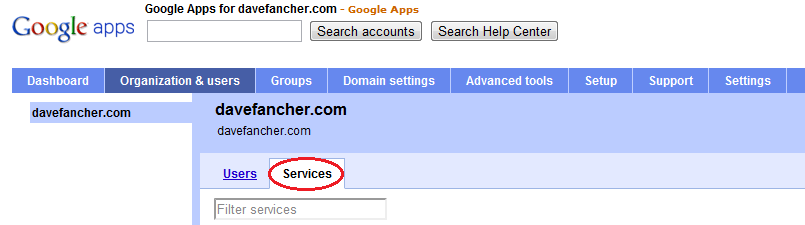
  2. Click to the “Organization & users” tab
  3. Click the “Services” link
    Services Tab
  4. Locate Google Sync in the services List
  5. Ensure that Google Sync is “On”
    Google Sync Service
  6. If Google Sync was off click the “Save changes” button that appeared at the bottom of the page.
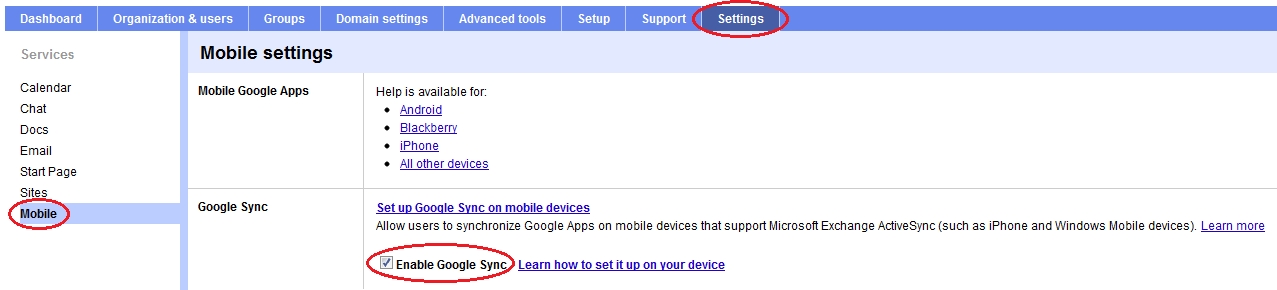
  7. Click to the “Settings” tab
  8. Select the “Mobile” option from the list on the left
  9. Check the “Enable Google Sync” box
    Enable Google Sync
  10. Click the “Save changes” button that appeared at the bottom of the page.
You should now be able to sync your mobile device.

JustDecompile – First Impressions

I have posted a new review of JustDecompile that looks at a later beta release.

With Red Gate now charging for .NET Reflector and updating the free version to expire at the end of May I’ve been starting to think about alternate decompilation tools.  A few days ago I saw an article on InfoQ about Telerik’s JustDecompile tool and thought I’d take a look.  So how does JustDecompile fare?
(more…)

VSTS 2010 Load Test Browser Definitions

The list of browsers included in the VSTS 2010 browser list has a decent selection but with the release of IE9 and other browsers it’s already getting out of date. Luckily we can add additional browsers by creating new .browser files in Program Files\Microsoft Visual Studio 10.0\Common7\IDE\Templates\LoadTest\Browsers (Program Files (x86) on 64-bit systems).  The files are simple XML documents that include a name and a few header items such as user agent so there isn’t really anything scary in there.  For example, the definition for IE8 is as follows:

<Browser Name="Internet Explorer 8.0" MaxConnections="6">
  <Headers>
    <Header Name="User-Agent" Value="Mozilla/4.0 (compatible; MSIE 8.0; Windows NT 5.1)" />
    <Header Name="Accept" Value="*/*" />
    <Header Name="Accept-Language" Value="{{$IEAcceptLanguage}}" />
    <Header Name="Accept-Encoding" Value="GZIP" />
  </Headers>
</Browser>

(more…)

My New Laptop!

Samsung RF510A few years ago Esther and I bought a pair matching of matching Dell Studio 17s (isn’t that cute?).  Neither of us were ever really happy with them but for the most part they worked.  I had a hardware conflict that would cause Windows 7 to blue screen immediately after loading after I went through the initial setup but I managed to resolve that through safe mode.  The last few weeks were testing my patience since my battery was hardly holding a charge.  To top it off the optical drive in Esther’s laptop has been dead for I don’t remember how long so she’s been lugging around an external drive to play the various incarnations of the Sims games.

With Esther leaving the workforce to take care of Nadia it made sense for me to upgrade to something that will last me for a few more years and swap out the battery in my laptop for the one in hers and let her use that one.  So the hunt began.

(more…)

Not Another Regular Expression

I haven’t done anything with the System.Drawing namespace directly in a long time.  So long in fact that before today I honestly can’t remember the last time I needed anything in there.  When I needed to update the border color on an old ASP.NET DataGrid and the compiler informed me that I couldn’t use a hex string I was a bit surprised.  I needed a way to convert that string to a System.Drawing.Color.

In my haste the first thing I did was start writing a method to parse out the string and get the integer values to pass in to Color.FromArgb.  Because I needed to account for both the 3-digit and 6-digit formats in both uppercase and lowercase characters with or without the leading hash I started hacking out a regular expression.

I haven’t had much reason to use regular expressions for a long time either but apparently (and amazingly) I can apparently remember their syntax better than I can remember what’s in System.Drawing because with minimal documentation referencing this is what I came up with:

var re = new Regex(
	@"^#?(?([\dA-F]{3}$)(?<r>[\dA-F])(?<g>[\dA-F])(?<b>[\dA-F])|(?<r>[\dA-F]{2})(?<g>[\dA-F]{2})(?<b>[\dA-F]{2}))$",
 RegexOptions.IgnoreCase
);

As irritating and confusing as the syntax is I’m always amazed at how powerful regular expressions are.  There’s really quite a bit going on in this example so let’s take a look at what it’s matching.  I won’t talk about the RegexOptions piece because that should be pretty self-explanatory but otherwise we can break this one down into a few pieces starting with the most basic.

We start and end with the ^ and $ characters.  These ensure that the string we’re checking is respectively the first and last thing on the line.  Immediately following the opening ^ we see the #? pattern that says a valid match will start with no more than one instance of the # character.

Throughout the expression we repeatedly see the [\dA-F] pattern.  On its own this pattern matches a single hexadecimal digit (0-9, A-F).  When we need to match multiple consecutive hexadecimal digits we follow the pattern with a quantifier like {2} or {3}.

The remaining constructs in the expression deal with groups and conditional matching (formally called alternation).  These constructs look similar and are closely related.  In this example we’re using two types grouping patterns and an alternation pattern.  It’s probably best to start with the outermost construct and work our way in.

In this example alternation construct follows the (?(expression)yes-part|no-part) syntax.  I like to think of this conditional matching construct as the regular expression version of the ternary operator.  The expression is a zero-width assertion construct (non-advancing) that is used to determine whether the yes-part or no-part pattern should be matched.  Most of the time the construct for a zero-width assertion begins with (?= but in this case the assertion is is implied and the .NET regular expression parser allows us to omit the ?=.  In this example our zero-width assertion is ([\dA-F]{3}$).  That is, we’re evaluating whether the string matches exactly 3 hexadecimal digits followed by the end of the line.  In short, if the string is a 6-digit format the parser will match the “yes” part otherwise it will match the “no” part.  The reason we’re asserting the end of line here too is that we want to ensure that a 6-digit color doesn’t fall in to the “yes” part.

Note: Alternatively we could assert [\dA-F]{6} and swap the yes/no parts.

The “yes” and “no” parts are very similar in that they both consist of three named capturing groups: “r”, “g”, and “b”.  The named capturing groups are identified by the (?<name>pattern) syntax and instruct the parser to remember the values for use later in the pattern through backreferences or returning to C# via the Groups collection on the Match object.  Since we’ve really covered what the pattern does we won’t go into detail here.  We just need to recognize that when we’re matching a 3-digit color we capture the individual digits whereas when we have a 6-digit color we capture pairs of digits.  By using the same names in both parts our C# code can be completely ignorant of how the expression captured them.

Note: Regular expressions also allow for unnamed capturing groups that can be referred to by their ordinal index.  Even though they add clutter to an already potentially confusing string I usually stick to the named capturing groups because they make it easier to remember which group I’m working with.

This regular expression did the trick nicely.  I was able to extract the individual color components from both 3-digit and 6-digit color codes and fail out of anything that didn’t match by checking the match’s Success property.  Unfortunately this was only part of the conversion process.  I still needed to convert the values from the 3-digit pattern over to their 6-digit equivalent and pass the integer values to Color.FromArgb.  At this point I got to thinking “there has to be an easier way” as though the regular expression wasn’t enough.

No matter how far you have gone on a wrong road, turn back.
– Turkish Proverb

Remember that I said that I haven’t done anything with the System.Drawing namespace directly in a long time…  It turns out that there’s a ColorTranslator class in System.Drawing that provides a nice FromHtml method.  FromHtml takes a hex string and returns the equivalent System.Drawing.Color.  Problem solved.

KalamazooX 2011 Recap

I attended the 2011 Kalamazoo X conference in Kalamazoo, MI on April 30, 2011.  There were no family emergencies this year which was great because this year’s event was even better than last year’s!  I’d like to extend another huge “THANK YOU” to the organizers and speakers for making it happen again.

For those unfamiliar with the Kalamazoo X conference it’s not your typical software development conference.  While most software development conferences focus on technical skills, Kalamazoo X focuses on the often forgotten soft skills.  Also unlike other software development conferences Kalamazoo X only has one track of consisting of highly focused 30 minute sessions.  This format is perfect for my limited attention span.  I feel less tired after this conference than I typically do with others of similar length despite being bombed with a steady flow of information.

(more…)

Photo Featured in National Geographic Magazine!


Time For Some Windex

Originally uploaded by Dave Fancher

I’m interrupting my normally unscheduled software development posts to make an exciting announcement. I’ve been holding back, waiting to see it in print before saying much but now that I have a comp copy in-hand I’m not holding back any more.

My “Time for some Windex” photo is featured on a page of its own in the Wild section of the May 2011 issue of National Geographic Magazine! I haven’t seen the issue on shelves yet but I expect it will be available within a few days.

My Day of Agile

On March 26th I attended the Cincinnati Day of Agile conference.  It was nine hours and three tracks of talks and discussions about using Agile practices to build software.  The first track focused on introducing Agile concepts and techniques while track two was more about “soft” skills and getting the most out of Agile.  Track three was mostly an open space type track.  Despite still being a relative n00b to Agile I spent my day bouncing between tracks two and three.  What follows are my notes and thoughts from the sessions I attended.

(more…)

Parallel Programming in .NET 4

Over the years software development has relied on increasing processor clock speeds to achieve better performance.  For better or worse though the trend has changed to adding more processing cores.  Generally speaking, software development hasn’t adjusted to account for this transition.  As a result many applications aren’t taking full advantage of the underlying platform and therefore they’re not performing as well as they could.  In order to take advantage of multi-core and multi-processor systems though we need to change the way we write code to include parallelization.

Historically, parallel programming has been viewed as the realm of highly specialized software where only experts dared to tread.  Parallel programming aims to improve performance by executing multiple operations simultaneously.  The .NET framework has always supported some level of parallel programming.  It has included threads and locks all the way back to the early days of the framework.  The problem with threads and locks though is that using them correctly is difficult and error prone.  Where do I need locks?  Can I lock on this?  Should I use lock, ReaderWriterLock, or ReaderWriterLockSlim?  How do I return a result from another thread?  What’s the signature for the ThreadStart delegate passed to the Thread constructor?  These questions haven’t even started to touch on pooling, deadlocks, exception handling, cancellations, or a multitude of other considerations.  .NET 4 doesn’t eliminate these classes but builds upon them.
(more…)

VS2010 SP1 Now Available

Visual Studio Magazine is reporting that Microsoft has released Visual Studio SP1 and it is now available for download.  Among other things the service pack addresses issues with general stability, the editor, the shell, and IntelliTrace.  It also improves support for 64-bit environments, Silverlight 4, IIS Express and a variety other areas.  A full description of the service pack is available from Microsoft Support.